> ## Documentation Index
> Fetch the complete documentation index at: https://docs.bibigpt.co/llms.txt
> Use this file to discover all available pages before exploring further.
# Introduction
> [BibiGPT.co](https://bibigpt.co) example section for showcasing API endpoints
BibiGPT's API is currently in beta. If you have any questions or feedback, please reach out to us at
[hi@bibigpt.co](mailto:hi@bibigpt.co?subject=BibiGPT.co%20API%20Feedback).
温馨提示:我们正在优化产品体验,API 服务尚未完全与官网保持一致,感谢您的理解与支持!如果您有任何问题或反馈,请通过 [hi@bibigpt.co](mailto:hi@bibigpt.co?subject=BibiGPT.co%20API%20Feedback) 邮箱联系我们。
# BibiGPT 开放 API (beta)
Single source of truth: view the OpenAPI schema directly [https://api.bibigpt.co/api/openapi.json](https://api.bibigpt.co/api/openapi.json)
## 一、获取专属 API Token
All API endpoints are authenticated using `api_token` token in the HTTP header or picked up from the endpoint directly.
```shell theme={null}
curl --request GET \
--url https://api.bibigpt.co/api/v1/summarize \
--header 'Authorization: Bearer '
```
请在登录后,查看 [https://bibigpt.co/user/integration](https://bibigpt.co/user/integration) 页面,获取专属 API Token,购买时长额度请访问 [https://bibigpt.co/shop](https://bibigpt.co/shop) 页面。
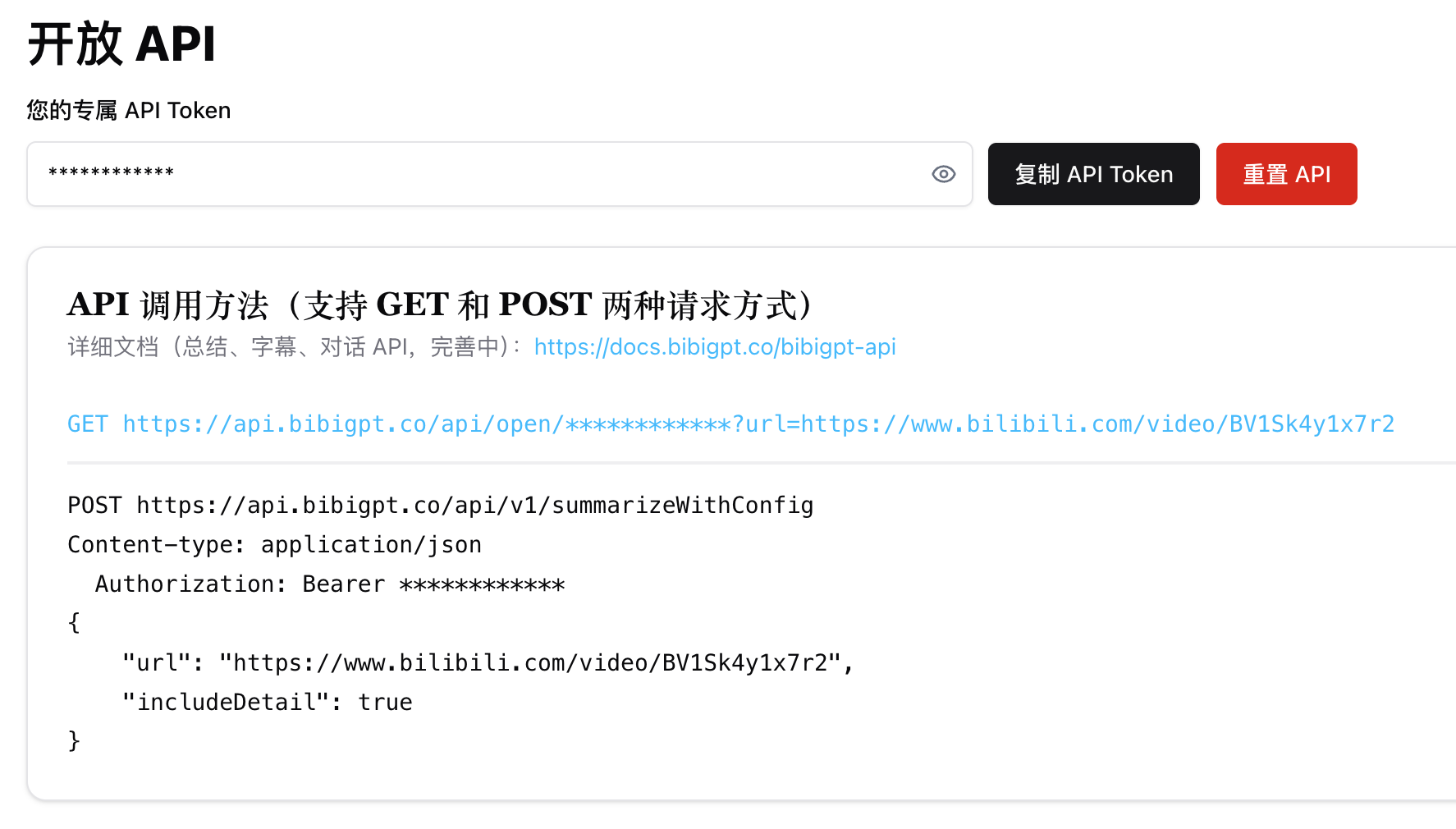 ## 二、API 调用方法
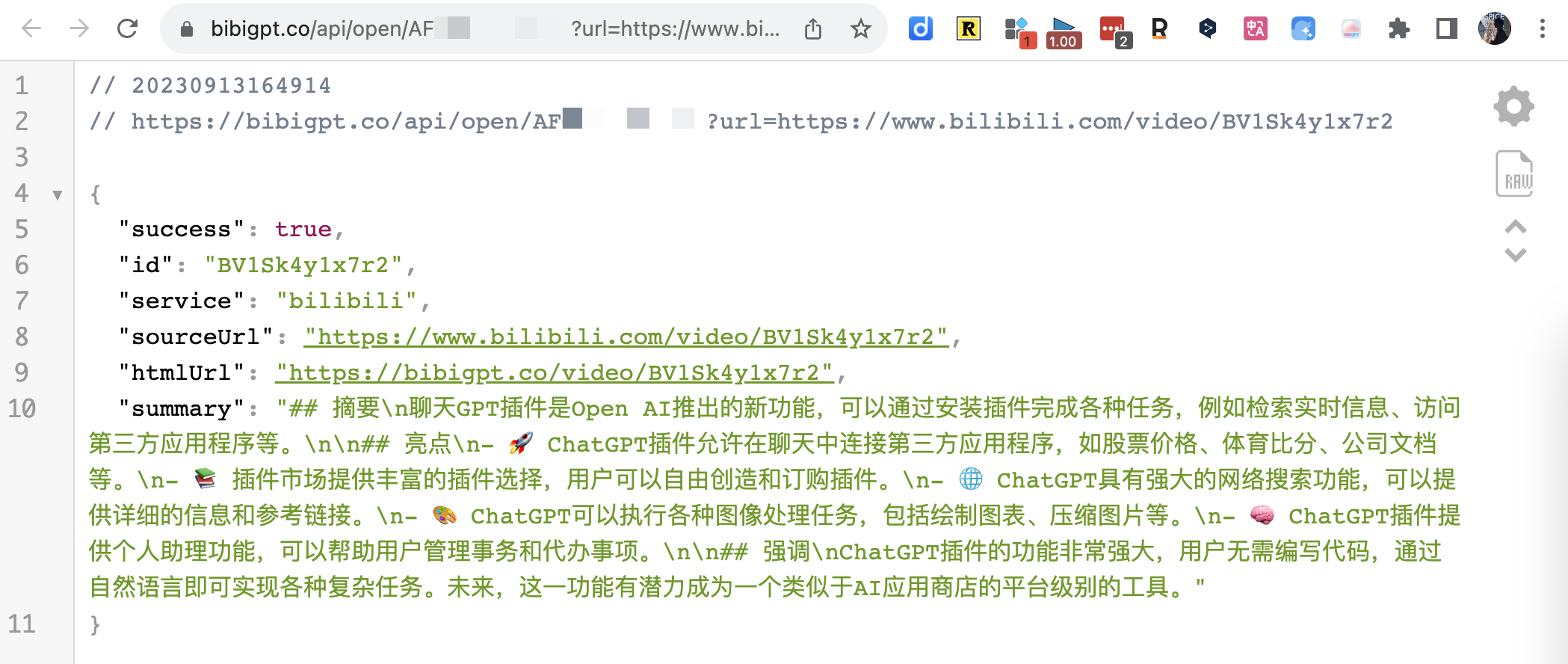
### 1. 总结 [/api/v1/summarize](https://docs.bibigpt.co/api-reference/open/generate-video-or-audio-summary-from-url)
GET 请求示例
## 二、API 调用方法
### 1. 总结 [/api/v1/summarize](https://docs.bibigpt.co/api-reference/open/generate-video-or-audio-summary-from-url)
GET 请求示例
 ### 2. 自定义总结参数 [/api/v1/summarizeWithConfig](https://docs.bibigpt.co/api-reference/open/generate-configurable-summary-from-url-based-on-prompt-config)
POST 方法能够设置 [promptConfig](https://docs.bibigpt.co/api-reference/open/generate-configurable-summary-from-url-based-on-prompt-config#body-prompt-config) 调整总结结果,同时支持 includeDetail 返回音视频内容详情
### 3. 字幕 [/api/v1/getSubtitle](https://docs.bibigpt.co/api-reference/open/only-returns-the-video-subtitles-array-in-detail)
相比于总结接口,由于少了请求 LLM 的时间,所以会快很多。
注意:默认情况下,会自动检测音频语言,从而产出对应的中文或英文字幕。但有时候自动检测可能失效(或由于缓存),如果发现字幕与音频语言不一致时,您可以手动指定 `audioLanguage` 参数。
```shell theme={null}
https://api.bibigpt.co/api/v1/getSubtitle?url=https://www.youtube.com/watch?v=z5U843Ob8xw&audioLanguage=en
```
关于「音频语言」的对应关系为(仅适用于当前默认语音识别模型):
```json theme={null}
{
"Auto": "auto",
"中文": "zh",
"English": "en",
"日本語": "ja",
"粤语": "yue",
"한국어": "ko",
"Deutsch": "de",
"Français": "fr",
"Русский": "ru"
}
```
如需支持以下语言请联系[商务](mailto:hi@bibigpt.co?subject=BibiGPT.co%20API%20AudioLanguage%20Feedback):`pt`(葡萄牙语)、`ar`(阿拉伯语)、`it`(意大利语)、`es`(西班牙语)、`hi`(印地语)、`id`(印尼语)、`th`(泰语)、`tr`(土耳其语)、`uk`(乌克兰语)、`vi`(越南语)
### 4. 文件 URL [/api/v1/summarize](https://docs.bibigpt.co/api-reference/open/generate-video-or-audio-summary-from-url)
BibiGPT API 支持自定义的音视频文件地址,给 API 一个文件下载链接就好。如果是本地文件,可以先上传到 OSS,记得确认下载链接可直接访问。
比如以下的 [https://a.jimmylv.cn/assets/music.mp3](https://a.jimmylv.cn/assets/music.mp3) (注意URL 路径以 `.mp3` 结尾)
> 💡 目前支持的类型包括 `mp3|mp4|m4a|m4s|wav|webm|mpga|aac|ogg|oga|flac|alac|wma|avi|mkv|mov|flv|3gp|mpeg|mpg|ts|ogv|vob` ,如果发现有还不支持的格式可以联系我!
### 2. 自定义总结参数 [/api/v1/summarizeWithConfig](https://docs.bibigpt.co/api-reference/open/generate-configurable-summary-from-url-based-on-prompt-config)
POST 方法能够设置 [promptConfig](https://docs.bibigpt.co/api-reference/open/generate-configurable-summary-from-url-based-on-prompt-config#body-prompt-config) 调整总结结果,同时支持 includeDetail 返回音视频内容详情
### 3. 字幕 [/api/v1/getSubtitle](https://docs.bibigpt.co/api-reference/open/only-returns-the-video-subtitles-array-in-detail)
相比于总结接口,由于少了请求 LLM 的时间,所以会快很多。
注意:默认情况下,会自动检测音频语言,从而产出对应的中文或英文字幕。但有时候自动检测可能失效(或由于缓存),如果发现字幕与音频语言不一致时,您可以手动指定 `audioLanguage` 参数。
```shell theme={null}
https://api.bibigpt.co/api/v1/getSubtitle?url=https://www.youtube.com/watch?v=z5U843Ob8xw&audioLanguage=en
```
关于「音频语言」的对应关系为(仅适用于当前默认语音识别模型):
```json theme={null}
{
"Auto": "auto",
"中文": "zh",
"English": "en",
"日本語": "ja",
"粤语": "yue",
"한국어": "ko",
"Deutsch": "de",
"Français": "fr",
"Русский": "ru"
}
```
如需支持以下语言请联系[商务](mailto:hi@bibigpt.co?subject=BibiGPT.co%20API%20AudioLanguage%20Feedback):`pt`(葡萄牙语)、`ar`(阿拉伯语)、`it`(意大利语)、`es`(西班牙语)、`hi`(印地语)、`id`(印尼语)、`th`(泰语)、`tr`(土耳其语)、`uk`(乌克兰语)、`vi`(越南语)
### 4. 文件 URL [/api/v1/summarize](https://docs.bibigpt.co/api-reference/open/generate-video-or-audio-summary-from-url)
BibiGPT API 支持自定义的音视频文件地址,给 API 一个文件下载链接就好。如果是本地文件,可以先上传到 OSS,记得确认下载链接可直接访问。
比如以下的 [https://a.jimmylv.cn/assets/music.mp3](https://a.jimmylv.cn/assets/music.mp3) (注意URL 路径以 `.mp3` 结尾)
> 💡 目前支持的类型包括 `mp3|mp4|m4a|m4s|wav|webm|mpga|aac|ogg|oga|flac|alac|wma|avi|mkv|mov|flv|3gp|mpeg|mpg|ts|ogv|vob` ,如果发现有还不支持的格式可以联系我!
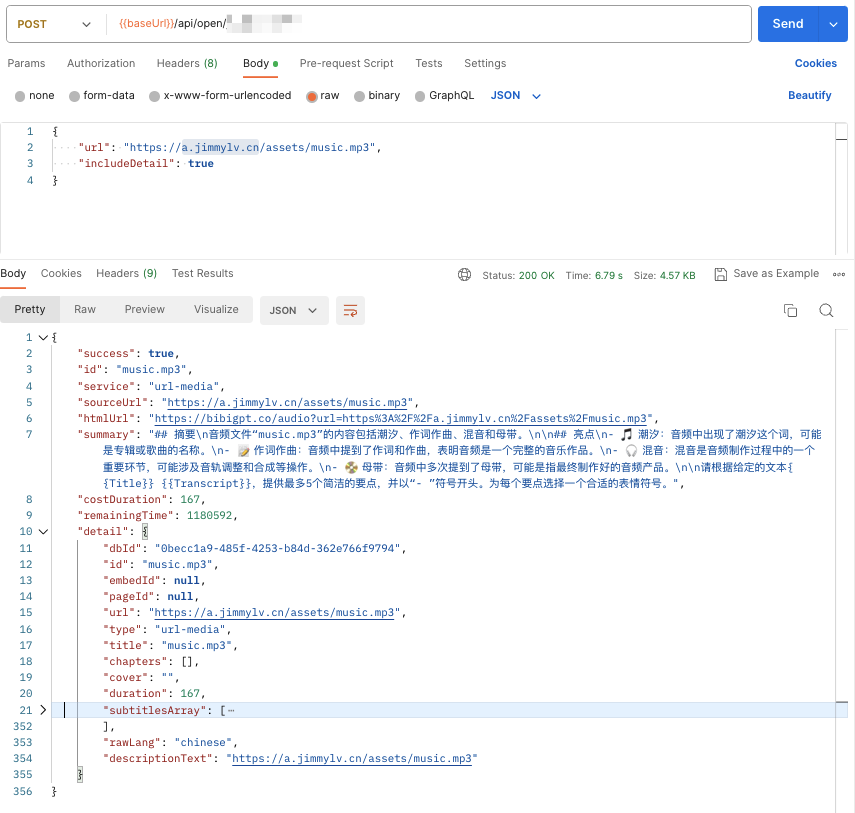 ### 5. AI 问答 [/api/open/\[apiToken\]/chat](https://docs.bibigpt.co/api-reference/endpoint/chat) (即将下线)
```tsx theme={null}
interface ChatContentParams {
url: string
question: string
# tuple for each [['Q1', 'A1'], ['Q2', 'A2']]
history?: [string, string][]
language?: string
}
```
### 5. AI 问答 [/api/open/\[apiToken\]/chat](https://docs.bibigpt.co/api-reference/endpoint/chat) (即将下线)
```tsx theme={null}
interface ChatContentParams {
url: string
question: string
# tuple for each [['Q1', 'A1'], ['Q2', 'A2']]
history?: [string, string][]
language?: string
}
```
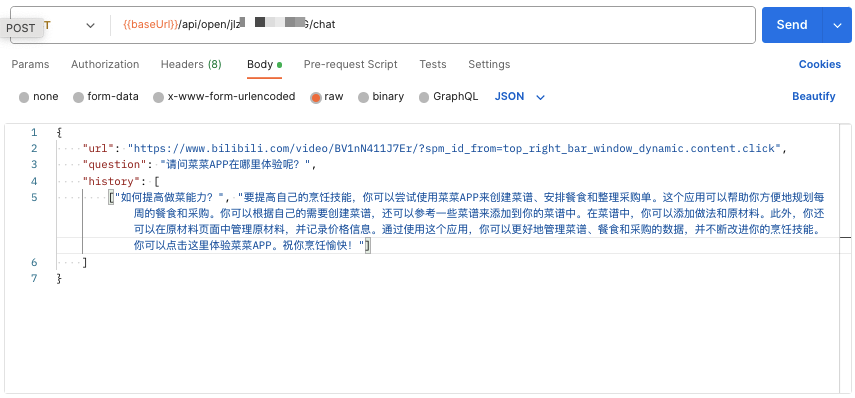
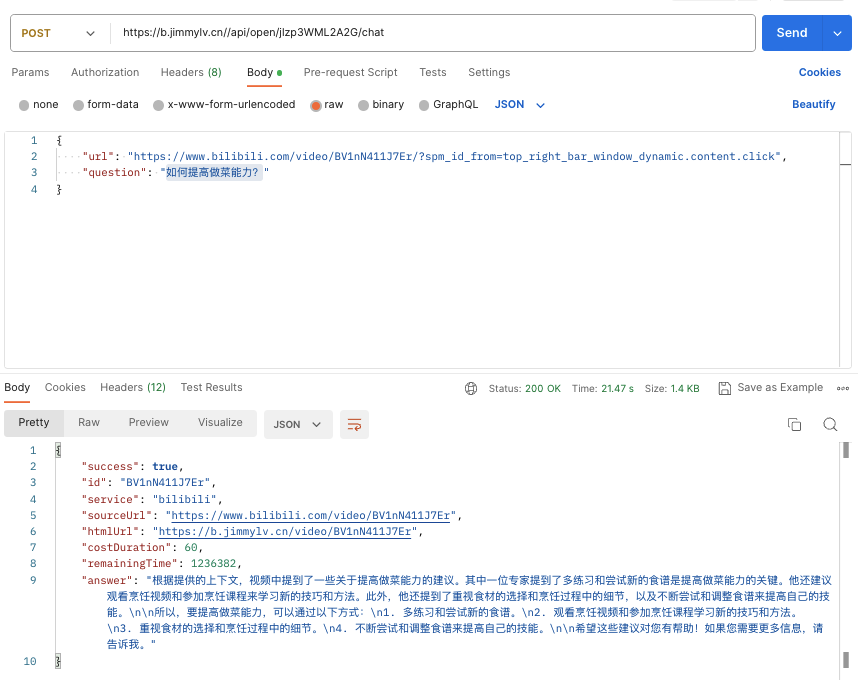 除了 `answer` 以外,还可以设置 `includeDetail` 参数,选择是否返回跟答案有关的 `sourceDocuments`
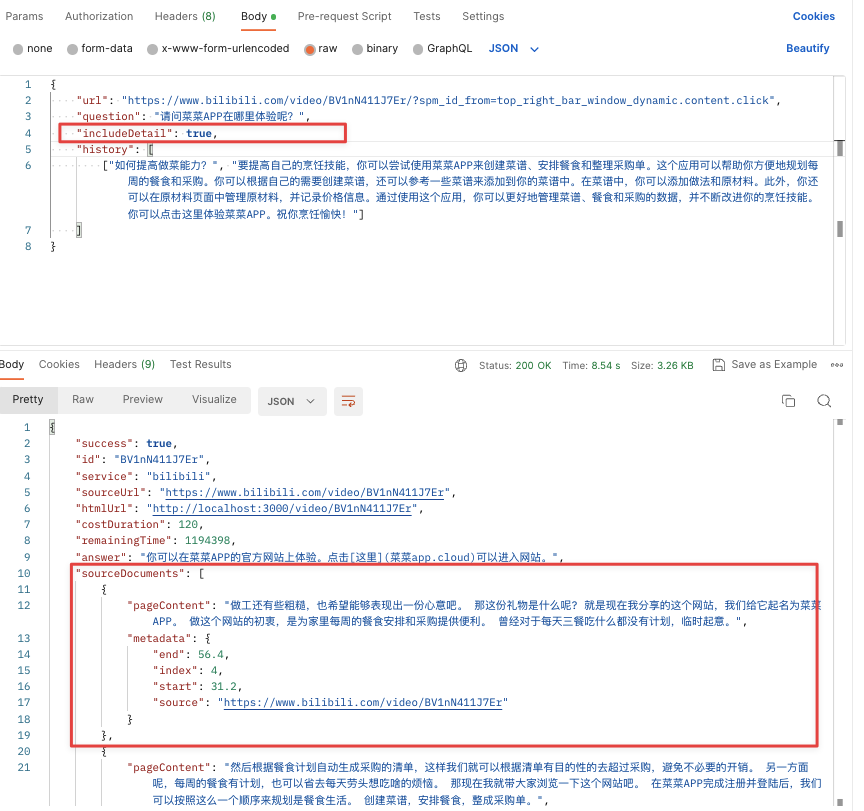 如果需要连续提问的话,记得把上一次的 QA 问题和答案作为 history 上下文,从而提高下一次回答的准确性和连贯度(当然,这样所消耗的 token 时长也会加倍)
 ### 6. AI 文案改写 [/api/v1/express](https://docs.bibigpt.co/api-reference/open/rewrite-video-subtitles-as-a-polished-article)
自动获取视频字幕并改写为结构化文章。支持自定义输出语言和模型。
```shell theme={null}
curl --request GET \
--url 'https://api.bibigpt.co/api/v1/express?url=https://www.youtube.com/watch?v=dQw4w9WgXcQ' \
--header 'Authorization: Bearer '
```
响应格式:
```json theme={null}
{
"success": true,
"id": "dQw4w9WgXcQ",
"service": "youtube",
"sourceUrl": "https://www.youtube.com/watch?v=dQw4w9WgXcQ",
"htmlUrl": "https://bibigpt.co/...",
"title": "视频标题",
"article": "改写后的完整 Markdown 文章...",
"fromCache": false,
"costDuration": 600,
"remainingTime": 3000
}
```
可选参数:
* `outputLanguage`:输出语言代码(如 `zh-CN`、`en-US`)
* `model`:指定 AI 模型
* `includeDetail`:是否返回音视频详情
### 7. AI 字幕润色 [/api/v1/getPolishedText](https://docs.bibigpt.co/api-reference/open/polish-video-subtitles-into-readable-article-segments)
自动获取视频字幕,按照章节或固定长度分段润色,一次性返回所有润色片段。支持 `keywords` 参数提高专业术语准确性。
```shell theme={null}
curl --request GET \
--url 'https://api.bibigpt.co/api/v1/getPolishedText?url=https://www.youtube.com/watch?v=dQw4w9WgXcQ&keywords=AI,GPT' \
--header 'Authorization: Bearer '
```
响应格式:
```json theme={null}
{
"success": true,
"id": "dQw4w9WgXcQ",
"service": "youtube",
"sourceUrl": "https://www.youtube.com/watch?v=dQw4w9WgXcQ",
"title": "视频标题",
"segments": [
{
"startTime": 0,
"endTime": 120,
"chapterTitle": "章节标题(如有)",
"polishedText": "润色后的 Markdown 文本...",
"fromCache": false
}
],
"costDuration": 600,
"remainingTime": 3000
}
```
可选参数:
* `keywords`:关键词(逗号分隔),提高专业术语的识别准确性
* `includeDetail`:是否返回音视频详情
## 三、API 接口参数(目前仅支持「总结」API)
### 3.1 可选配置参数 [promptConfig](https://docs.bibigpt.co/api-reference/open/generate-configurable-summary-from-url-based-on-prompt-config#body-prompt-config)
#### 1、promptConfig 只支持 POST 请求,作为 body 参数
### 6. AI 文案改写 [/api/v1/express](https://docs.bibigpt.co/api-reference/open/rewrite-video-subtitles-as-a-polished-article)
自动获取视频字幕并改写为结构化文章。支持自定义输出语言和模型。
```shell theme={null}
curl --request GET \
--url 'https://api.bibigpt.co/api/v1/express?url=https://www.youtube.com/watch?v=dQw4w9WgXcQ' \
--header 'Authorization: Bearer '
```
响应格式:
```json theme={null}
{
"success": true,
"id": "dQw4w9WgXcQ",
"service": "youtube",
"sourceUrl": "https://www.youtube.com/watch?v=dQw4w9WgXcQ",
"htmlUrl": "https://bibigpt.co/...",
"title": "视频标题",
"article": "改写后的完整 Markdown 文章...",
"fromCache": false,
"costDuration": 600,
"remainingTime": 3000
}
```
可选参数:
* `outputLanguage`:输出语言代码(如 `zh-CN`、`en-US`)
* `model`:指定 AI 模型
* `includeDetail`:是否返回音视频详情
### 7. AI 字幕润色 [/api/v1/getPolishedText](https://docs.bibigpt.co/api-reference/open/polish-video-subtitles-into-readable-article-segments)
自动获取视频字幕,按照章节或固定长度分段润色,一次性返回所有润色片段。支持 `keywords` 参数提高专业术语准确性。
```shell theme={null}
curl --request GET \
--url 'https://api.bibigpt.co/api/v1/getPolishedText?url=https://www.youtube.com/watch?v=dQw4w9WgXcQ&keywords=AI,GPT' \
--header 'Authorization: Bearer '
```
响应格式:
```json theme={null}
{
"success": true,
"id": "dQw4w9WgXcQ",
"service": "youtube",
"sourceUrl": "https://www.youtube.com/watch?v=dQw4w9WgXcQ",
"title": "视频标题",
"segments": [
{
"startTime": 0,
"endTime": 120,
"chapterTitle": "章节标题(如有)",
"polishedText": "润色后的 Markdown 文本...",
"fromCache": false
}
],
"costDuration": 600,
"remainingTime": 3000
}
```
可选参数:
* `keywords`:关键词(逗号分隔),提高专业术语的识别准确性
* `includeDetail`:是否返回音视频详情
## 三、API 接口参数(目前仅支持「总结」API)
### 3.1 可选配置参数 [promptConfig](https://docs.bibigpt.co/api-reference/open/generate-configurable-summary-from-url-based-on-prompt-config#body-prompt-config)
#### 1、promptConfig 只支持 POST 请求,作为 body 参数
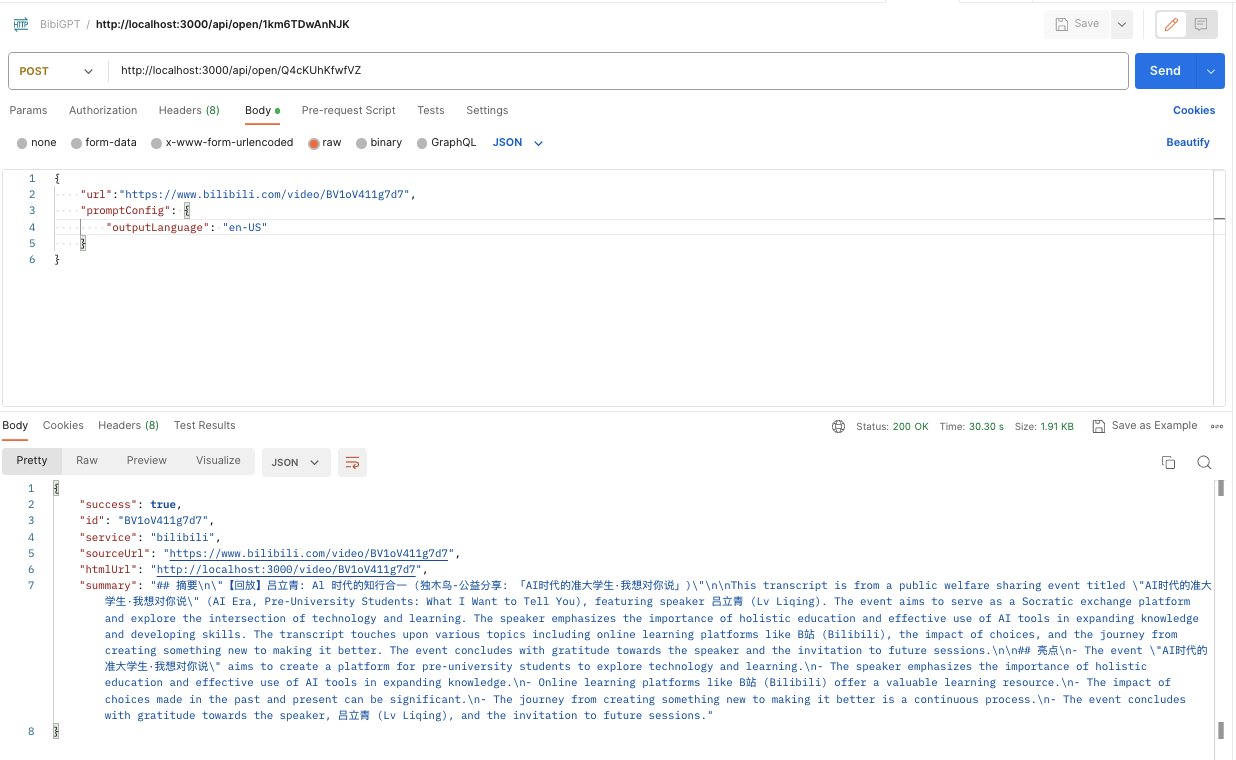 #### 2、promptConfig 不填时的默认参数,可根据需求自行修改
 ```json theme={null}
{
"showEmoji": true,
"showTimestamp": false,
"outlineLevel": 1,
"sentenceNumber": 5,
"detailLevel": 700,
"outputLanguage": "zh-CN"
}
```
注意: `detailLevel` 对应「句子长短」,对应关系为 50,即 700/50=14(Web页面显示的数值)
另外, 关于「输出语言」的对应关系为:
```jsx theme={null}
{
English: 'en-US',
中文: 'zh-CN',
繁體中文: 'zh-TW',
日本語: 'ja-JP',
русский: 'ru-RU',
Italiano: 'it-IT',
Deutsch: 'de-DE',
Español: 'es-ES',
Français: 'fr-FR',
Nederlands: 'nl-NL',
Português: 'pt-PT',
한국어: 'ko-KR',
ភាសាខ្មែរ: 'km-KH',
हिंदी: 'hi-IN',
ภาษาไทย: 'th-TH',
}
```
#### 3、promptConfig 中有一个特殊参数: `isRefresh` ,当它有值并为 `true` 时,才会忽略缓存
举例,这是一个「*不输出emoji表情符号,显示时间戳,大纲层级为2,句子个数为3,句子长短为10,输出语言为英文,且强行刷新缓存*」的promptConfig:
```json theme={null}
{
"showEmoji": false,
"showTimestamp": true,
"outlineLevel": 2,
"sentenceNumber": 3,
"detailLevel": 500,
"outputLanguage": "en-US",
"isRefresh": true
}
```
### 3.2 自定义总结
```json theme={null}
{
"showEmoji": true,
"showTimestamp": false,
"outlineLevel": 1,
"sentenceNumber": 5,
"detailLevel": 700,
"outputLanguage": "zh-CN"
}
```
注意: `detailLevel` 对应「句子长短」,对应关系为 50,即 700/50=14(Web页面显示的数值)
另外, 关于「输出语言」的对应关系为:
```jsx theme={null}
{
English: 'en-US',
中文: 'zh-CN',
繁體中文: 'zh-TW',
日本語: 'ja-JP',
русский: 'ru-RU',
Italiano: 'it-IT',
Deutsch: 'de-DE',
Español: 'es-ES',
Français: 'fr-FR',
Nederlands: 'nl-NL',
Português: 'pt-PT',
한국어: 'ko-KR',
ភាសាខ្មែរ: 'km-KH',
हिंदी: 'hi-IN',
ภาษาไทย: 'th-TH',
}
```
#### 3、promptConfig 中有一个特殊参数: `isRefresh` ,当它有值并为 `true` 时,才会忽略缓存
举例,这是一个「*不输出emoji表情符号,显示时间戳,大纲层级为2,句子个数为3,句子长短为10,输出语言为英文,且强行刷新缓存*」的promptConfig:
```json theme={null}
{
"showEmoji": false,
"showTimestamp": true,
"outlineLevel": 2,
"sentenceNumber": 3,
"detailLevel": 500,
"outputLanguage": "en-US",
"isRefresh": true
}
```
### 3.2 自定义总结
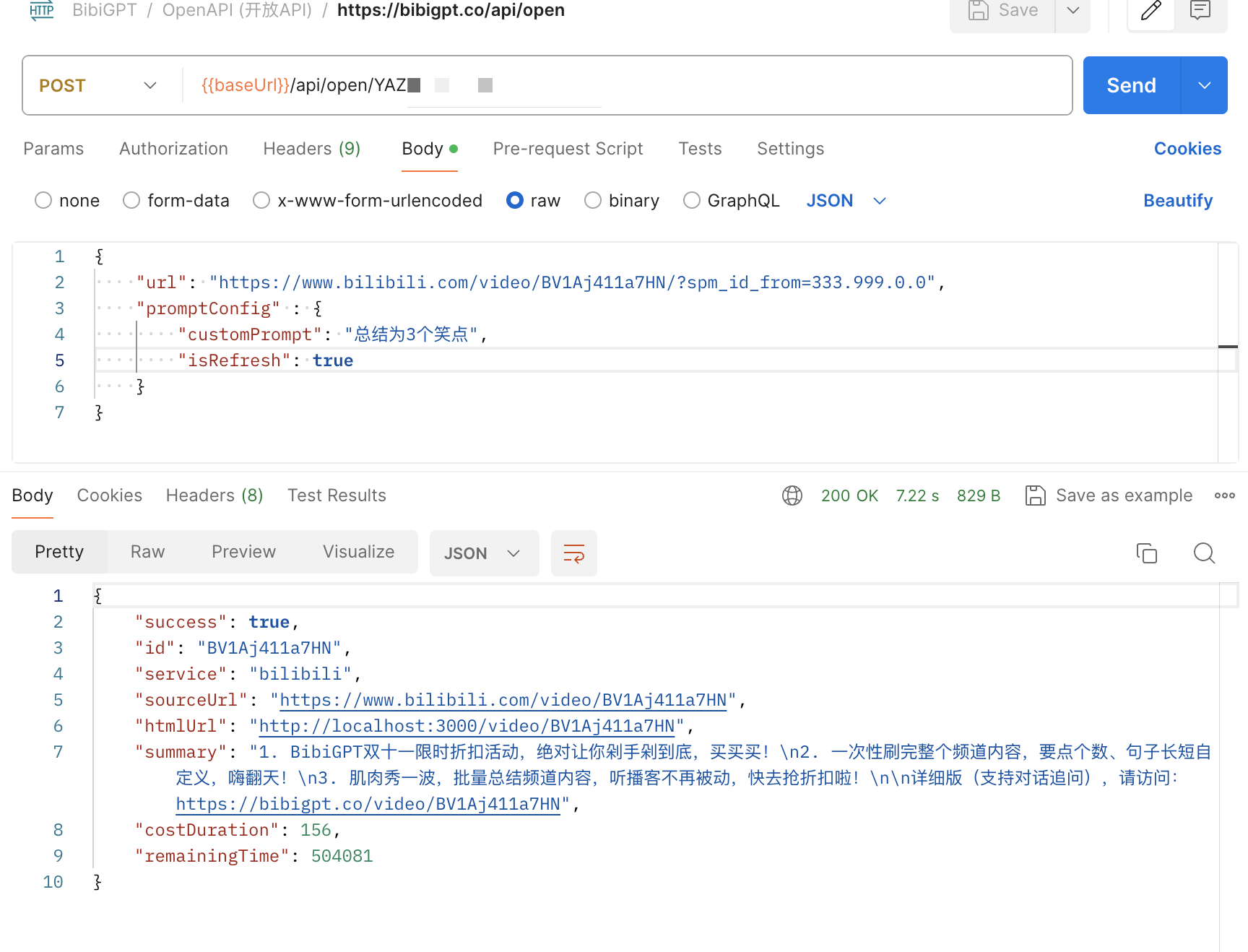 ```json theme={null}
{
"url": "https://www.bilibili.com/video/BV1Aj411a7HN",
"promptConfig": {
"customPrompt": "总结为3个笑点",
"isRefresh": true
}
}
```
在 promptConfig 当中添加 customPrompt 可以定制自己的总结提示词。需要注意的是,如果视频被总结过,那么需要 `isRefresh: true` 跳过缓存的结果,customPrompt 自定义总结才会生效。
### 3.3 limitation 限制条件
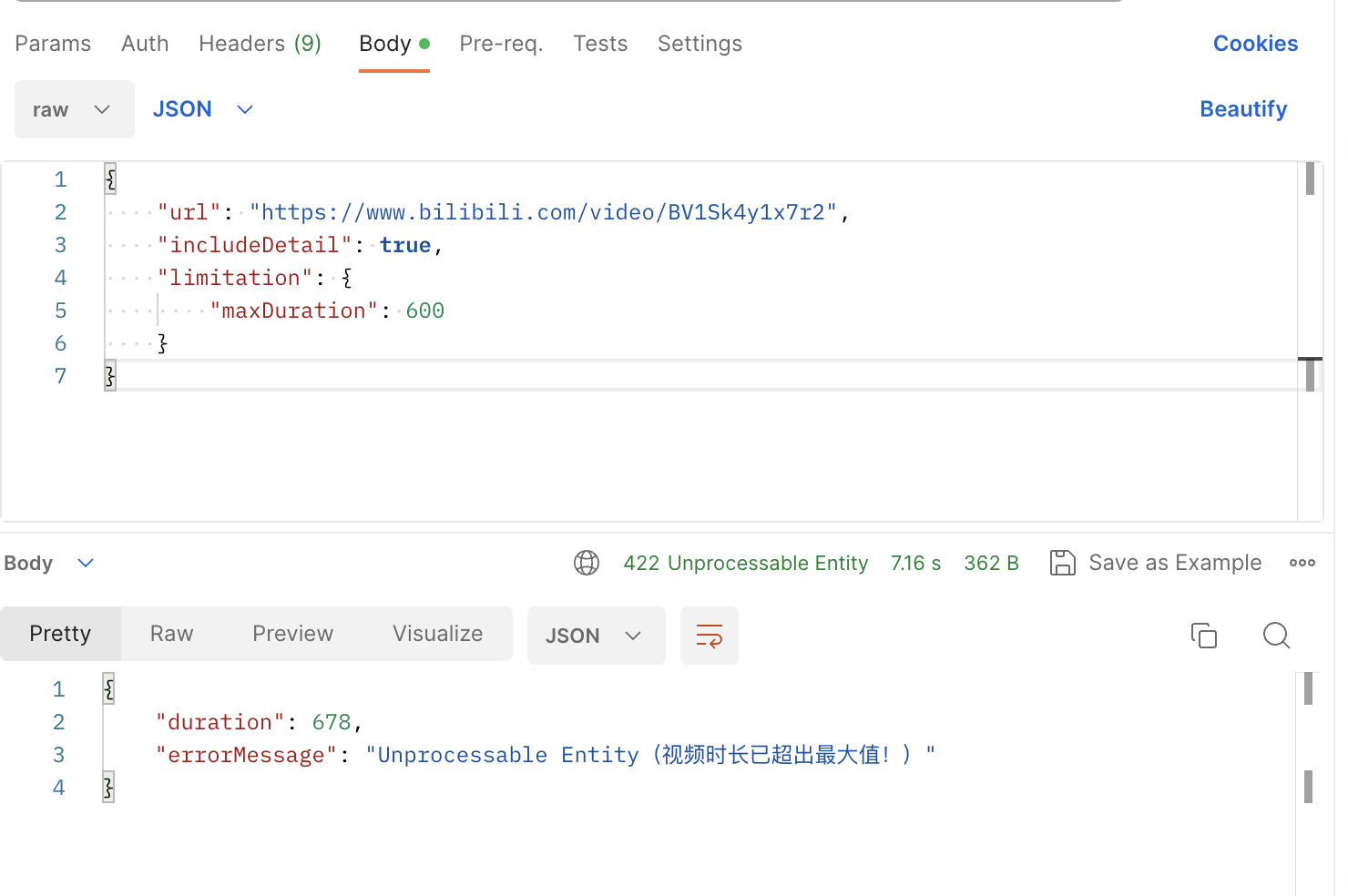
作为 API 的 limitation 字段可以设置 `maxDuration` 最大时长,然后如果后台检测 url 所对应的音视频时长超过了maxDuration ,就返回 422 error 错误状态码
```json theme={null}
{
"url": "https://www.bilibili.com/video/BV1Sk4y1x7r2",
"includeDetail": true,
"limitation": {
"maxDuration": 600
}
}
```
```json theme={null}
{
"url": "https://www.bilibili.com/video/BV1Aj411a7HN",
"promptConfig": {
"customPrompt": "总结为3个笑点",
"isRefresh": true
}
}
```
在 promptConfig 当中添加 customPrompt 可以定制自己的总结提示词。需要注意的是,如果视频被总结过,那么需要 `isRefresh: true` 跳过缓存的结果,customPrompt 自定义总结才会生效。
### 3.3 limitation 限制条件
作为 API 的 limitation 字段可以设置 `maxDuration` 最大时长,然后如果后台检测 url 所对应的音视频时长超过了maxDuration ,就返回 422 error 错误状态码
```json theme={null}
{
"url": "https://www.bilibili.com/video/BV1Sk4y1x7r2",
"includeDetail": true,
"limitation": {
"maxDuration": 600
}
}
```
 ## 四、使用案例
### 4.1 微信助理
[ChatGPT AI助力音视频一键总结,成功链接维客创云啦!](https://mp.weixin.qq.com/s/iFoi6Yx7QU1Oh042Az4hlQ)
[https://github.com/zhayujie/chatgpt-on-wechat/issues/1417](https://github.com/zhayujie/chatgpt-on-wechat/issues/1417)
[【看吗?买吗?】今天的苹果发布会相关视频多到爆炸,又无聊。\_哔哩哔哩\_bilibili](https://www.bilibili.com/video/BV1GN4y1X7Na)
### 4.2 移动端 iOS 快捷指令
【AI 视频笔记】BibiGPT 开放API & IFTTT 无限想象力
[【AI 视频笔记】苹果备忘录:一键总结 B 站视频,联动快捷指令丨BibiGPT 开放API & IFTTT 无限想象力\_哔哩哔哩\_bilibili](https://www.bilibili.com/video/BV1ZN411z7Hc/)
### 4.3 浏览器插件
[【BibiGPT】浏览器插件:支持任意网页音视频内容的一键转录 & 总结\_哔哩哔哩\_bilibili](https://www.bilibili.com/video/BV1gN411W7NY)
### 4.4 联动笔记软件
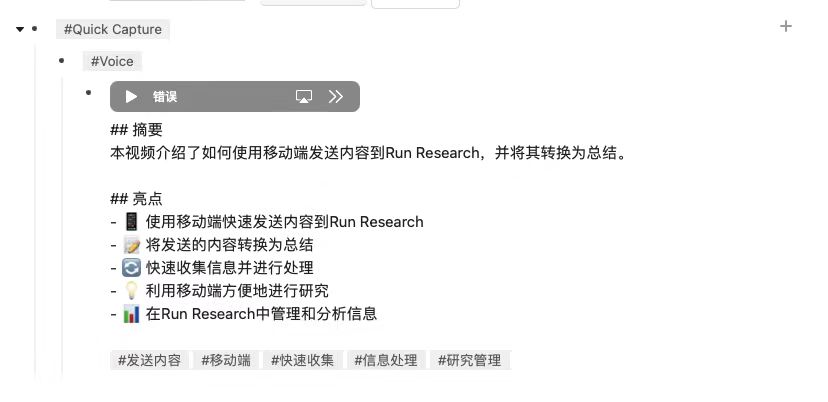
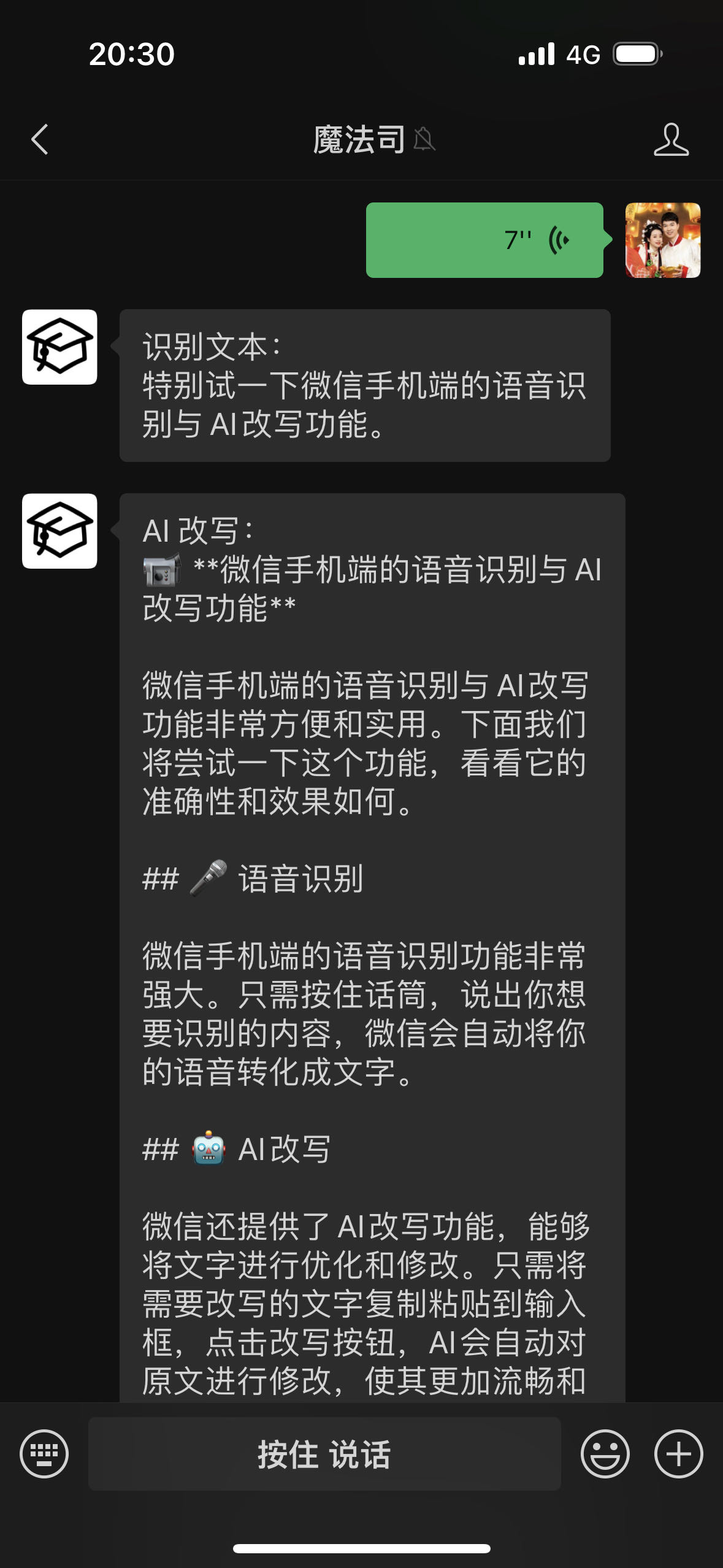
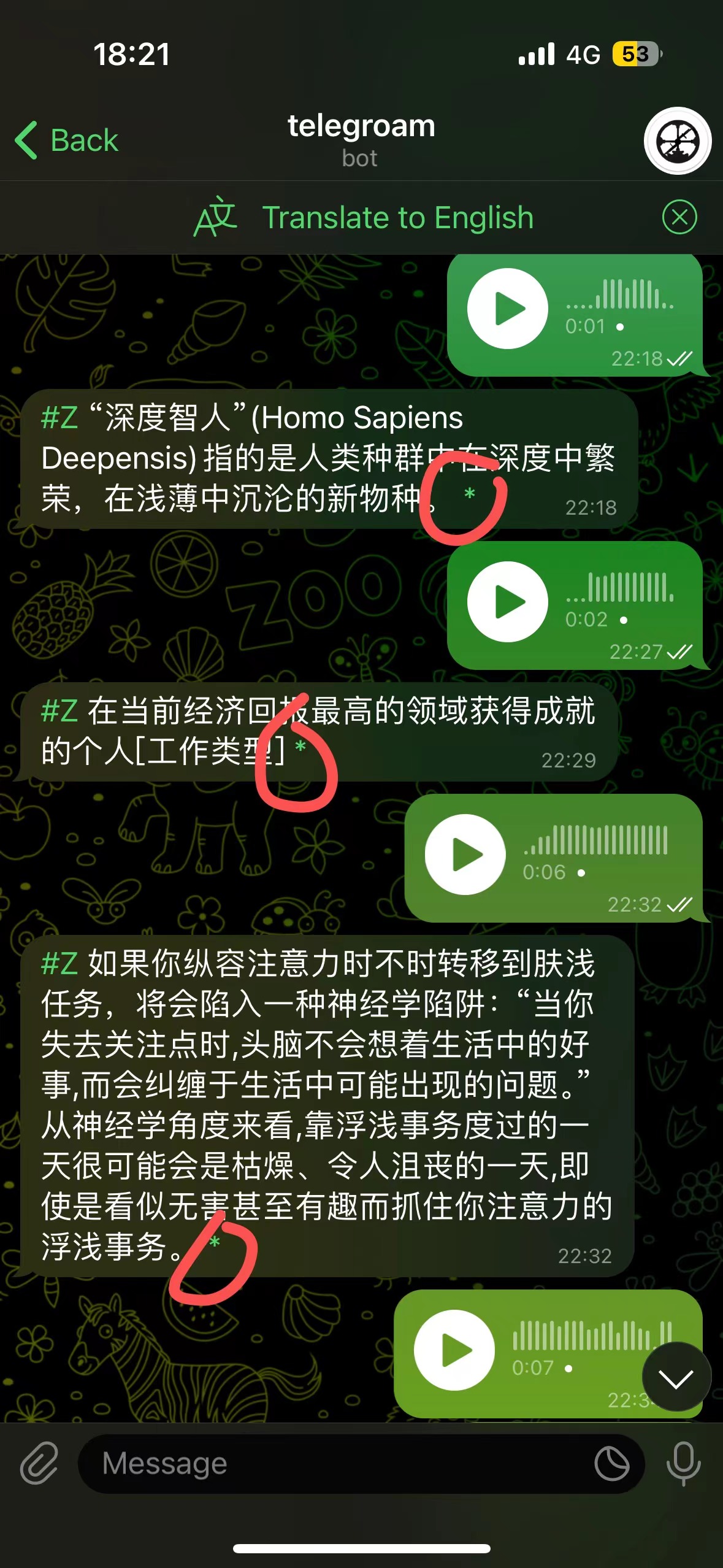
语音输入 → Roam Research → AI 改写 → AI 回顾
通过 [telegroam](https://github.com/JimmyLv/telegroam) 发送语音,然后用BibiGPT的API总结成文本,一键保存到Roam Research
## 四、使用案例
### 4.1 微信助理
[ChatGPT AI助力音视频一键总结,成功链接维客创云啦!](https://mp.weixin.qq.com/s/iFoi6Yx7QU1Oh042Az4hlQ)
[https://github.com/zhayujie/chatgpt-on-wechat/issues/1417](https://github.com/zhayujie/chatgpt-on-wechat/issues/1417)
[【看吗?买吗?】今天的苹果发布会相关视频多到爆炸,又无聊。\_哔哩哔哩\_bilibili](https://www.bilibili.com/video/BV1GN4y1X7Na)
### 4.2 移动端 iOS 快捷指令
【AI 视频笔记】BibiGPT 开放API & IFTTT 无限想象力
[【AI 视频笔记】苹果备忘录:一键总结 B 站视频,联动快捷指令丨BibiGPT 开放API & IFTTT 无限想象力\_哔哩哔哩\_bilibili](https://www.bilibili.com/video/BV1ZN411z7Hc/)
### 4.3 浏览器插件
[【BibiGPT】浏览器插件:支持任意网页音视频内容的一键转录 & 总结\_哔哩哔哩\_bilibili](https://www.bilibili.com/video/BV1gN411W7NY)
### 4.4 联动笔记软件
语音输入 → Roam Research → AI 改写 → AI 回顾
通过 [telegroam](https://github.com/JimmyLv/telegroam) 发送语音,然后用BibiGPT的API总结成文本,一键保存到Roam Research
 ***
详细文档(完善中):[https://docs.bibigpt.co/api-reference](https://docs.bibigpt.co/api-reference)
***
详细文档(完善中):[https://docs.bibigpt.co/api-reference](https://docs.bibigpt.co/api-reference)