> ## Documentation Index
> Fetch the complete documentation index at: https://docs.bibigpt.co/llms.txt
> Use this file to discover all available pages before exploring further.
# Introduction
> [BibiGPT.co](https://bibigpt.co) example section for showcasing API endpoints
BibiGPT's API is currently in beta. If you have any questions or feedback, please reach out to us at
[hi@bibigpt.co](mailto:hi@bibigpt.co?subject=BibiGPT.co%20API%20Feedback).
Tip: We are optimizing the product experience, and the API service may not be fully consistent with the official website yet. Thank you for your understanding and support! If you have any questions or feedback, please contact us at [hi@bibigpt.co](mailto:hi@bibigpt.co?subject=BibiGPT.co%20API%20Feedback).
# BibiGPT Open API (beta)
Single source of truth: view the OpenAPI schema directly [https://api.bibigpt.co/api/openapi.json](https://api.bibigpt.co/api/openapi.json)
## 1. Get Exclusive API Token
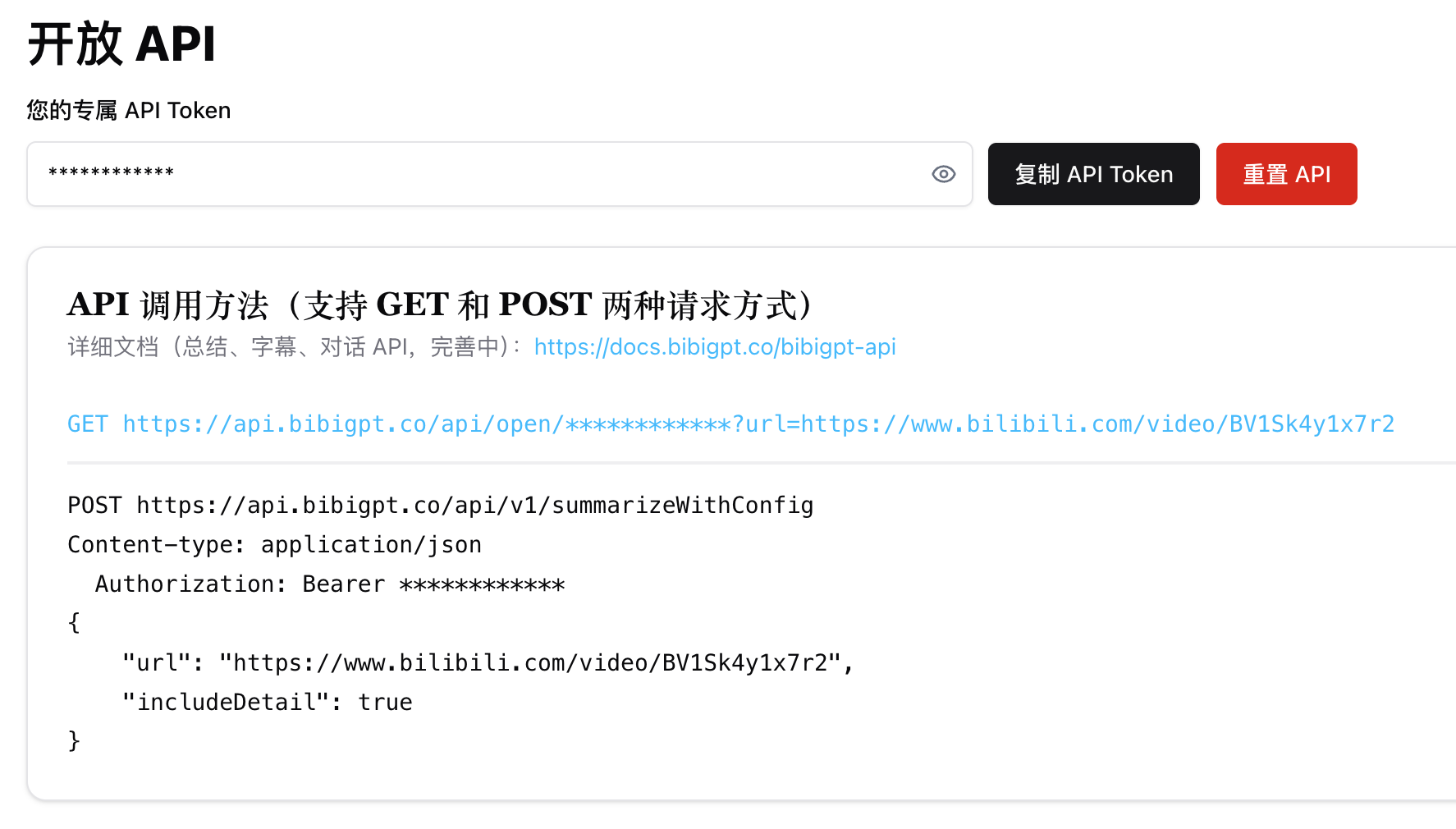
All API endpoints are authenticated using `api_token` token in the HTTP header or picked up from the endpoint directly.
```shell theme={null}
curl --request GET \
--url https://api.bibigpt.co/api/v1/summarize \
--header 'Authorization: Bearer '
```
After logging in, please check the [https://bibigpt.co/user/integration](https://bibigpt.co/user/integration) page to get your exclusive API Token. To purchase time credits, please visit the [https://bibigpt.co/shop](https://bibigpt.co/shop) page.
 ## 2. API Call Methods
### 1. Summarize [/api/v1/summarize](https://docs.bibigpt.co/api-reference/open/generate-video-or-audio-summary-from-url)
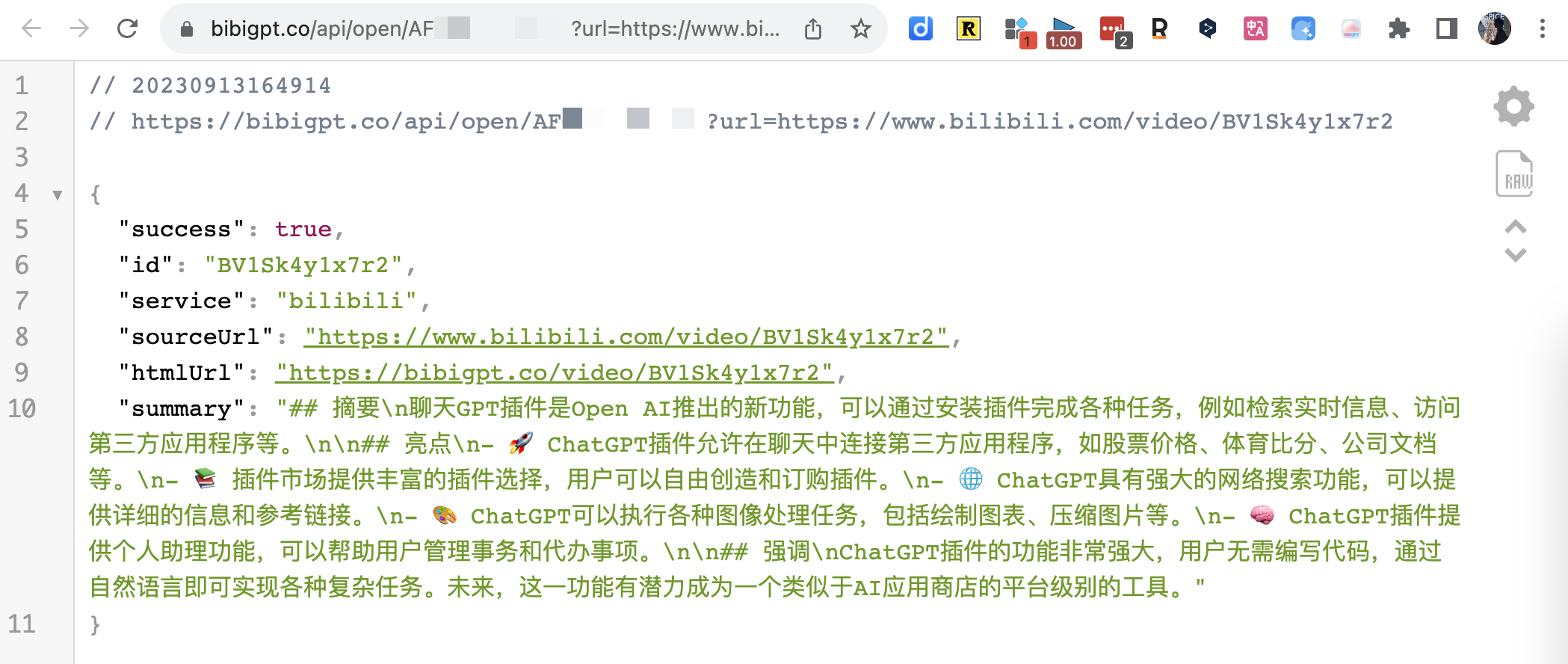
GET Request Example
## 2. API Call Methods
### 1. Summarize [/api/v1/summarize](https://docs.bibigpt.co/api-reference/open/generate-video-or-audio-summary-from-url)
GET Request Example
 ### 2. Custom Summary Parameters [/api/v1/summarizeWithConfig](https://docs.bibigpt.co/api-reference/open/generate-configurable-summary-from-url-based-on-prompt-config)
The POST method allows setting [promptConfig](https://docs.bibigpt.co/api-reference/open/generate-configurable-summary-from-url-based-on-prompt-config#body-prompt-config) to adjust summary results, and also supports includeDetail to return audio/video content details.
### 3. Subtitle [/api/v1/getSubtitle](https://docs.bibigpt.co/api-reference/open/only-returns-the-video-subtitles-array-in-detail)
Compared to the summary interface, it is much faster because it saves the time of requesting the LLM.
Note: By default, the audio language is automatically detected to produce corresponding Chinese or English subtitles. However, sometimes automatic detection may fail (or due to cache). If you find that the subtitles do not match the audio language, you can manually specify the `audioLanguage` parameter.
```shell theme={null}
https://api.bibigpt.co/api/v1/getSubtitle?url=https://www.youtube.com/watch?v=z5U843Ob8xw&audioLanguage=en
```
The correspondence for "Audio Language" is (only applicable to the current default speech recognition model):
```json theme={null}
{
"Auto": "auto",
"中文": "zh",
"English": "en",
"日本語": "ja",
"粤语": "yue",
"한국어": "ko",
"Deutsch": "de",
"Français": "fr",
"Русский": "ru"
}
```
If you need support for the following languages, please contact [Business](mailto:hi@bibigpt.co?subject=BibiGPT.co%20API%20AudioLanguage%20Feedback): `pt` (Portuguese), `ar` (Arabic), `it` (Italian), `es` (Spanish), `hi` (Hindi), `id` (Indonesian), `th` (Thai), `tr` (Turkish), `uk` (Ukrainian), `vi` (Vietnamese)
### 4. File URL [/api/v1/summarize](https://docs.bibigpt.co/api-reference/open/generate-video-or-audio-summary-from-url)
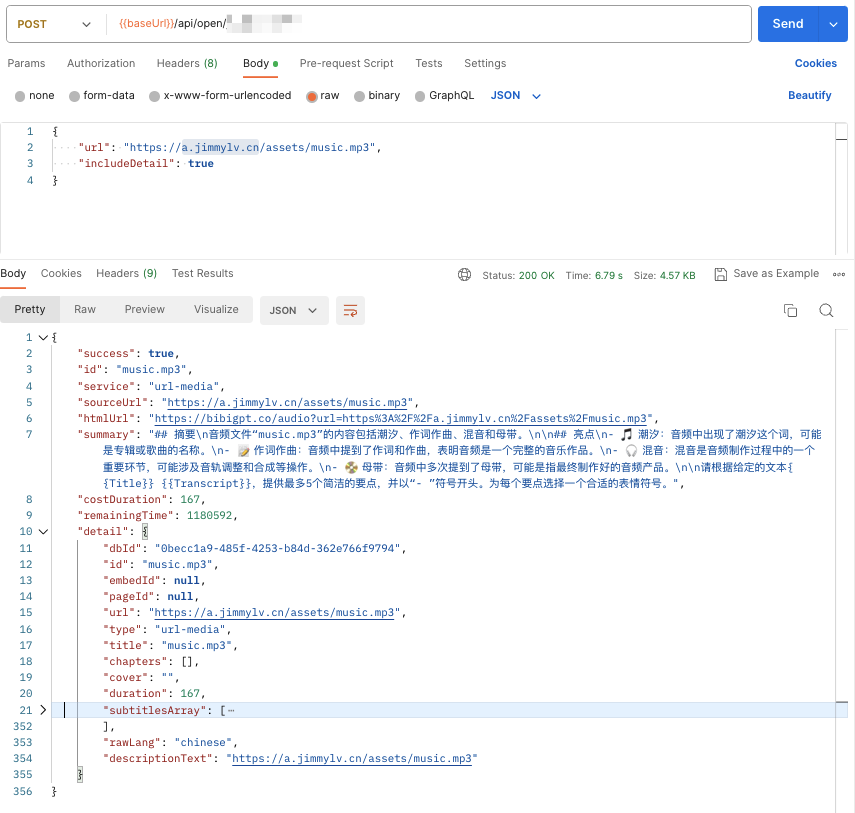
BibiGPT API supports custom audio/video file addresses. Just provide the API with a file download link. If it is a local file, you can upload it to OSS first, and remember to confirm that the download link is directly accessible.
For example, the following [https://a.jimmylv.cn/assets/music.mp3](https://a.jimmylv.cn/assets/music.mp3) (note that the URL path ends with `.mp3`)
> 💡 Currently supported types include `mp3|mp4|m4a|m4s|wav|webm|mpga|aac|ogg|oga|flac|alac|wma|avi|mkv|mov|flv|3gp|mpeg|mpg|ts|ogv|vob`. If you find any unsupported formats, please contact me!
### 2. Custom Summary Parameters [/api/v1/summarizeWithConfig](https://docs.bibigpt.co/api-reference/open/generate-configurable-summary-from-url-based-on-prompt-config)
The POST method allows setting [promptConfig](https://docs.bibigpt.co/api-reference/open/generate-configurable-summary-from-url-based-on-prompt-config#body-prompt-config) to adjust summary results, and also supports includeDetail to return audio/video content details.
### 3. Subtitle [/api/v1/getSubtitle](https://docs.bibigpt.co/api-reference/open/only-returns-the-video-subtitles-array-in-detail)
Compared to the summary interface, it is much faster because it saves the time of requesting the LLM.
Note: By default, the audio language is automatically detected to produce corresponding Chinese or English subtitles. However, sometimes automatic detection may fail (or due to cache). If you find that the subtitles do not match the audio language, you can manually specify the `audioLanguage` parameter.
```shell theme={null}
https://api.bibigpt.co/api/v1/getSubtitle?url=https://www.youtube.com/watch?v=z5U843Ob8xw&audioLanguage=en
```
The correspondence for "Audio Language" is (only applicable to the current default speech recognition model):
```json theme={null}
{
"Auto": "auto",
"中文": "zh",
"English": "en",
"日本語": "ja",
"粤语": "yue",
"한국어": "ko",
"Deutsch": "de",
"Français": "fr",
"Русский": "ru"
}
```
If you need support for the following languages, please contact [Business](mailto:hi@bibigpt.co?subject=BibiGPT.co%20API%20AudioLanguage%20Feedback): `pt` (Portuguese), `ar` (Arabic), `it` (Italian), `es` (Spanish), `hi` (Hindi), `id` (Indonesian), `th` (Thai), `tr` (Turkish), `uk` (Ukrainian), `vi` (Vietnamese)
### 4. File URL [/api/v1/summarize](https://docs.bibigpt.co/api-reference/open/generate-video-or-audio-summary-from-url)
BibiGPT API supports custom audio/video file addresses. Just provide the API with a file download link. If it is a local file, you can upload it to OSS first, and remember to confirm that the download link is directly accessible.
For example, the following [https://a.jimmylv.cn/assets/music.mp3](https://a.jimmylv.cn/assets/music.mp3) (note that the URL path ends with `.mp3`)
> 💡 Currently supported types include `mp3|mp4|m4a|m4s|wav|webm|mpga|aac|ogg|oga|flac|alac|wma|avi|mkv|mov|flv|3gp|mpeg|mpg|ts|ogv|vob`. If you find any unsupported formats, please contact me!
 ### 5. AI Q\&A [/api/open/\[apiToken\]/chat](https://docs.bibigpt.co/api-reference/endpoint/chat) (Going offline soon)
```tsx theme={null}
interface ChatContentParams {
url: string
question: string
# tuple for each [['Q1', 'A1'], ['Q2', 'A2']]
history?: [string, string][]
language?: string
}
```
### 5. AI Q\&A [/api/open/\[apiToken\]/chat](https://docs.bibigpt.co/api-reference/endpoint/chat) (Going offline soon)
```tsx theme={null}
interface ChatContentParams {
url: string
question: string
# tuple for each [['Q1', 'A1'], ['Q2', 'A2']]
history?: [string, string][]
language?: string
}
```
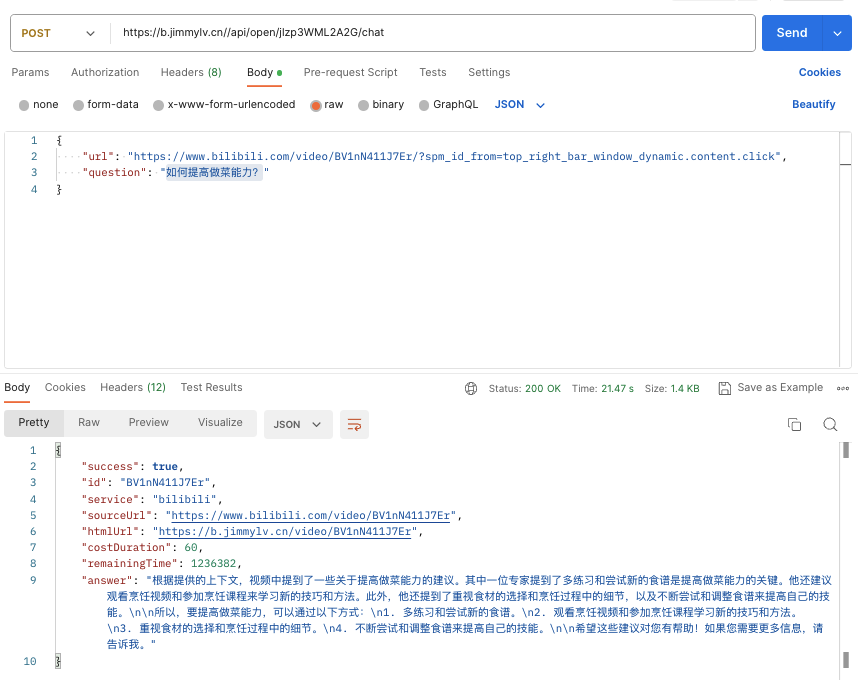 In addition to `answer`, you can also set the `includeDetail` parameter to choose whether to return `sourceDocuments` related to the answer.
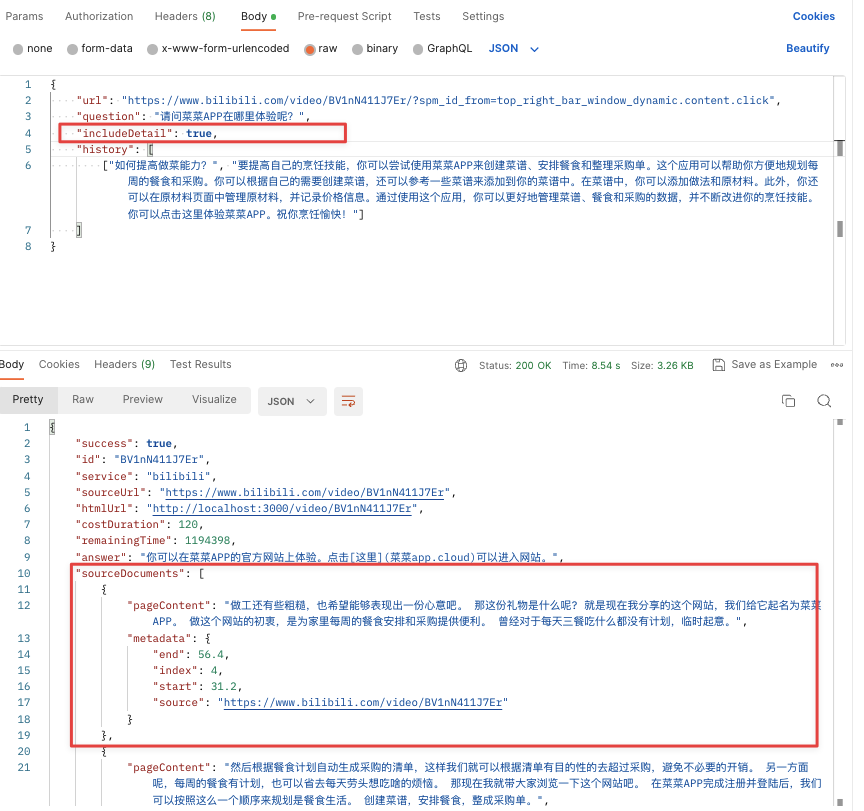 If you need to ask continuous questions, remember to use the previous QA question and answer as history context to improve the accuracy and coherence of the next answer (of course, the token duration consumed will also double).
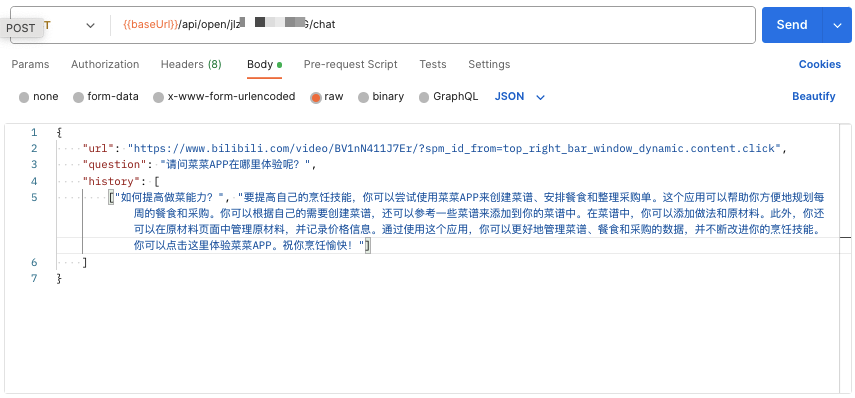 ### 6. AI Article Rewrite [/api/v1/express](https://docs.bibigpt.co/api-reference/open/rewrite-video-subtitles-as-a-polished-article)
Automatically fetches video subtitles and rewrites them into a structured article. Supports custom output language and model.
```shell theme={null}
curl --request GET \
--url 'https://api.bibigpt.co/api/v1/express?url=https://www.youtube.com/watch?v=dQw4w9WgXcQ' \
--header 'Authorization: Bearer '
```
Response format:
```json theme={null}
{
"success": true,
"id": "dQw4w9WgXcQ",
"service": "youtube",
"sourceUrl": "https://www.youtube.com/watch?v=dQw4w9WgXcQ",
"htmlUrl": "https://bibigpt.co/...",
"title": "Video Title",
"article": "Full rewritten Markdown article...",
"fromCache": false,
"costDuration": 600,
"remainingTime": 3000
}
```
Optional parameters:
* `outputLanguage`: Output language code (e.g., `zh-CN`, `en-US`)
* `model`: AI model to use
* `includeDetail`: Whether to include audio/video details in the response
### 7. AI Subtitle Polish [/api/v1/getPolishedText](https://docs.bibigpt.co/api-reference/open/polish-video-subtitles-into-readable-article-segments)
Automatically fetches video subtitles, polishes them by chapter or fixed-length segments, and returns all polished segments at once. Supports `keywords` parameter for improved professional terminology accuracy.
```shell theme={null}
curl --request GET \
--url 'https://api.bibigpt.co/api/v1/getPolishedText?url=https://www.youtube.com/watch?v=dQw4w9WgXcQ&keywords=AI,GPT' \
--header 'Authorization: Bearer '
```
Response format:
```json theme={null}
{
"success": true,
"id": "dQw4w9WgXcQ",
"service": "youtube",
"sourceUrl": "https://www.youtube.com/watch?v=dQw4w9WgXcQ",
"title": "Video Title",
"segments": [
{
"startTime": 0,
"endTime": 120,
"chapterTitle": "Chapter title (if available)",
"polishedText": "Polished Markdown text...",
"fromCache": false
}
],
"costDuration": 600,
"remainingTime": 3000
}
```
Optional parameters:
* `keywords`: Keywords (comma-separated) to improve professional terminology recognition accuracy
* `includeDetail`: Whether to include audio/video details in the response
## 3. API Interface Parameters (Currently only supports "Summarize" API)
### 3.1 Optional Configuration Parameters [promptConfig](https://docs.bibigpt.co/api-reference/open/generate-configurable-summary-from-url-based-on-prompt-config#body-prompt-config)
#### 1. promptConfig only supports POST requests, as a body parameter
### 6. AI Article Rewrite [/api/v1/express](https://docs.bibigpt.co/api-reference/open/rewrite-video-subtitles-as-a-polished-article)
Automatically fetches video subtitles and rewrites them into a structured article. Supports custom output language and model.
```shell theme={null}
curl --request GET \
--url 'https://api.bibigpt.co/api/v1/express?url=https://www.youtube.com/watch?v=dQw4w9WgXcQ' \
--header 'Authorization: Bearer '
```
Response format:
```json theme={null}
{
"success": true,
"id": "dQw4w9WgXcQ",
"service": "youtube",
"sourceUrl": "https://www.youtube.com/watch?v=dQw4w9WgXcQ",
"htmlUrl": "https://bibigpt.co/...",
"title": "Video Title",
"article": "Full rewritten Markdown article...",
"fromCache": false,
"costDuration": 600,
"remainingTime": 3000
}
```
Optional parameters:
* `outputLanguage`: Output language code (e.g., `zh-CN`, `en-US`)
* `model`: AI model to use
* `includeDetail`: Whether to include audio/video details in the response
### 7. AI Subtitle Polish [/api/v1/getPolishedText](https://docs.bibigpt.co/api-reference/open/polish-video-subtitles-into-readable-article-segments)
Automatically fetches video subtitles, polishes them by chapter or fixed-length segments, and returns all polished segments at once. Supports `keywords` parameter for improved professional terminology accuracy.
```shell theme={null}
curl --request GET \
--url 'https://api.bibigpt.co/api/v1/getPolishedText?url=https://www.youtube.com/watch?v=dQw4w9WgXcQ&keywords=AI,GPT' \
--header 'Authorization: Bearer '
```
Response format:
```json theme={null}
{
"success": true,
"id": "dQw4w9WgXcQ",
"service": "youtube",
"sourceUrl": "https://www.youtube.com/watch?v=dQw4w9WgXcQ",
"title": "Video Title",
"segments": [
{
"startTime": 0,
"endTime": 120,
"chapterTitle": "Chapter title (if available)",
"polishedText": "Polished Markdown text...",
"fromCache": false
}
],
"costDuration": 600,
"remainingTime": 3000
}
```
Optional parameters:
* `keywords`: Keywords (comma-separated) to improve professional terminology recognition accuracy
* `includeDetail`: Whether to include audio/video details in the response
## 3. API Interface Parameters (Currently only supports "Summarize" API)
### 3.1 Optional Configuration Parameters [promptConfig](https://docs.bibigpt.co/api-reference/open/generate-configurable-summary-from-url-based-on-prompt-config#body-prompt-config)
#### 1. promptConfig only supports POST requests, as a body parameter
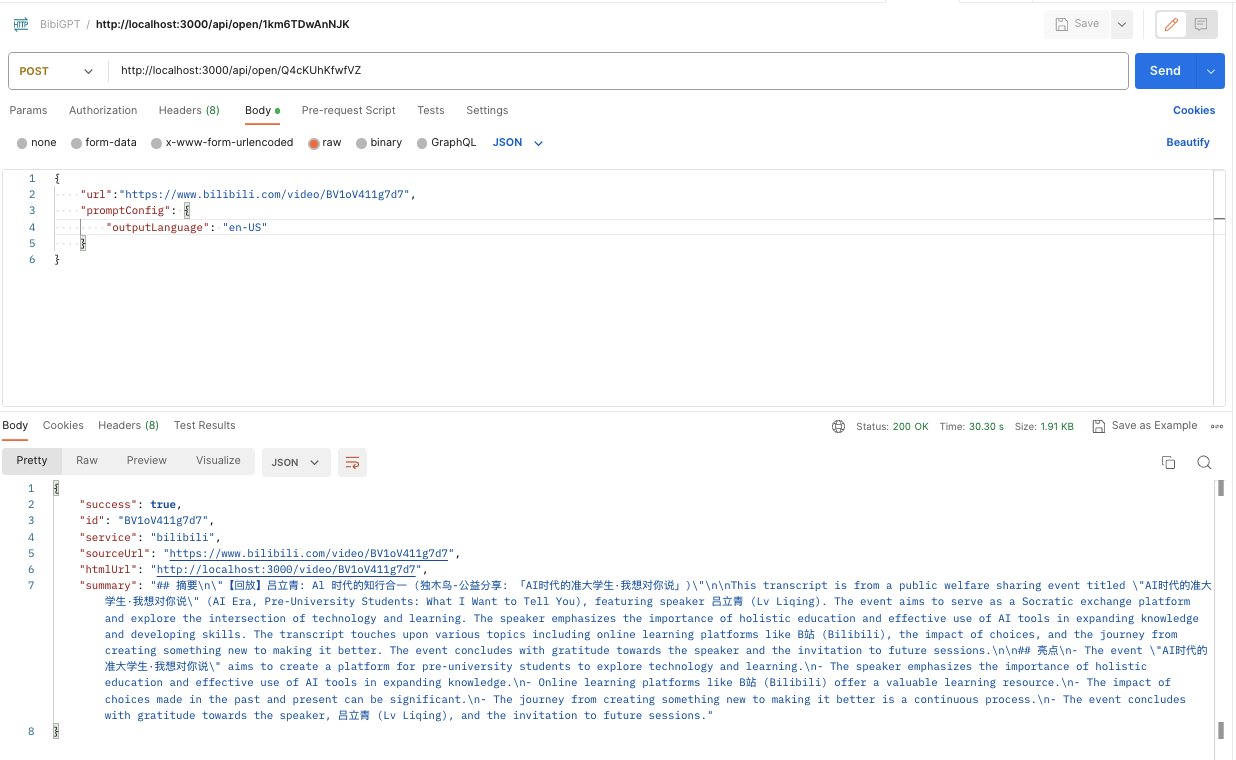 #### 2. Default parameters when promptConfig is empty, can be modified as needed
 ```json theme={null}
{
"showEmoji": true,
"showTimestamp": false,
"outlineLevel": 1,
"sentenceNumber": 5,
"detailLevel": 700,
"outputLanguage": "zh-CN"
}
```
Note: `detailLevel` corresponds to "sentence length", and the relationship is 50, i.e., 700/50=14 (value displayed on the Web page).
In addition, the correspondence for "Output Language" is:
```jsx theme={null}
{
English: 'en-US',
中文: 'zh-CN',
繁體中文: 'zh-TW',
日本語: 'ja-JP',
русский: 'ru-RU',
Italiano: 'it-IT',
Deutsch: 'de-DE',
Español: 'es-ES',
Français: 'fr-FR',
Nederlands: 'nl-NL',
Português: 'pt-PT',
한국어: 'ko-KR',
ភាសាខ្មែរ: 'km-KH',
हिंदी: 'hi-IN',
ภาษาไทย: 'th-TH',
}
```
#### 3. promptConfig has a special parameter: `isRefresh`. It ignores cache only when it has a value and is `true`
Example: This is a promptConfig for "*Do not output emoji, show timestamp, outline level 2, sentence number 3, sentence length 10, output language English, and force refresh cache*":
```json theme={null}
{
"showEmoji": false,
"showTimestamp": true,
"outlineLevel": 2,
"sentenceNumber": 3,
"detailLevel": 500,
"outputLanguage": "en-US",
"isRefresh": true
}
```
### 3.2 Custom Summary
```json theme={null}
{
"showEmoji": true,
"showTimestamp": false,
"outlineLevel": 1,
"sentenceNumber": 5,
"detailLevel": 700,
"outputLanguage": "zh-CN"
}
```
Note: `detailLevel` corresponds to "sentence length", and the relationship is 50, i.e., 700/50=14 (value displayed on the Web page).
In addition, the correspondence for "Output Language" is:
```jsx theme={null}
{
English: 'en-US',
中文: 'zh-CN',
繁體中文: 'zh-TW',
日本語: 'ja-JP',
русский: 'ru-RU',
Italiano: 'it-IT',
Deutsch: 'de-DE',
Español: 'es-ES',
Français: 'fr-FR',
Nederlands: 'nl-NL',
Português: 'pt-PT',
한국어: 'ko-KR',
ភាសាខ្មែរ: 'km-KH',
हिंदी: 'hi-IN',
ภาษาไทย: 'th-TH',
}
```
#### 3. promptConfig has a special parameter: `isRefresh`. It ignores cache only when it has a value and is `true`
Example: This is a promptConfig for "*Do not output emoji, show timestamp, outline level 2, sentence number 3, sentence length 10, output language English, and force refresh cache*":
```json theme={null}
{
"showEmoji": false,
"showTimestamp": true,
"outlineLevel": 2,
"sentenceNumber": 3,
"detailLevel": 500,
"outputLanguage": "en-US",
"isRefresh": true
}
```
### 3.2 Custom Summary
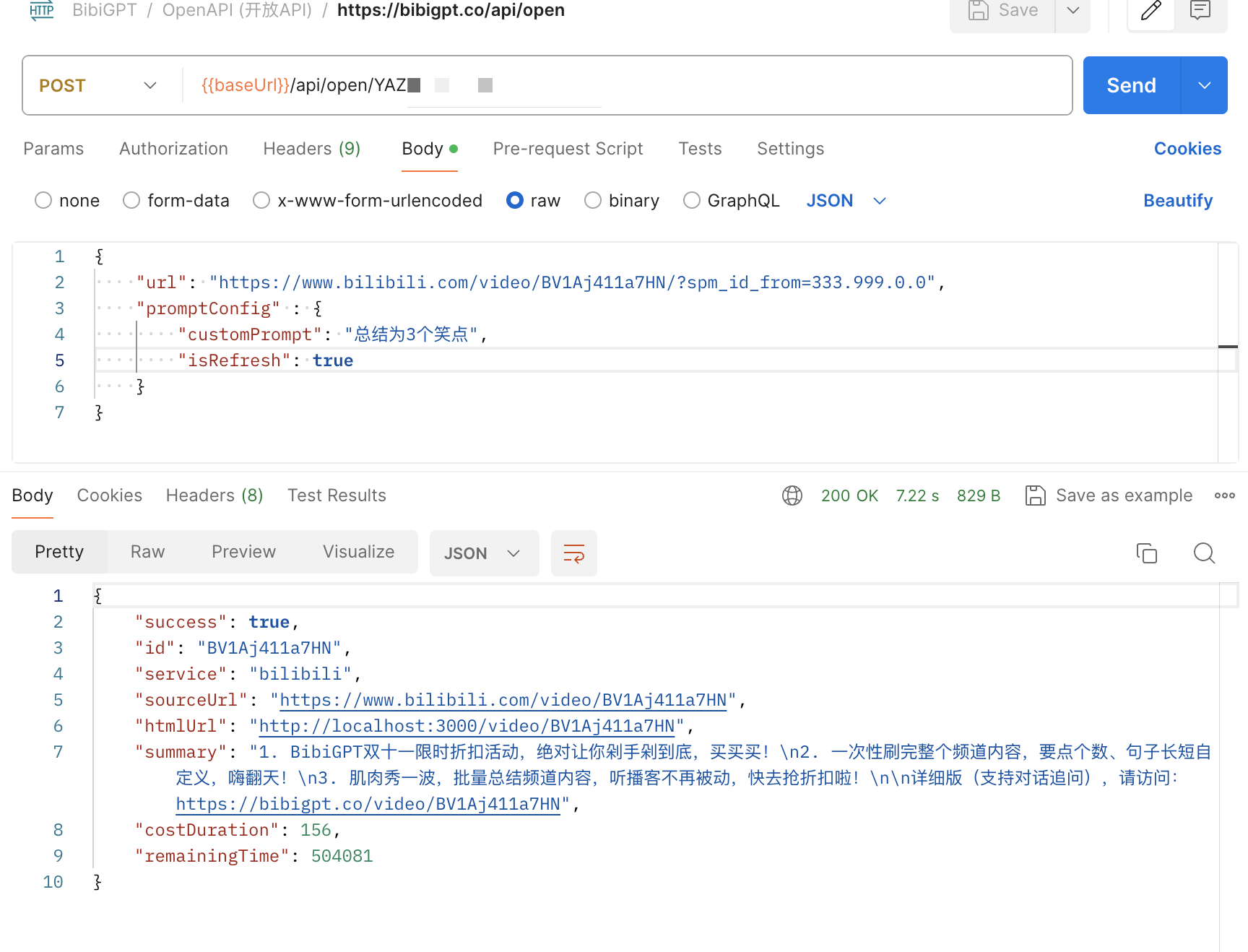 ```json theme={null}
{
"url": "https://www.bilibili.com/video/BV1Aj411a7HN",
"promptConfig": {
"customPrompt": "Summarize as 3 jokes",
"isRefresh": true
}
}
```
By adding customPrompt to promptConfig, you can customize your own summary prompt. Note that if the video has been summarized, you need `isRefresh: true` to skip the cached result for the customPrompt custom summary to take effect.
### 3.3 Limitation Conditions
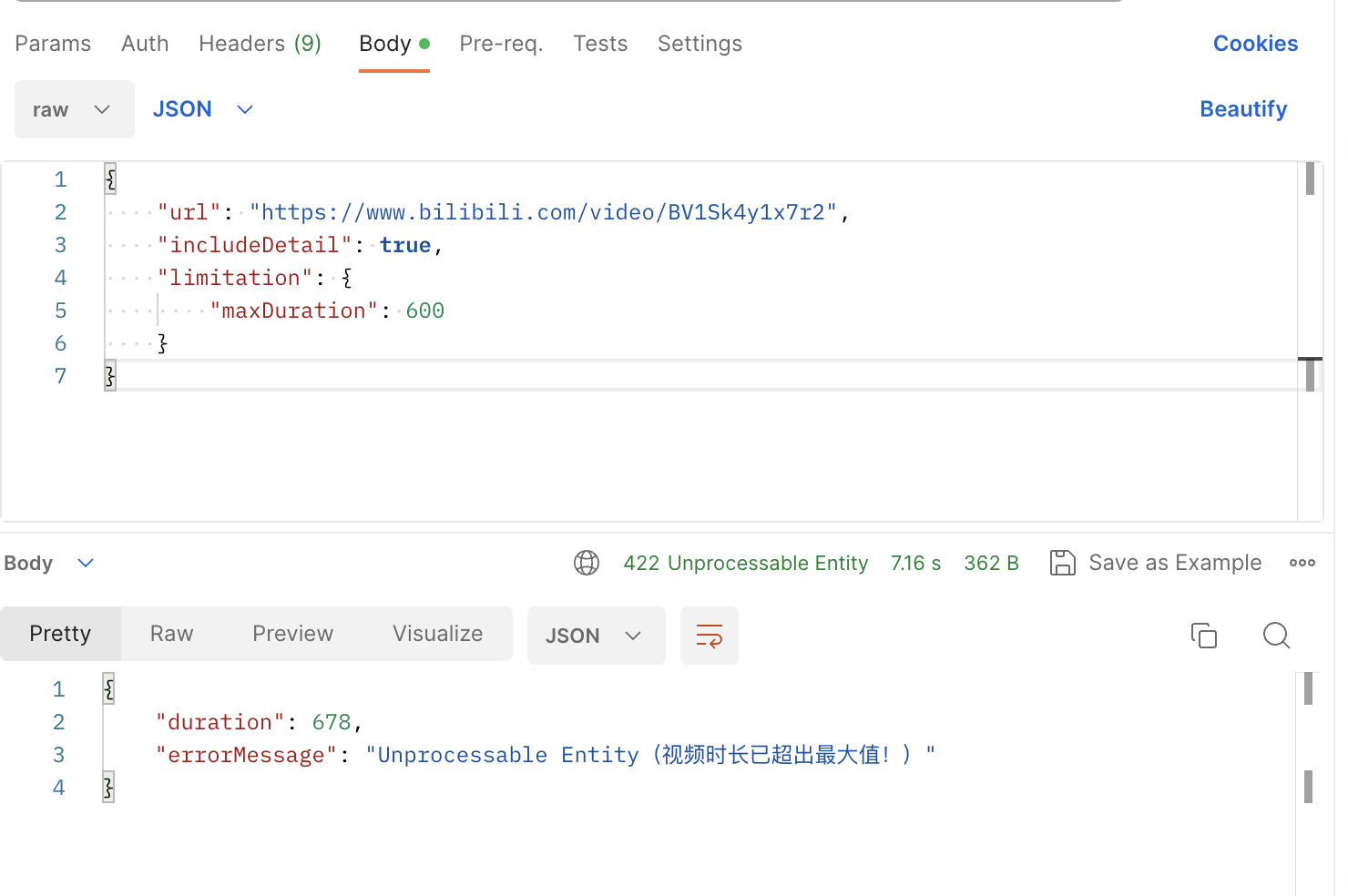
As the limitation field of the API, you can set `maxDuration`. If the backend detects that the audio/video duration corresponding to the url exceeds maxDuration, it returns a 422 error status code.
```json theme={null}
{
"url": "https://www.bilibili.com/video/BV1Sk4y1x7r2",
"includeDetail": true,
"limitation": {
"maxDuration": 600
}
}
```
```json theme={null}
{
"url": "https://www.bilibili.com/video/BV1Aj411a7HN",
"promptConfig": {
"customPrompt": "Summarize as 3 jokes",
"isRefresh": true
}
}
```
By adding customPrompt to promptConfig, you can customize your own summary prompt. Note that if the video has been summarized, you need `isRefresh: true` to skip the cached result for the customPrompt custom summary to take effect.
### 3.3 Limitation Conditions
As the limitation field of the API, you can set `maxDuration`. If the backend detects that the audio/video duration corresponding to the url exceeds maxDuration, it returns a 422 error status code.
```json theme={null}
{
"url": "https://www.bilibili.com/video/BV1Sk4y1x7r2",
"includeDetail": true,
"limitation": {
"maxDuration": 600
}
}
```
 ## 4. Use Cases
### 4.1 WeChat Assistant
[ChatGPT AI helps one-click audio/video summary, successfully linking to WeKe Creator Cloud!](https://mp.weixin.qq.com/s/iFoi6Yx7QU1Oh042Az4hlQ)
[https://github.com/zhayujie/chatgpt-on-wechat/issues/1417](https://github.com/zhayujie/chatgpt-on-wechat/issues/1417)
[【Watch? Buy?】There are so many videos related to today's Apple event, and they are boring. \_bilibili](https://www.bilibili.com/video/BV1GN4y1X7Na)
### 4.2 Mobile iOS Shortcuts
【AI Video Note】BibiGPT Open API & IFTTT Unlimited Imagination
[【AI Video Note】Apple Notes: One-click summary of Bilibili videos, linking with Shortcuts 丨 BibiGPT Open API & IFTTT Unlimited Imagination \_bilibili](https://www.bilibili.com/video/BV1ZN411z7Hc/)
### 4.3 Browser Extension
[【BibiGPT】Browser Extension: Supports one-click transcription & summary of audio/video content on any web page \_bilibili](https://www.bilibili.com/video/BV1gN411W7NY)
### 4.4 Linking Note Apps
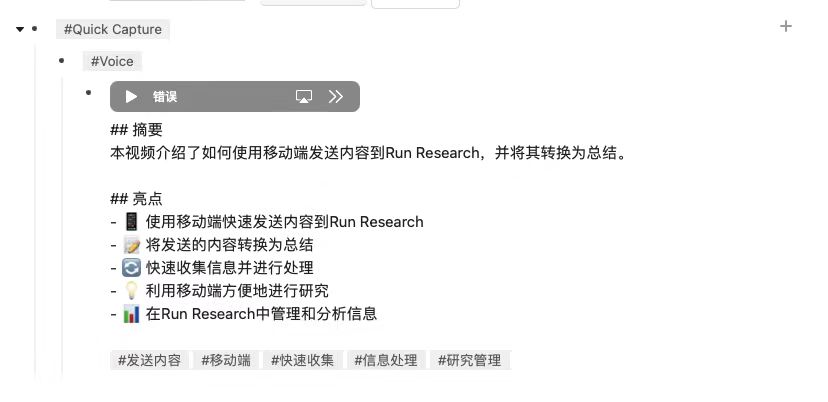
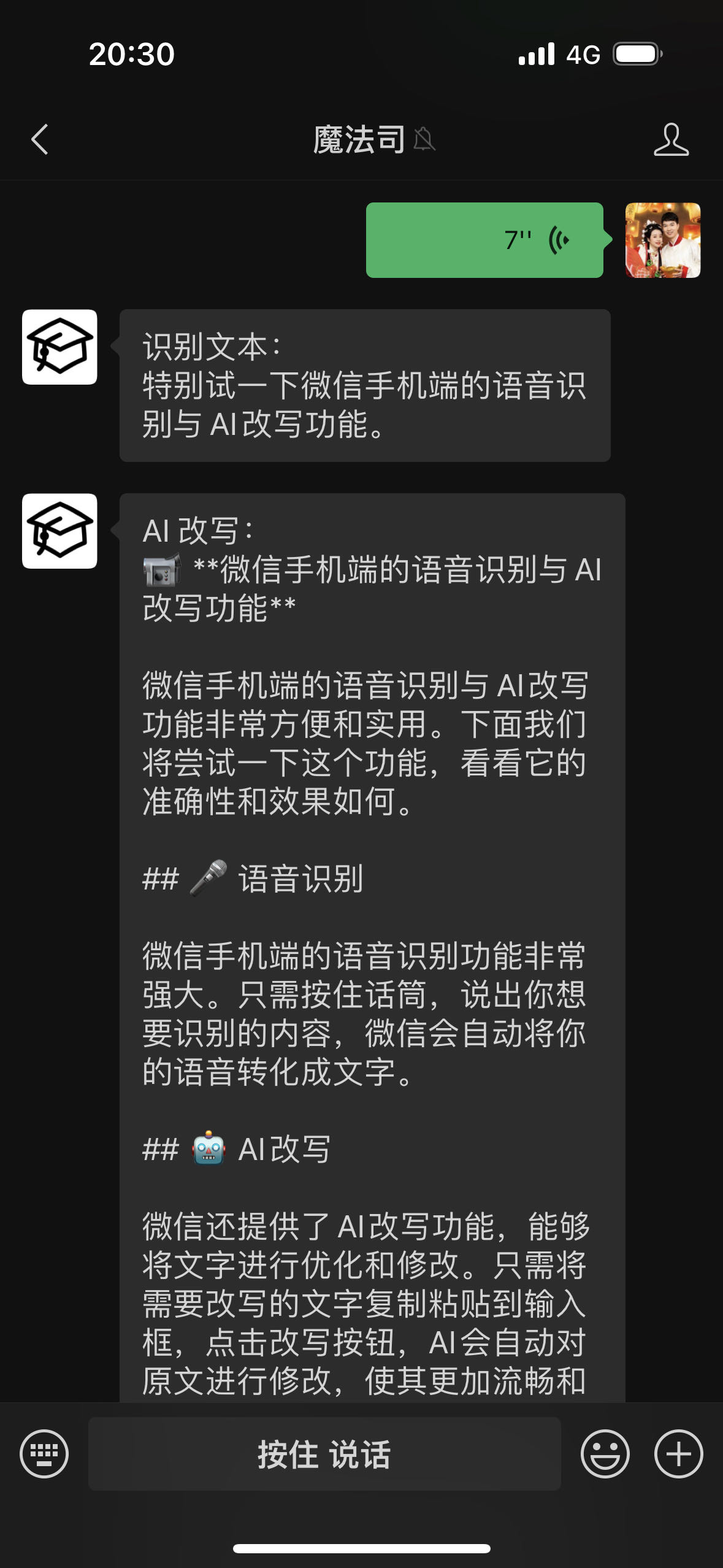
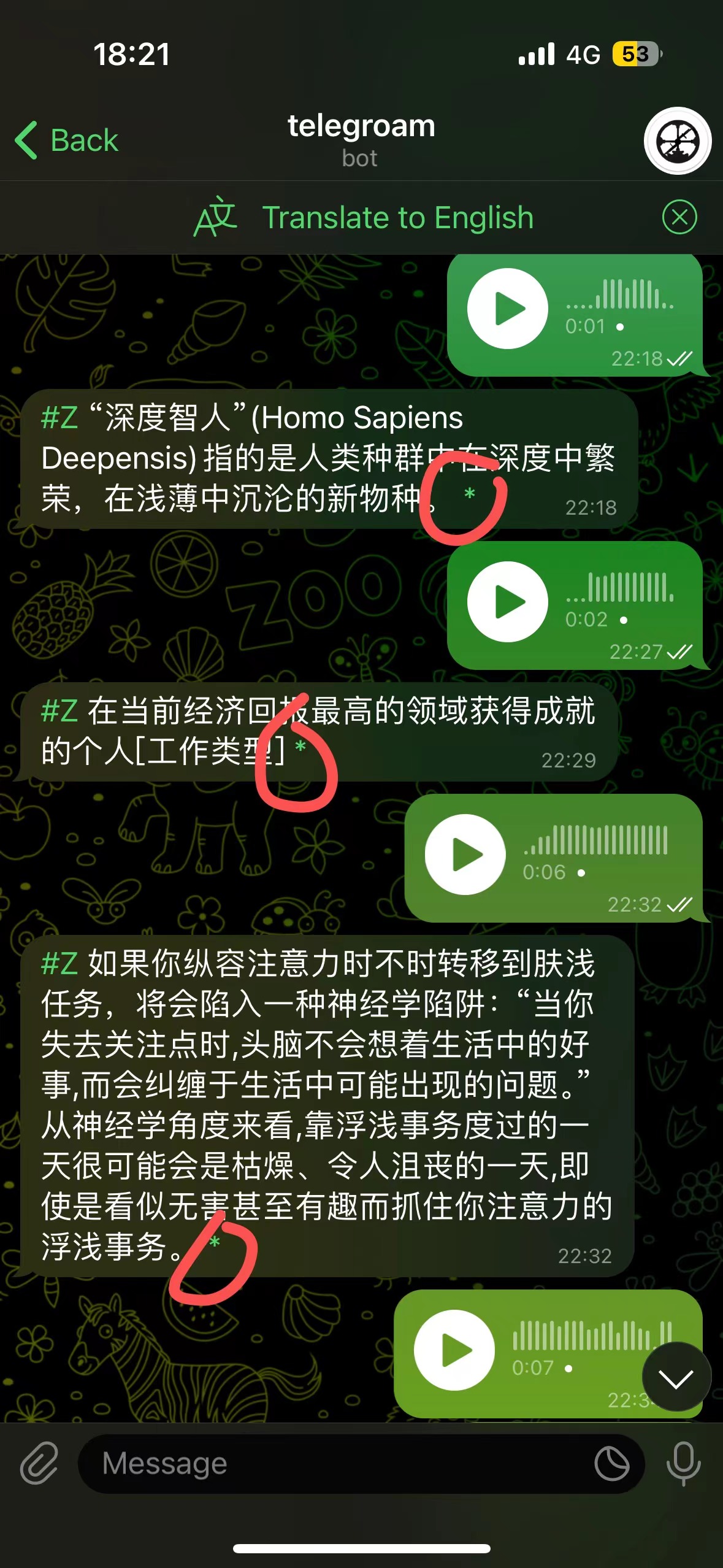
Voice Input → Roam Research → AI Rewrite → AI Review
Send voice via [telegroam](https://github.com/JimmyLv/telegroam), then use BibiGPT's API to summarize into text, and save to Roam Research with one click
## 4. Use Cases
### 4.1 WeChat Assistant
[ChatGPT AI helps one-click audio/video summary, successfully linking to WeKe Creator Cloud!](https://mp.weixin.qq.com/s/iFoi6Yx7QU1Oh042Az4hlQ)
[https://github.com/zhayujie/chatgpt-on-wechat/issues/1417](https://github.com/zhayujie/chatgpt-on-wechat/issues/1417)
[【Watch? Buy?】There are so many videos related to today's Apple event, and they are boring. \_bilibili](https://www.bilibili.com/video/BV1GN4y1X7Na)
### 4.2 Mobile iOS Shortcuts
【AI Video Note】BibiGPT Open API & IFTTT Unlimited Imagination
[【AI Video Note】Apple Notes: One-click summary of Bilibili videos, linking with Shortcuts 丨 BibiGPT Open API & IFTTT Unlimited Imagination \_bilibili](https://www.bilibili.com/video/BV1ZN411z7Hc/)
### 4.3 Browser Extension
[【BibiGPT】Browser Extension: Supports one-click transcription & summary of audio/video content on any web page \_bilibili](https://www.bilibili.com/video/BV1gN411W7NY)
### 4.4 Linking Note Apps
Voice Input → Roam Research → AI Rewrite → AI Review
Send voice via [telegroam](https://github.com/JimmyLv/telegroam), then use BibiGPT's API to summarize into text, and save to Roam Research with one click
 ***
Detailed documentation (In progress): [https://docs.bibigpt.co/api-reference](https://docs.bibigpt.co/api-reference)
***
Detailed documentation (In progress): [https://docs.bibigpt.co/api-reference](https://docs.bibigpt.co/api-reference)