> ## Documentation Index
> Fetch the complete documentation index at: https://docs.bibigpt.co/llms.txt
> Use this file to discover all available pages before exploring further.
# Batch Export to EPUB eBook
> Batch Export to EPUB eBook is one of the core features of BibiGPT. BibiGPT has launched a new function for Pro users. Learn about feature highlights, applicable scenarios, and usage suggestions to improve learning and content processing efficiency. Suitable for users who want to improve efficiency and reading experience to get started quickly.
## Feature Overview
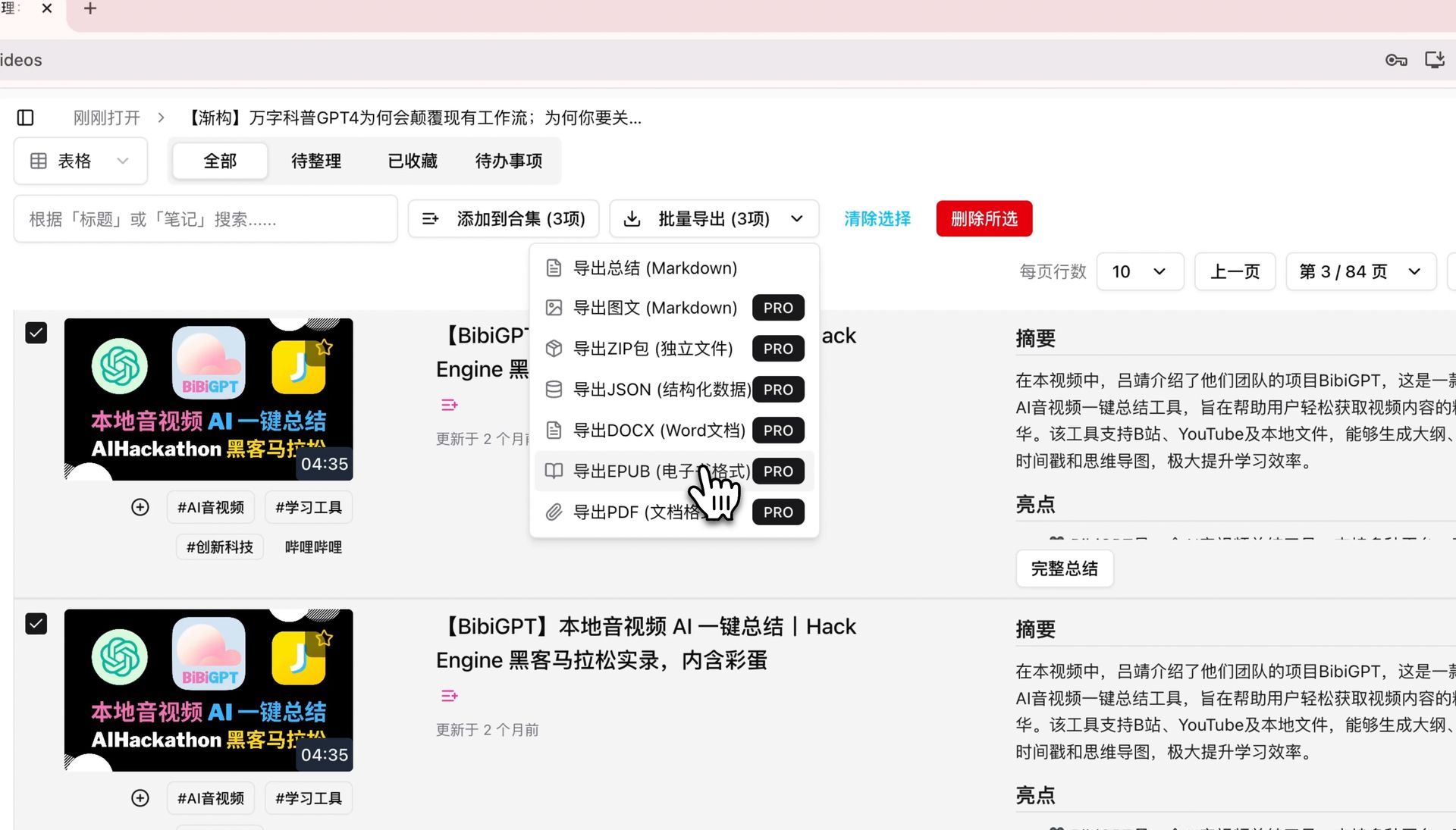
BibiGPT has launched a new feature for Pro users to batch export content as EPUB eBooks. Users can package multiple independent video summaries or an entire collection into a single structured eBook with one click, facilitating immersive offline reading on mobile phones or e-readers. The exported eBook contains AI summaries and detailed original transcripts, perfectly solving the pain point of inconvenient long-form reading on the web and greatly optimizing the mobile deep learning experience.
Here is an example of the function interface:
 ## Solved Pain Points
I want to organize multiple video summaries or entire course collections I've made to facilitate immersive, offline deep reading on my phone or e-reader, but copying and pasting them one by one is very troublesome and the reading experience is poor.
## Core Features
* BibiGPT launched a new batch export to EPUB eBook feature for Pro users.
* Users can package multiple independent video summaries or entire collections into one structured eBook with one click.
* Exported eBooks include AI summaries and detailed transcripts, optimizing the mobile deep learning experience.
* One-click packaging of multiple summaries or collections into a clear eBook for comfortable offline reading anywhere.
## Feature Highlights
BibiGPT added a batch export EPUB eBook function for Pro users, allowing you to package multiple video summaries or entire collections into one clearly structured eBook with one click for comfortable offline reading on your device anytime, anywhere.
## Applicable Scenarios
* I want to organize multiple video summaries or entire course collections I've made to facilitate immersive, offline deep reading on my phone or e-reader, but copying and pasting them one by one is very troublesome and the reading experience is poor.
## Related Features
## Solved Pain Points
I want to organize multiple video summaries or entire course collections I've made to facilitate immersive, offline deep reading on my phone or e-reader, but copying and pasting them one by one is very troublesome and the reading experience is poor.
## Core Features
* BibiGPT launched a new batch export to EPUB eBook feature for Pro users.
* Users can package multiple independent video summaries or entire collections into one structured eBook with one click.
* Exported eBooks include AI summaries and detailed transcripts, optimizing the mobile deep learning experience.
* One-click packaging of multiple summaries or collections into a clear eBook for comfortable offline reading anywhere.
## Feature Highlights
BibiGPT added a batch export EPUB eBook function for Pro users, allowing you to package multiple video summaries or entire collections into one clearly structured eBook with one click for comfortable offline reading on your device anytime, anywhere.
## Applicable Scenarios
* I want to organize multiple video summaries or entire course collections I've made to facilitate immersive, offline deep reading on my phone or e-reader, but copying and pasting them one by one is very troublesome and the reading experience is poor.
## Related Features