> ## Documentation Index
> Fetch the complete documentation index at: https://docs.bibigpt.co/llms.txt
> Use this file to discover all available pages before exploring further.
# Cloud Drive File Import and Auto-Sync Monitoring
> Cloud Drive File Import and Auto-Sync Monitoring is one of the core features of BibiGPT. BibiGPT has updated its cloud drive integration, supporting Baidu Netdisk, Aliyun Drive, Dropbox, and Box. Learn about feature highlights, applicable scenarios, and usage suggestions to improve learning and content processing efficiency.
## Feature Overview
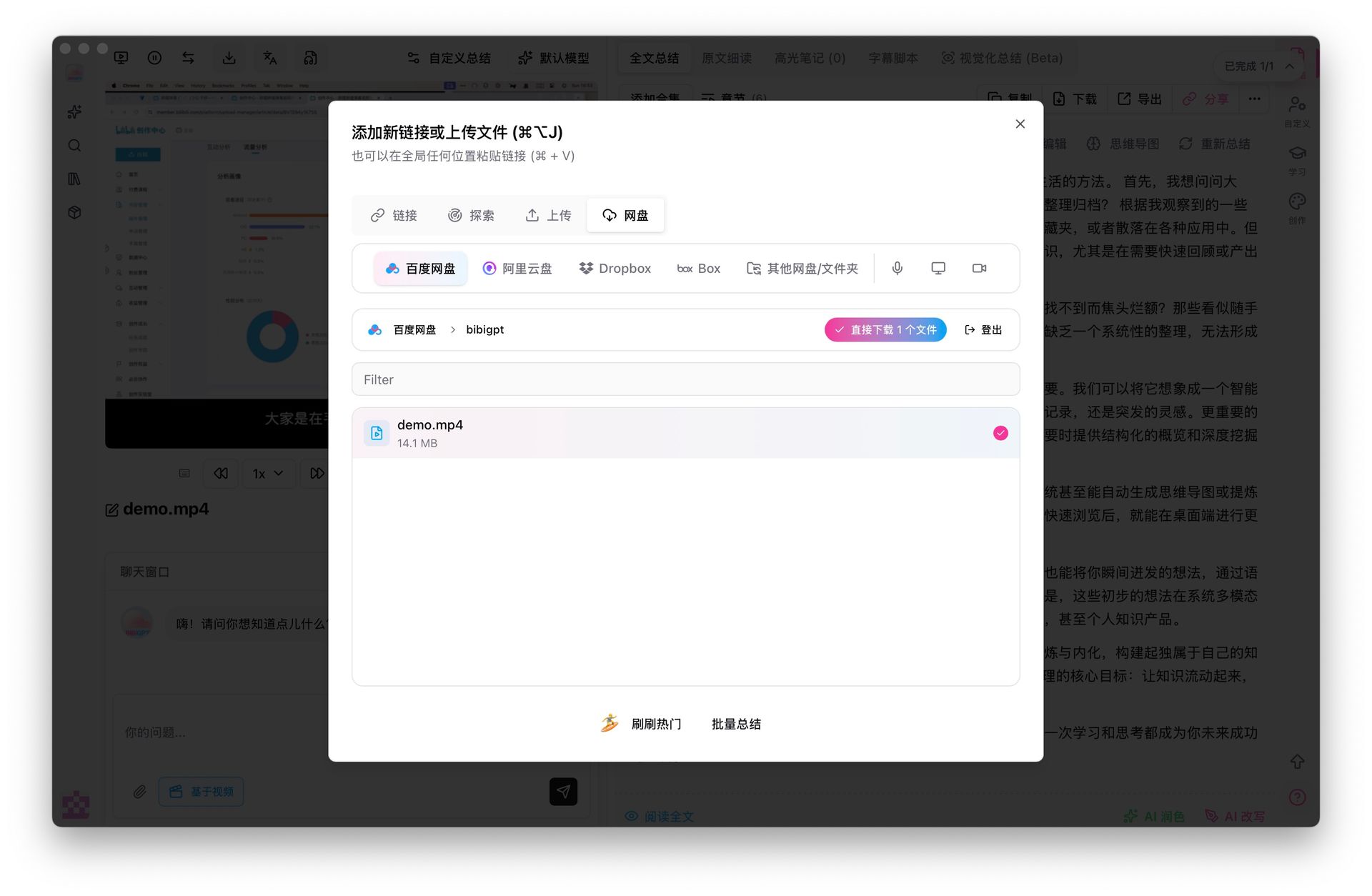
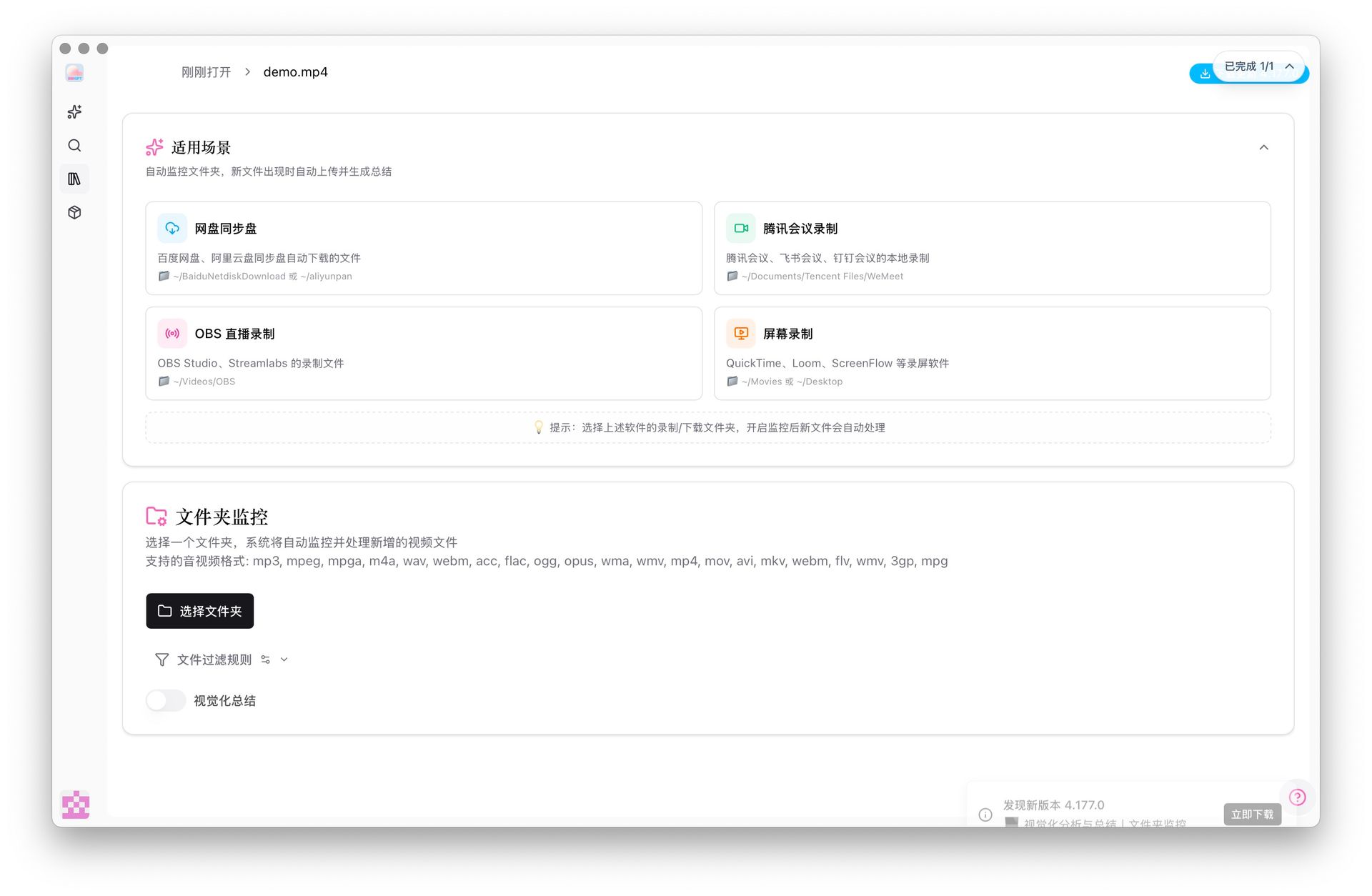
BibiGPT has updated its cloud drive integration to support Baidu Netdisk, Aliyun Drive, Dropbox, and Box. Addressing the pain point that cloud drive APIs are prone to rate limiting, BibiGPT recommends the "Sync Drive" mode: users sync files to a local folder via the cloud drive client, and BibiGPT monitors that folder, automatically starting a summary once a new file is detected. This feature requires the BibiGPT desktop client and supports file filtering and automatic visualized summaries, making the cloud material processing workflow more automated and efficient.
Here is an example of the function interface:
 ## Solved Pain Points
"Many of my learning materials and videos are stored in Baidu Netdisk or Aliyun Drive, but the download speed is often limited and very slow. I want to turn these cloud audio/videos into notes, but every time I have to manually download and then upload to the AI tool, the process is too tedious and inefficient."
## Core Features
* BibiGPT updated cloud drive integration for Baidu Netdisk, Aliyun Drive, Dropbox, and Box.
* Recommends "Sync Drive" mode: sync files locally and have BibiGPT monitor the folder for automatic summarization.
* Requires BibiGPT desktop client; supports file filtering and automatic visualized summaries.
* Integrated entries for mainstream cloud drives (Baidu, Aliyun, Dropbox, etc.) and launched **"Local Sync Folder Monitoring"**.
## Feature Highlights
BibiGPT integrated mainstream cloud drive entries and launched the **"Local Sync Folder Monitoring"** function. Users only need to sync files locally through official cloud drive clients, and BibiGPT will automatically detect new files for AI summarization, perfectly circumventing API rate limiting and achieving a seamless "Save to cloud, auto-notes locally" workflow.
## Applicable Scenarios
* Many of my learning materials and videos are stored in Baidu Netdisk or Aliyun Drive, but the download speed is often limited and very slow.
* I want to turn these cloud audio/videos into notes without the manual download/upload hassle.
## Usage Suggestions
* Users only need to sync files locally through official cloud drive clients, and BibiGPT will automatically detect new files for AI summarization, perfectly circumventing API rate limiting and achieving a seamless "Save to cloud, auto-notes locally" workflow.
## Related Features
## Solved Pain Points
"Many of my learning materials and videos are stored in Baidu Netdisk or Aliyun Drive, but the download speed is often limited and very slow. I want to turn these cloud audio/videos into notes, but every time I have to manually download and then upload to the AI tool, the process is too tedious and inefficient."
## Core Features
* BibiGPT updated cloud drive integration for Baidu Netdisk, Aliyun Drive, Dropbox, and Box.
* Recommends "Sync Drive" mode: sync files locally and have BibiGPT monitor the folder for automatic summarization.
* Requires BibiGPT desktop client; supports file filtering and automatic visualized summaries.
* Integrated entries for mainstream cloud drives (Baidu, Aliyun, Dropbox, etc.) and launched **"Local Sync Folder Monitoring"**.
## Feature Highlights
BibiGPT integrated mainstream cloud drive entries and launched the **"Local Sync Folder Monitoring"** function. Users only need to sync files locally through official cloud drive clients, and BibiGPT will automatically detect new files for AI summarization, perfectly circumventing API rate limiting and achieving a seamless "Save to cloud, auto-notes locally" workflow.
## Applicable Scenarios
* Many of my learning materials and videos are stored in Baidu Netdisk or Aliyun Drive, but the download speed is often limited and very slow.
* I want to turn these cloud audio/videos into notes without the manual download/upload hassle.
## Usage Suggestions
* Users only need to sync files locally through official cloud drive clients, and BibiGPT will automatically detect new files for AI summarization, perfectly circumventing API rate limiting and achieving a seamless "Save to cloud, auto-notes locally" workflow.
## Related Features