> ## Documentation Index
> Fetch the complete documentation index at: https://docs.bibigpt.co/llms.txt
> Use this file to discover all available pages before exploring further.
# Bring Sources into a Creation Draft
> When writing a public article or Xiaohongshu post, pull in the current video, collection recap and Q&A, selected chapters, and highlights. Audio-only items get generated images when there is no footage.
## Overview
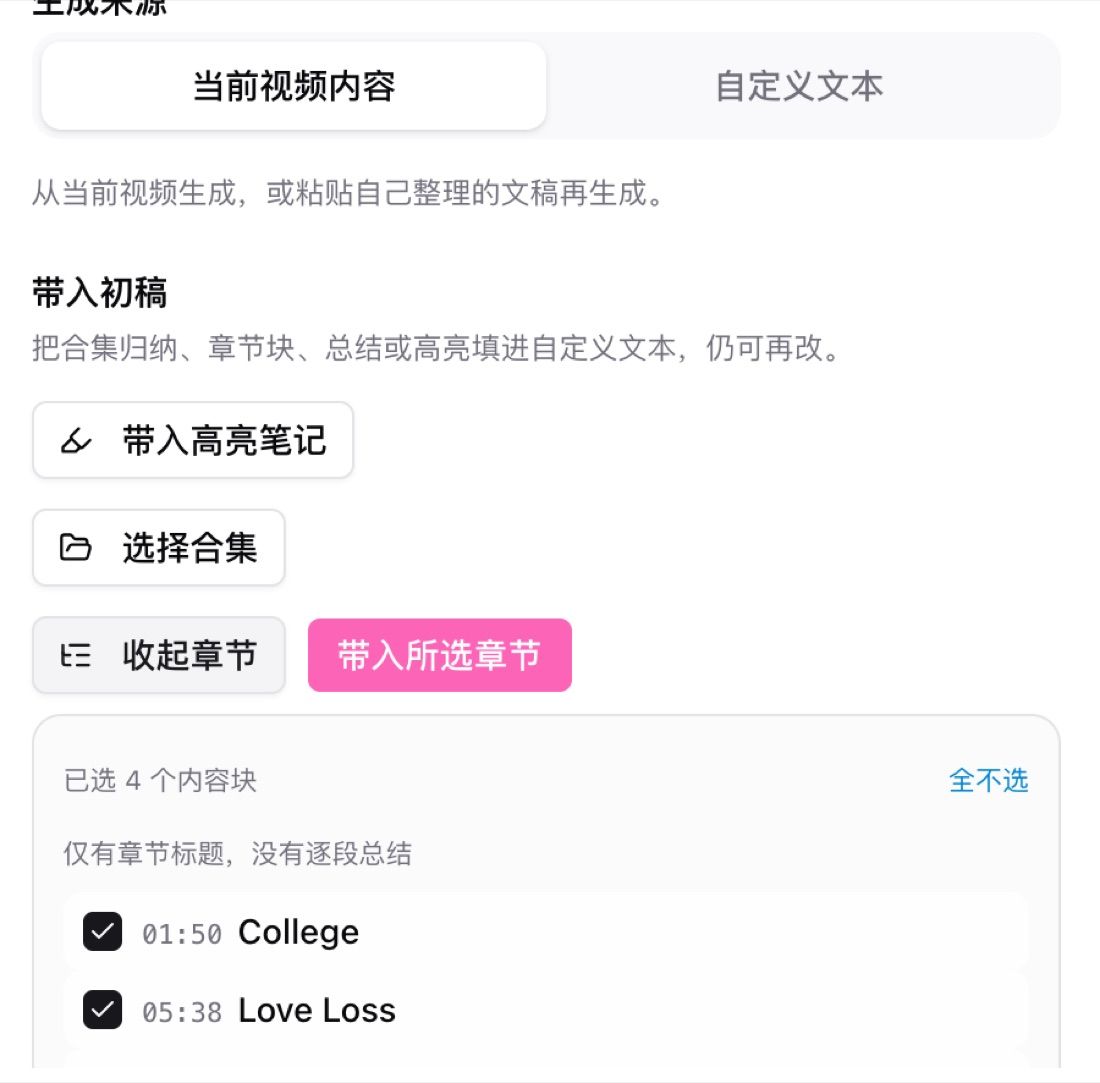
Open an existing summary, then go to Create / public article or Xiaohongshu. The panel starts with a generation source: current video, or custom text. Under that, Bring into draft can fill collection recap, collection Q\&A, chapter blocks, the summary, or highlights into the custom text. You can still edit after filling.
 ## Pain Point
Drafts used to be stitched by hand from summaries, collections, chapters, and highlights. Entries were scattered, chapters were not multi-select, and audio-only items had no frames to pull.
## Key Features
* **Generation source**: current video, or switch to custom text before generating
* **From a collection**: drop the recap and Q\&A into the draft instead of copying by hand
* **Multi-select chapters**: pick several blocks, clear all, then Bring selected chapters
* **Bring highlights**: fill marked highlights into the custom text
* **Audio-only images**: when there is no footage, images are generated from the content; public articles that need frames must be linked to the original video first
## Highlights
Sources live in one place. Collection recap, Q\&A, chapters, and highlights can land in the same draft.
## Use Cases
* A course collection already has a recap, and you want that plus Q\&A as the article start
* A long video where only a few chapters belong in the prompt
* A podcast with no screenshots that still needs an illustrated post
## Tips
* Open the default prompt on custom text before editing, so source and tone stay clear
* If the public article needs original frames, link the video first; do not rely on audio-only generation
* Collection import fits series you have already recapped; a single video can use current video content
## Related Features
***
**Related**: [AI video to article](https://bibigpt.co/article) — try it now
**Upgrade to Pro**: unlock article rewrite and collection import → [Pricing](https://bibigpt.co/pricing)
## Pain Point
Drafts used to be stitched by hand from summaries, collections, chapters, and highlights. Entries were scattered, chapters were not multi-select, and audio-only items had no frames to pull.
## Key Features
* **Generation source**: current video, or switch to custom text before generating
* **From a collection**: drop the recap and Q\&A into the draft instead of copying by hand
* **Multi-select chapters**: pick several blocks, clear all, then Bring selected chapters
* **Bring highlights**: fill marked highlights into the custom text
* **Audio-only images**: when there is no footage, images are generated from the content; public articles that need frames must be linked to the original video first
## Highlights
Sources live in one place. Collection recap, Q\&A, chapters, and highlights can land in the same draft.
## Use Cases
* A course collection already has a recap, and you want that plus Q\&A as the article start
* A long video where only a few chapters belong in the prompt
* A podcast with no screenshots that still needs an illustrated post
## Tips
* Open the default prompt on custom text before editing, so source and tone stay clear
* If the public article needs original frames, link the video first; do not rely on audio-only generation
* Collection import fits series you have already recapped; a single video can use current video content
## Related Features
***
**Related**: [AI video to article](https://bibigpt.co/article) — try it now
**Upgrade to Pro**: unlock article rewrite and collection import → [Pricing](https://bibigpt.co/pricing)