> ## Documentation Index
> Fetch the complete documentation index at: https://docs.bibigpt.co/llms.txt
> Use this file to discover all available pages before exploring further.
# AI Image Custom Style
> AI Image Custom Style is one of the core features of BibiGPT. BibiGPT has launched the "AI Image Custom Style" function, giving users greater creative freedom. Learn about feature highlights, applicable scenarios, and usage suggestions to improve learning and content processing efficiency. Suitable for users who want to improve efficiency and reading experience to get started quickly.
## Feature Overview
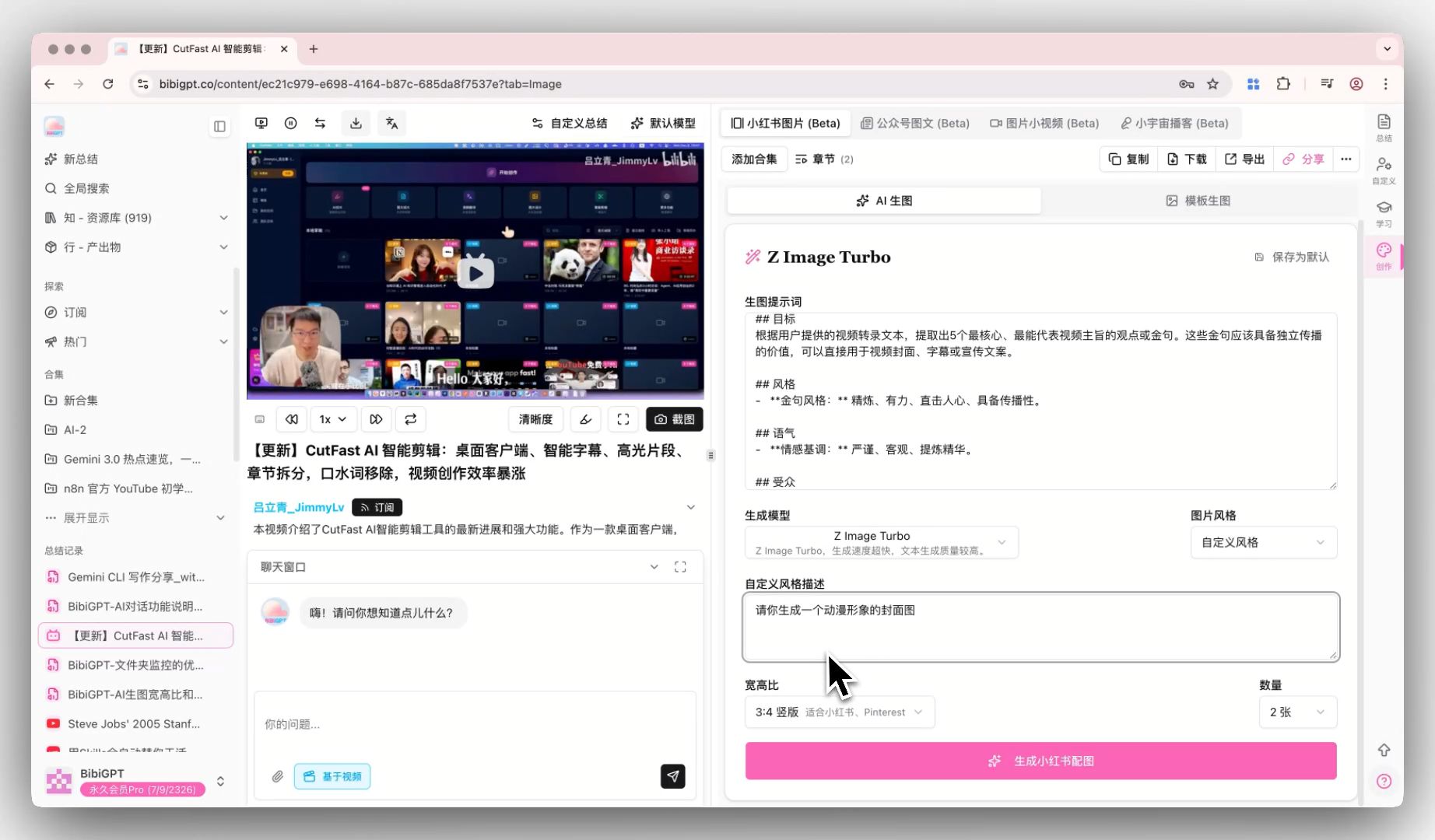
BibiGPT has launched the "AI Image Custom Style" function, giving users greater creative freedom. After selecting "Custom Style" in the AI image generation tool on the right creation panel, users can enter any prompt (such as "anime image cover") and adjust the image ratio (such as 16:9) and the number of generations. The system can not only generate precise images based on the description, but also automatically save the user's custom description. When switching to other videos, the style configuration can be directly reused without re-entering, greatly improving the efficiency of personalized sharing.
Here is an example of the function interface:
 ## Solved Pain Points
"Although the built-in image styles are good, sometimes I need a more personalized cover, such as anime style or specific scene description, and I hope my settings can be remembered so that I don't have to re-enter them every time."
## Core Features
* BibiGPT has launched the "AI Image Custom Style" function, giving users greater creative freedom.
* After selecting "Custom Style" in the AI image generation tool on the right creation panel, users can enter any prompt (such as "anime image cover") and adjust the image ratio (such as 16:9) and the number of generations.
* The system can not only generate precise images based on the description, but also automatically save the user's custom description. When switching to other videos, the style configuration can be directly reused without re-entering, greatly improving the efficiency of personalized sharing.
* BibiGPT has added a "Custom Style" option to the AI image generation function on the right creation panel.
## Feature Highlights
BibiGPT has added a "Custom Style" option to the AI image generation function on the right creation panel. Users can generate cover images that fully meet their wishes (such as anime images) by entering custom prompts, setting image ratios (such as 16:9) and quantity. At the same time, these custom descriptions will be automatically saved and remain available after switching videos.
## Applicable Scenarios
* Although the built-in image styles are good, sometimes I need a more personalized cover, such as anime style or specific scene description, and I hope my settings can be remembered so that I don't have to re-enter them every time.
## Usage Suggestions
* Users can generate cover images that fully meet their wishes (such as anime images) by entering custom prompts, setting image ratios (such as 16:9) and quantity.
* At the same time, these custom descriptions will be automatically saved and remain available after switching videos.
## Related Features
## Solved Pain Points
"Although the built-in image styles are good, sometimes I need a more personalized cover, such as anime style or specific scene description, and I hope my settings can be remembered so that I don't have to re-enter them every time."
## Core Features
* BibiGPT has launched the "AI Image Custom Style" function, giving users greater creative freedom.
* After selecting "Custom Style" in the AI image generation tool on the right creation panel, users can enter any prompt (such as "anime image cover") and adjust the image ratio (such as 16:9) and the number of generations.
* The system can not only generate precise images based on the description, but also automatically save the user's custom description. When switching to other videos, the style configuration can be directly reused without re-entering, greatly improving the efficiency of personalized sharing.
* BibiGPT has added a "Custom Style" option to the AI image generation function on the right creation panel.
## Feature Highlights
BibiGPT has added a "Custom Style" option to the AI image generation function on the right creation panel. Users can generate cover images that fully meet their wishes (such as anime images) by entering custom prompts, setting image ratios (such as 16:9) and quantity. At the same time, these custom descriptions will be automatically saved and remain available after switching videos.
## Applicable Scenarios
* Although the built-in image styles are good, sometimes I need a more personalized cover, such as anime style or specific scene description, and I hope my settings can be remembered so that I don't have to re-enter them every time.
## Usage Suggestions
* Users can generate cover images that fully meet their wishes (such as anime images) by entering custom prompts, setting image ratios (such as 16:9) and quantity.
* At the same time, these custom descriptions will be automatically saved and remain available after switching videos.
## Related Features