> ## Documentation Index
> Fetch the complete documentation index at: https://docs.bibigpt.co/llms.txt
> Use this file to discover all available pages before exploring further.
# Chat Attachment Upload
> Upload PDFs, spreadsheets, and screenshots in BibiGPT video chat or custom-summary follow-up so answers can use both the clip and your files.
## Overview
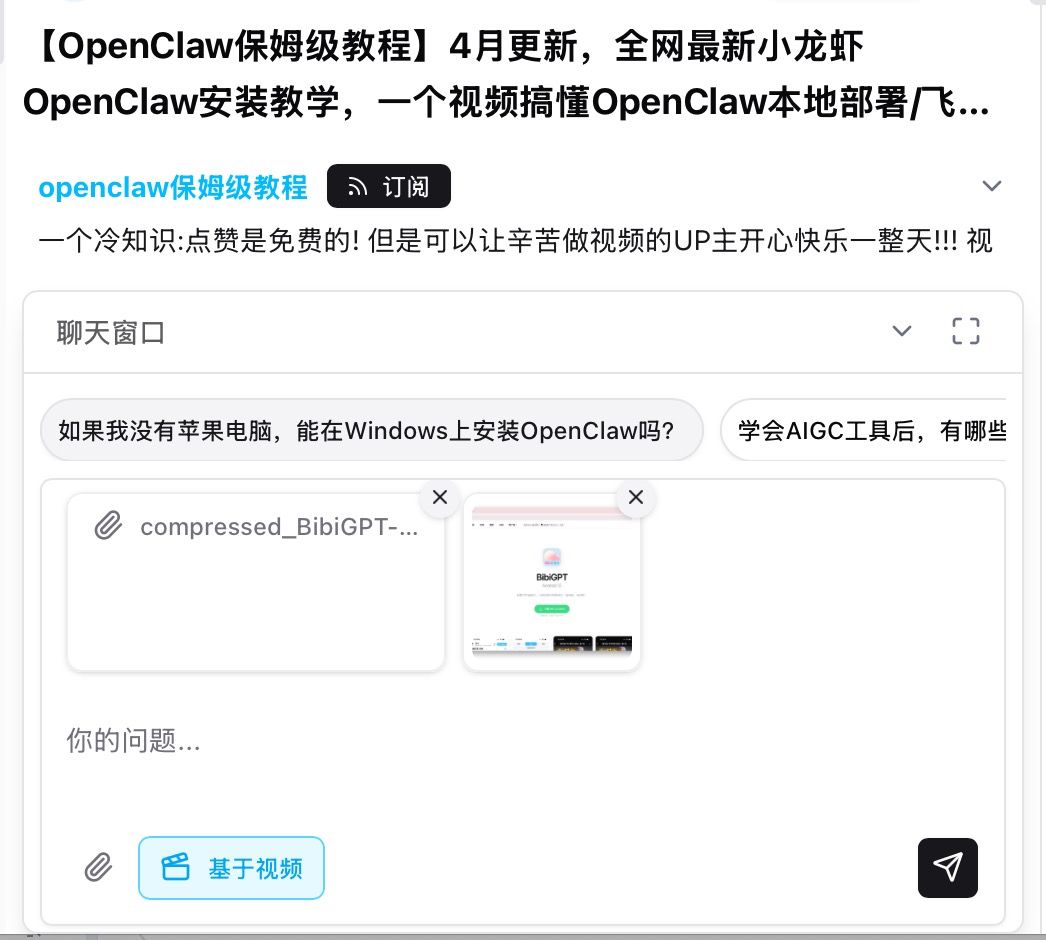
The chat window on a video page and follow-up chat under a custom summary both accept attachments. Tap the paperclip under the input to add images or documents to the current thread.
 ## Pain Point
When I chat about a video I often want to drop in a notes PDF, a spreadsheet, or a screenshot. I used to paste text only—tables and pictures were stuck outside the conversation.
## Key Features
* Works in the video chat window and in custom-summary follow-up
* Images: PNG / JPG / WebP / GIF and other `image/*`
* Documents: PDF, TXT, Markdown, CSV, DOCX, XLSX, PPTX
* Up to 10 files per send, 10MB each
* Cards sit above the input with a remove control; images show a thumbnail
* With Based on video on, answers use both the clip and your files
## Highlights
The thread is no longer limited to one video. Your handouts, tables, and screenshots can sit in the same context.
## Use Cases
* Ask about a step while the lecture PDF is attached
* Cross-check a spreadsheet against what the speaker said
* Paste a UI screenshot so the reply matches the screen you are editing
## Tips
* Chat attachments are images and documents only; upload video or audio from the main input
* Long file names are truncated in the card; the file itself is unchanged
## Related Features
***
**Related**: [Chat attachments](https://bibigpt.co/) — try it now
**Upgrade to Pro**: more chat and attachment quota → [Pricing](https://bibigpt.co/pricing)
## Pain Point
When I chat about a video I often want to drop in a notes PDF, a spreadsheet, or a screenshot. I used to paste text only—tables and pictures were stuck outside the conversation.
## Key Features
* Works in the video chat window and in custom-summary follow-up
* Images: PNG / JPG / WebP / GIF and other `image/*`
* Documents: PDF, TXT, Markdown, CSV, DOCX, XLSX, PPTX
* Up to 10 files per send, 10MB each
* Cards sit above the input with a remove control; images show a thumbnail
* With Based on video on, answers use both the clip and your files
## Highlights
The thread is no longer limited to one video. Your handouts, tables, and screenshots can sit in the same context.
## Use Cases
* Ask about a step while the lecture PDF is attached
* Cross-check a spreadsheet against what the speaker said
* Paste a UI screenshot so the reply matches the screen you are editing
## Tips
* Chat attachments are images and documents only; upload video or audio from the main input
* Long file names are truncated in the card; the file itself is unchanged
## Related Features
***
**Related**: [Chat attachments](https://bibigpt.co/) — try it now
**Upgrade to Pro**: more chat and attachment quota → [Pricing](https://bibigpt.co/pricing)