> ## Documentation Index
> Fetch the complete documentation index at: https://docs.bibigpt.co/llms.txt
> Use this file to discover all available pages before exploring further.
# Nested Collection Folders
> BibiGPT collections support nested folders with drag-and-drop. Group related collections into a multi-level structure instead of scrolling one long flat list.
## Overview
Collection folders in BibiGPT can nest: drag one folder onto another and it becomes a subfolder. Organize collections by topic the way you'd organize directories on your computer, instead of facing one endless flat list.
 ## Pain Point
"I've built up a lot of collections in BibiGPT, and the list is now long and completely flat — finding one takes forever. There was no way to group related topics together. I wanted several AI-related collections filed under one 'AI' parent, and it simply wasn't possible."
## Key Features
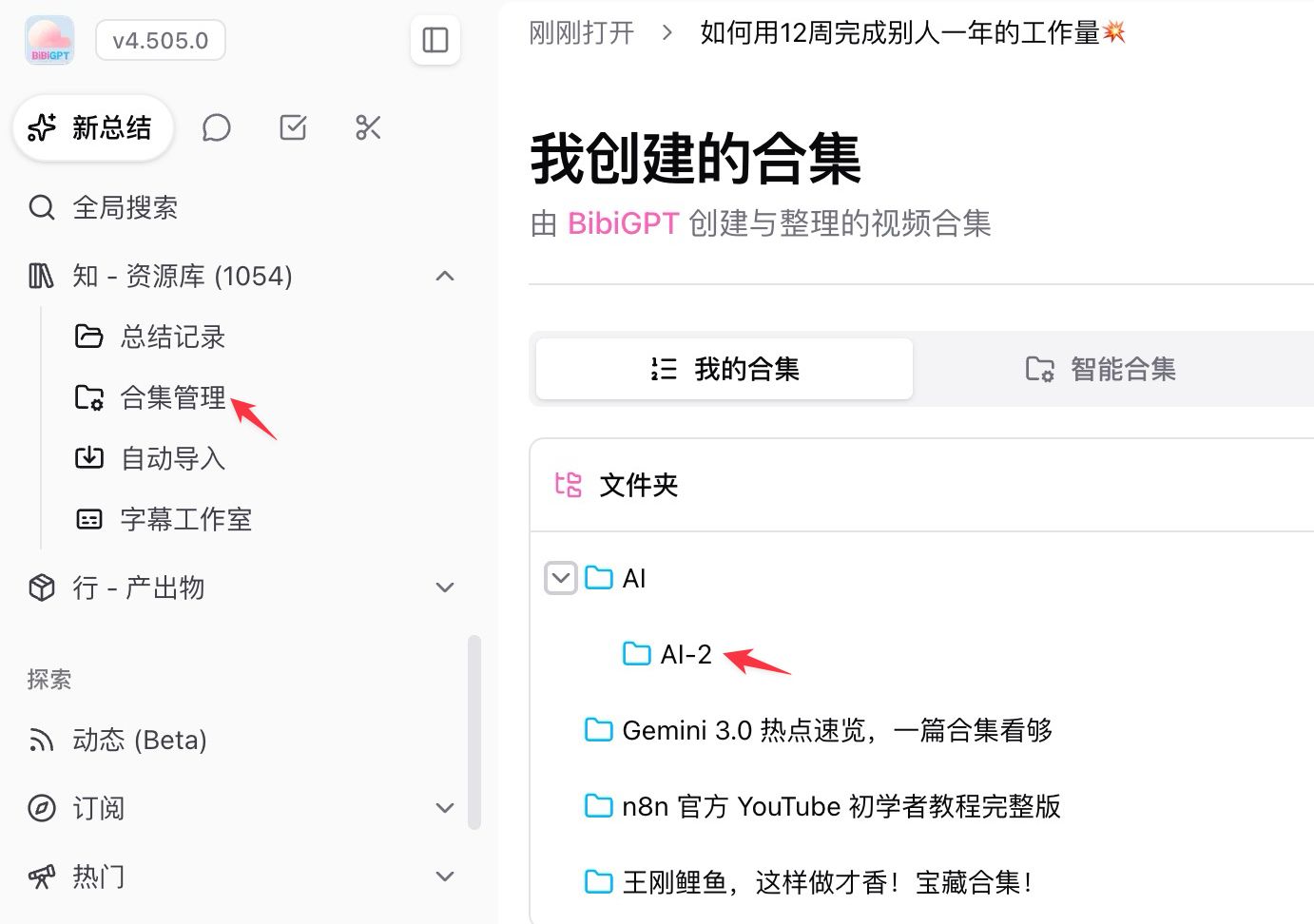
* **Drag to nest**: under Library > Collections > My Collections, drag one folder onto another to create a parent-child level; drag it onto the header to move it back to the top level
* **Menu fallback**: if dragging is awkward, use the row's **⋯ > Move to** menu to pick a destination directly
* **Tree view in the sidebar**: subfolders tuck into the parent's expandable area, collapsed by default. Parents that contain subfolders always show their expand arrow, so you can see at a glance where another level exists
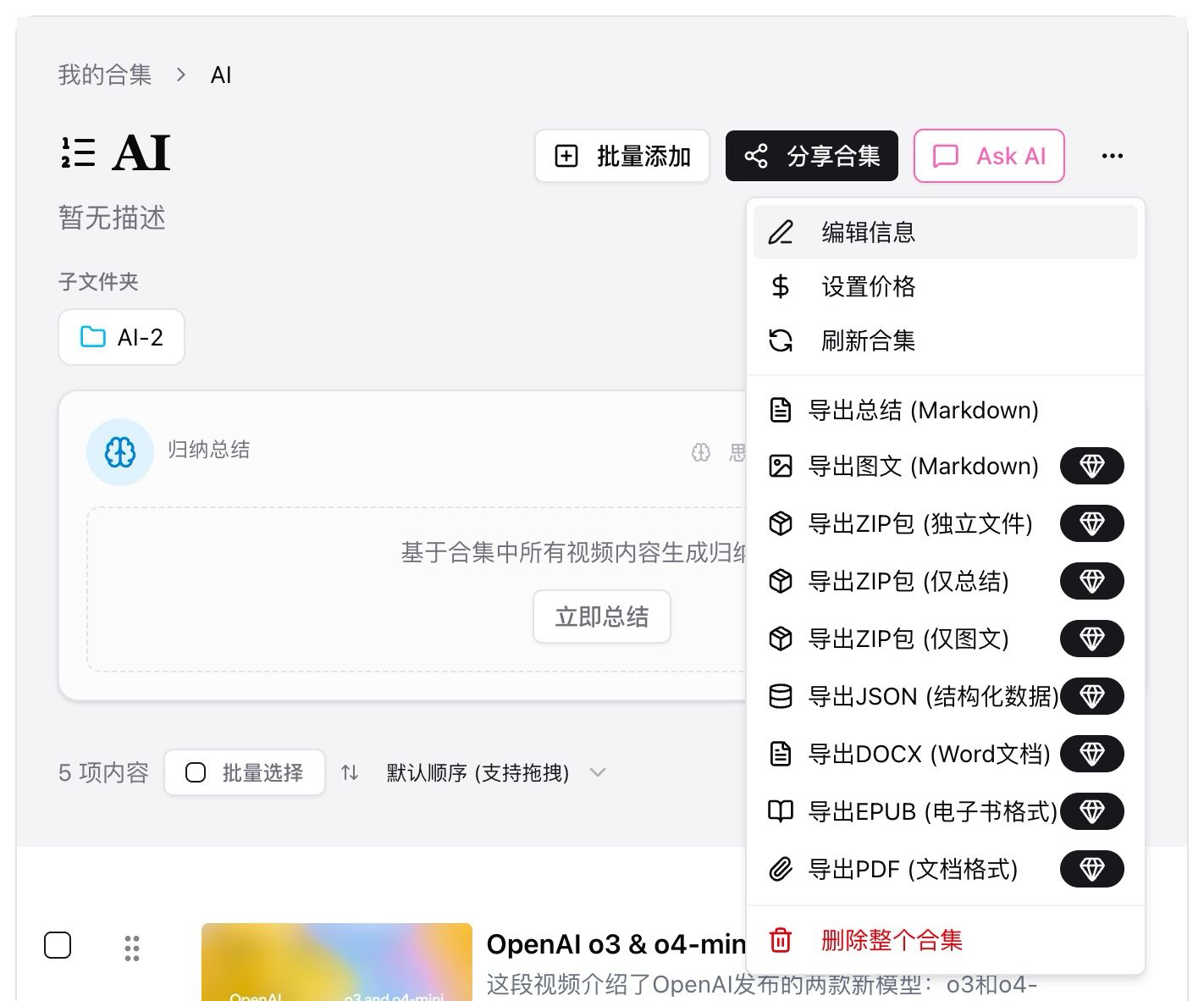
* **Two-way navigation on detail pages**: a multi-level breadcrumb at the top walks you back up, while the Subfolders section lists what sits below so you can keep drilling down
* **Everything else still works**: batch add, share collection, Ask AI, and collection-level export are unchanged
## Pain Point
"I've built up a lot of collections in BibiGPT, and the list is now long and completely flat — finding one takes forever. There was no way to group related topics together. I wanted several AI-related collections filed under one 'AI' parent, and it simply wasn't possible."
## Key Features
* **Drag to nest**: under Library > Collections > My Collections, drag one folder onto another to create a parent-child level; drag it onto the header to move it back to the top level
* **Menu fallback**: if dragging is awkward, use the row's **⋯ > Move to** menu to pick a destination directly
* **Tree view in the sidebar**: subfolders tuck into the parent's expandable area, collapsed by default. Parents that contain subfolders always show their expand arrow, so you can see at a glance where another level exists
* **Two-way navigation on detail pages**: a multi-level breadcrumb at the top walks you back up, while the Subfolders section lists what sits below so you can keep drilling down
* **Everything else still works**: batch add, share collection, Ask AI, and collection-level export are unchanged
 ## Highlights
Collections go from "a pile of boxes side by side" to "a directory you can expand level by level." The more collections you have, the more search time the structure saves.
## Use Cases
* Dozens of collections accumulated over time that need filing under broad themes such as AI, career, or language learning
* A course or series split into several sub-topics, with a parent collection on top and subfolders holding each part
* Long-term knowledge archiving that needs a stable folder structure so things stay findable later
## Tips
* Plan two or three top-level folders first, then drag existing collections in — faster than classifying as you go
* Keep frequently used collections at the top level and tuck the long tail into subfolders, balancing speed and tidiness
* Nesting goes five levels deep; going further prompts that the nesting is too deep — two or three levels is usually plenty
* If a parent collection has a dedicated summary prompt, subfolders do not inherit it; set it separately
* Multi-level structure is available on the web and desktop apps; the mobile app still shows collections as a flat list
## Related Features
## Highlights
Collections go from "a pile of boxes side by side" to "a directory you can expand level by level." The more collections you have, the more search time the structure saves.
## Use Cases
* Dozens of collections accumulated over time that need filing under broad themes such as AI, career, or language learning
* A course or series split into several sub-topics, with a parent collection on top and subfolders holding each part
* Long-term knowledge archiving that needs a stable folder structure so things stay findable later
## Tips
* Plan two or three top-level folders first, then drag existing collections in — faster than classifying as you go
* Keep frequently used collections at the top level and tuck the long tail into subfolders, balancing speed and tidiness
* Nesting goes five levels deep; going further prompts that the nesting is too deep — two or three levels is usually plenty
* If a parent collection has a dedicated summary prompt, subfolders do not inherit it; set it separately
* Multi-level structure is available on the web and desktop apps; the mobile app still shows collections as a flat list
## Related Features