> ## Documentation Index
> Fetch the complete documentation index at: https://docs.bibigpt.co/llms.txt
> Use this file to discover all available pages before exploring further.
# Custom Summary Pin to Top by Default
> Custom Summary Pin to Top by Default is one of the core features of BibiGPT. BibiGPT has launched the "" function to solve the pain point that users need to manually switch to a specific summary mode every time. Learn about feature highlights, applicable scenarios, and usage suggestions to improve learning and content processing efficiency.
## Feature Overview
BibiGPT has launched the "Custom Summary Pin to Top by Default" function, which solves the pain point that users need to manually switch to a specific summary mode every time. Users can now pin commonly used custom prompts (such as "Key Quote Extraction") by clicking the "Pin" icon in "New Summary" or "Preferences". After setting, when opening any video, the system will prioritize displaying the result of the custom summary by default, while retaining the original general summary as an option, greatly optimizing the user experience for users with specific reading habits.
Here is an example of the function interface:
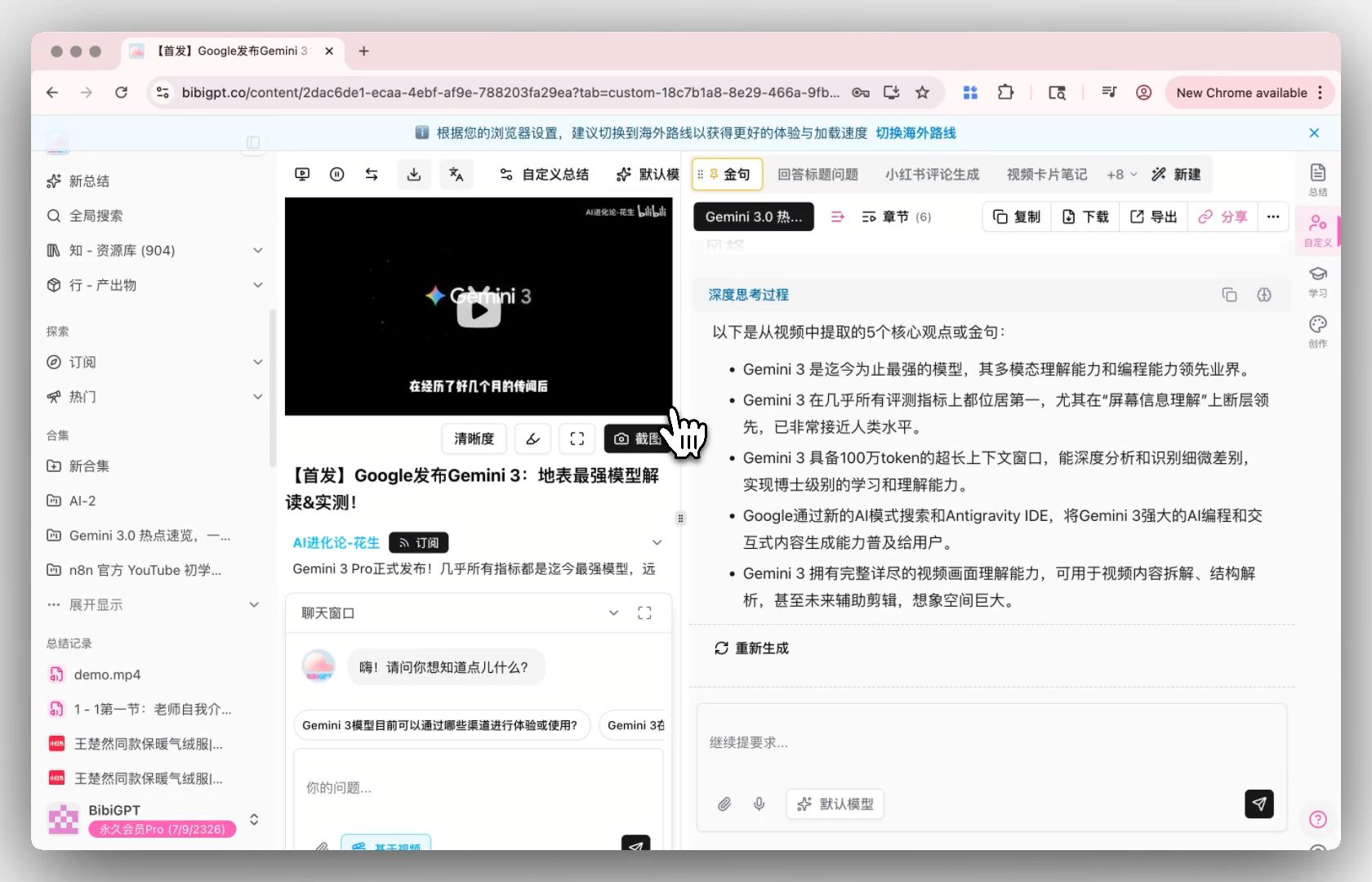
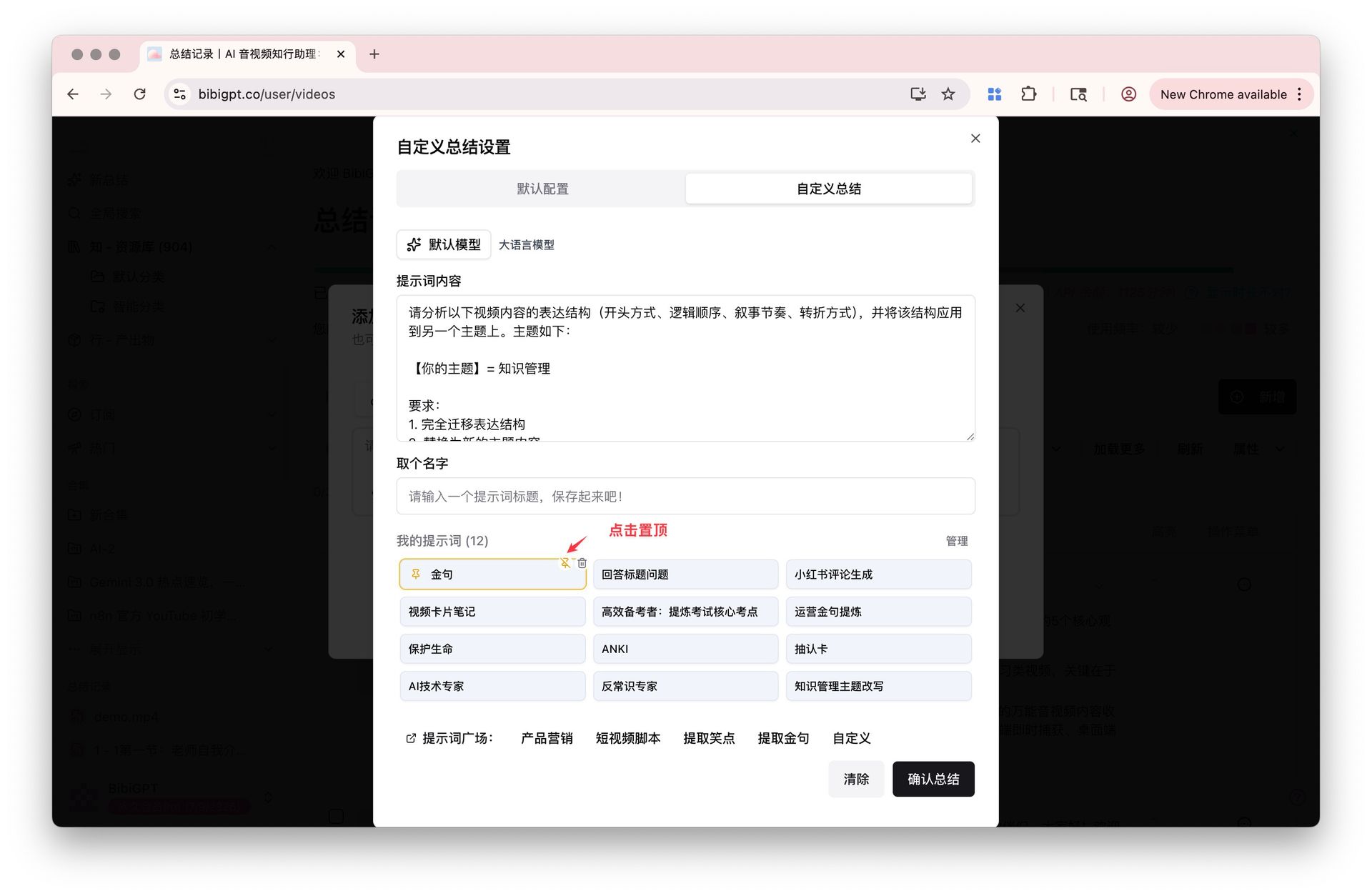 ## Solved Pain Points
"I have my own preferred summary method (for example, I only want to see 'key quotes' or 'core viewpoints'), but previously every time I opened a new video, I had to manually switch to that custom prompt, which was very troublesome and repetitive."
## Core Features
* BibiGPT has launched the "Custom Summary Pin to Top by Default" function, which solves the pain point that users need to manually switch to a specific summary mode every time.
* Users can now pin commonly used custom prompts (such as "Key Quote Extraction") by clicking the "Pin" icon in "New Summary" or "Preferences".
* After setting, when opening any video, the system will prioritize displaying the result of the custom summary by default, while retaining the original general summary as an option, greatly optimizing the user experience for users with specific reading habits.
* BibiGPT now allows users to "pin" specific prompts in "Custom Summary" as default options.
## Feature Highlights
BibiGPT now allows users to "pin" specific prompts in "Custom Summary" as default options. After setting, opening any video will directly summarize according to the logic of the prompt (such as directly generating key quotes), without manual switching, significantly improving personalized reading efficiency.
## Applicable Scenarios
* I have my own preferred summary method (for example, I only want to see 'key quotes' or 'core viewpoints'), but previously every time I opened a new video, I had to manually switch to that custom prompt, which was very troublesome and repetitive.
## Usage Suggestions
* After setting, opening any video will directly summarize according to the logic of the prompt (such as directly generating key quotes), without manual switching, significantly improving personalized reading efficiency.
## Related Features
## Solved Pain Points
"I have my own preferred summary method (for example, I only want to see 'key quotes' or 'core viewpoints'), but previously every time I opened a new video, I had to manually switch to that custom prompt, which was very troublesome and repetitive."
## Core Features
* BibiGPT has launched the "Custom Summary Pin to Top by Default" function, which solves the pain point that users need to manually switch to a specific summary mode every time.
* Users can now pin commonly used custom prompts (such as "Key Quote Extraction") by clicking the "Pin" icon in "New Summary" or "Preferences".
* After setting, when opening any video, the system will prioritize displaying the result of the custom summary by default, while retaining the original general summary as an option, greatly optimizing the user experience for users with specific reading habits.
* BibiGPT now allows users to "pin" specific prompts in "Custom Summary" as default options.
## Feature Highlights
BibiGPT now allows users to "pin" specific prompts in "Custom Summary" as default options. After setting, opening any video will directly summarize according to the logic of the prompt (such as directly generating key quotes), without manual switching, significantly improving personalized reading efficiency.
## Applicable Scenarios
* I have my own preferred summary method (for example, I only want to see 'key quotes' or 'core viewpoints'), but previously every time I opened a new video, I had to manually switch to that custom prompt, which was very troublesome and repetitive.
## Usage Suggestions
* After setting, opening any video will directly summarize according to the logic of the prompt (such as directly generating key quotes), without manual switching, significantly improving personalized reading efficiency.
## Related Features