> ## Documentation Index
> Fetch the complete documentation index at: https://docs.bibigpt.co/llms.txt
> Use this file to discover all available pages before exploring further.
# Multi-Audio/Video File Merged Summary
> Multi-Audio/Video File Merged Summary is one of the core features of BibiGPT. BibiGPT has launched the "" function, greatly optimizing the multi-file processing workflow. Learn about feature highlights, applicable scenarios, and usage suggestions to improve learning and content processing efficiency. Suitable for users who want to improve efficiency and reading experience to get started quickly.
## Feature Overview
BibiGPT has launched the "Multi-Audio/Video File Merged Summary" function, greatly optimizing the multi-file processing workflow. The main updates are as follows:
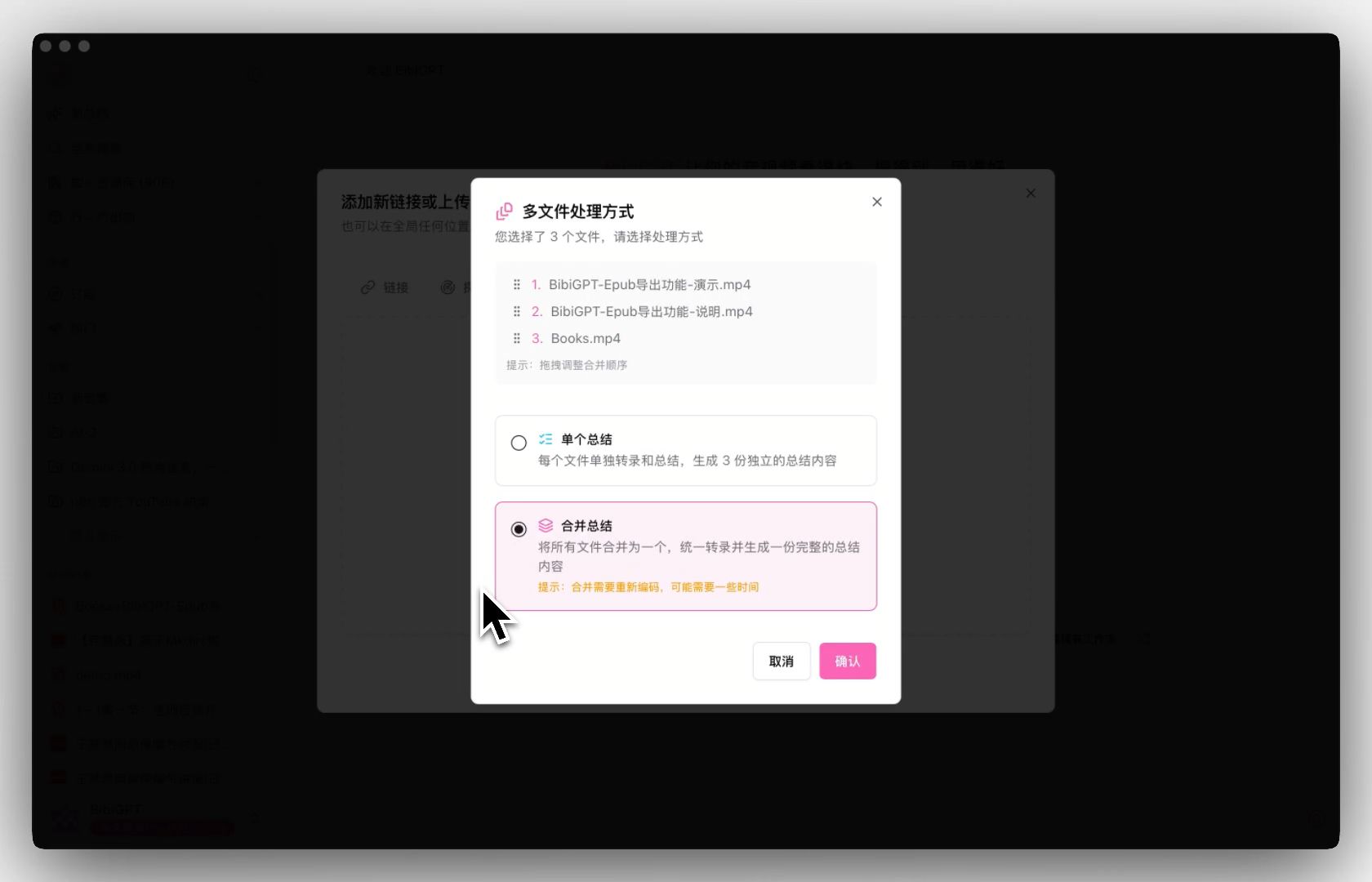
1. **Batch Upload and Mode Selection**: Supports uploading multiple audio/video files at once. Users can choose between "Single Summary" (generating independent summaries for each file) or "Merged Summary" mode.
2. **Free Sorting and Merging**: In Merged Summary mode, users can freely adjust the file order by dragging and dropping, and the system will merge them into a unified transcription stream.
3. **Unified Output**: Merged tasks will generate a complete video progress bar containing all segments, a coherent AI summary, and a merged transcript.
This function perfectly solves the pain points of users who need to process segmented videos (such as multi-part courses, meeting segments), making content organization more efficient and complete.
Here is an example of the function interface:
 ## Solved Pain Points
"I have several related video or audio segments (such as the first and second half of a course, or meetings recorded in segments). Every time I have to upload and summarize them separately, getting several independent notes, which feels very fragmented when reading. I hope to combine them directly to generate a complete summary."
## Core Features
* BibiGPT has launched the "Multi-Audio/Video File Merged Summary" function, greatly optimizing the multi-file processing workflow.
* Main updates:
* 1. **Batch Upload and Mode Selection**: Supports uploading multiple audio/video files at once; users choose between "Single Summary" or "Merged Summary" mode.
* 2. **Free Sorting and Merging**: In merging mode, users freely adjust file order via drag-and-drop; the system merges them into one unified transcription stream.
## Feature Highlights
BibiGPT added multi-file upload and processing features, allowing users to upload multiple audio/video files at once and providing a "Merged Summary" mode. Users can freely drag and drop to adjust file order, and the system automatically merges them into a unified transcription task, generating coherent, complete summary content and transcripts.
## Applicable Scenarios
* I have several related video or audio segments (such as the first and second half of a course, or meetings recorded in segments). Every time I have to upload and summarize them separately, getting several independent notes, which feels very fragmented when reading.
* I hope to combine them directly to generate a complete summary.
## Usage Suggestions
* Users can freely drag and drop to adjust file order, and the system automatically merges them into a unified transcription task, generating coherent, complete summary content and transcripts.
## Related Features
## Solved Pain Points
"I have several related video or audio segments (such as the first and second half of a course, or meetings recorded in segments). Every time I have to upload and summarize them separately, getting several independent notes, which feels very fragmented when reading. I hope to combine them directly to generate a complete summary."
## Core Features
* BibiGPT has launched the "Multi-Audio/Video File Merged Summary" function, greatly optimizing the multi-file processing workflow.
* Main updates:
* 1. **Batch Upload and Mode Selection**: Supports uploading multiple audio/video files at once; users choose between "Single Summary" or "Merged Summary" mode.
* 2. **Free Sorting and Merging**: In merging mode, users freely adjust file order via drag-and-drop; the system merges them into one unified transcription stream.
## Feature Highlights
BibiGPT added multi-file upload and processing features, allowing users to upload multiple audio/video files at once and providing a "Merged Summary" mode. Users can freely drag and drop to adjust file order, and the system automatically merges them into a unified transcription task, generating coherent, complete summary content and transcripts.
## Applicable Scenarios
* I have several related video or audio segments (such as the first and second half of a course, or meetings recorded in segments). Every time I have to upload and summarize them separately, getting several independent notes, which feels very fragmented when reading.
* I hope to combine them directly to generate a complete summary.
## Usage Suggestions
* Users can freely drag and drop to adjust file order, and the system automatically merges them into a unified transcription task, generating coherent, complete summary content and transcripts.
## Related Features