> ## Documentation Index
> Fetch the complete documentation index at: https://docs.bibigpt.co/llms.txt
> Use this file to discover all available pages before exploring further.
# OpenAI GPT-5 Model Support
> OpenAI GPT-5 Model Support is one of the core features of BibiGPT. BibiGPT has successfully integrated OpenAI's latest GPT-5 series models, including GPT-5 Chat, GPT-5 Mini, and GPT-5 Nano. Learn about feature highlights, applicable scenarios, and usage suggestions to improve learning and content processing efficiency.
## Feature Overview
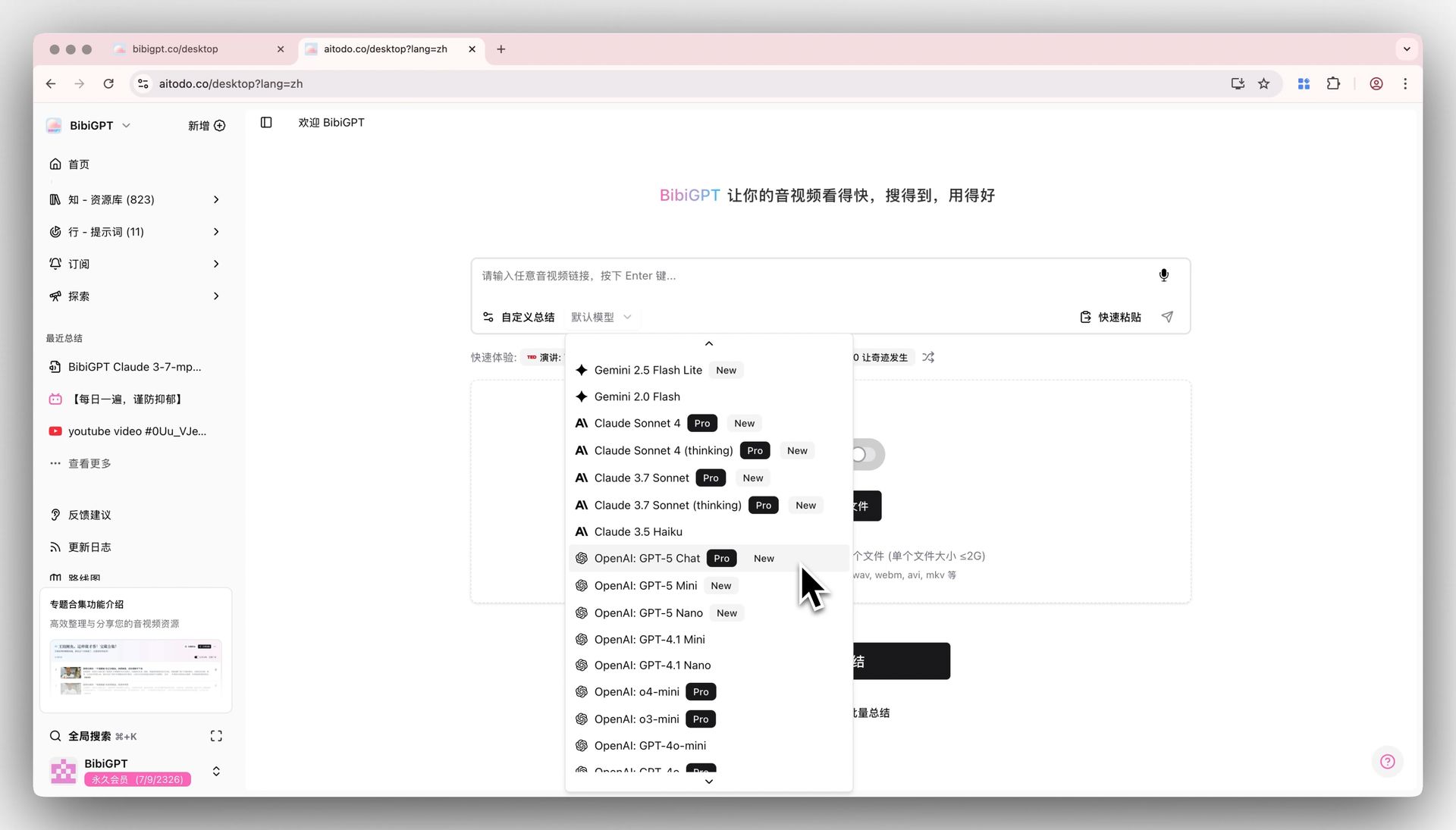
BibiGPT has successfully integrated OpenAI's latest GPT-5 series models, including GPT-5 Chat, GPT-5 Mini, and GPT-5 Nano. Users can now directly find and use these cutting-edge models in the model selection list to summarize audio and video content. Among them, GPT-5 Chat is exclusively available for paid members, while GPT-5 Mini and GPT-5 Nano are open to all registered users (can be experienced using free gifted time). This update allows users to immediately utilize the world's strongest AI to obtain higher quality summaries without waiting or complex configurations.
Here is an example of the function interface:
 ## Solved Pain Points
I heard that GPT-5 was released and want to use it immediately to summarize audio and video to see how good it is, but I don't know where to use it and don't want to mess with complex API settings.
## Core Features
* BibiGPT has successfully integrated OpenAI's latest GPT-5 series models, including GPT-5 Chat, GPT-5 Mini, and GPT-5 Nano.
* Users can now find and use these models directly in the model selection list.
* GPT-5 Chat is for paid members; GPT-5 Mini and GPT-5 Nano are open to all users.
* This update enables users to obtain higher quality summaries using the most powerful AI available.
## Feature Highlights
BibiGPT is among the first to connect to the latest OpenAI GPT-5 series models. Users simply select from the model list to immediately use GPT-5's powerful capabilities for one-click audio and video summarization, experiencing top-tier AI technology firsthand.
## Applicable Scenarios
* I heard that GPT-5 was released and want to use it immediately to summarize audio and video to see how good it is, but I don't know where to use it and don't want to mess with complex API settings.
## Usage Suggestions
* BibiGPT is among the first to connect to the latest OpenAI GPT-5 series models. Users simply select from the model list to immediately use GPT-5's powerful capabilities for one-click audio and video summarization, experiencing top-tier AI technology firsthand.
## Related Features
## Solved Pain Points
I heard that GPT-5 was released and want to use it immediately to summarize audio and video to see how good it is, but I don't know where to use it and don't want to mess with complex API settings.
## Core Features
* BibiGPT has successfully integrated OpenAI's latest GPT-5 series models, including GPT-5 Chat, GPT-5 Mini, and GPT-5 Nano.
* Users can now find and use these models directly in the model selection list.
* GPT-5 Chat is for paid members; GPT-5 Mini and GPT-5 Nano are open to all users.
* This update enables users to obtain higher quality summaries using the most powerful AI available.
## Feature Highlights
BibiGPT is among the first to connect to the latest OpenAI GPT-5 series models. Users simply select from the model list to immediately use GPT-5's powerful capabilities for one-click audio and video summarization, experiencing top-tier AI technology firsthand.
## Applicable Scenarios
* I heard that GPT-5 was released and want to use it immediately to summarize audio and video to see how good it is, but I don't know where to use it and don't want to mess with complex API settings.
## Usage Suggestions
* BibiGPT is among the first to connect to the latest OpenAI GPT-5 series models. Users simply select from the model list to immediately use GPT-5's powerful capabilities for one-click audio and video summarization, experiencing top-tier AI technology firsthand.
## Related Features