> ## Documentation Index
> Fetch the complete documentation index at: https://docs.bibigpt.co/llms.txt
> Use this file to discover all available pages before exploring further.
# Output List Collapse/Expand Optimization
> Output List Collapse/Expand Optimization is one of the core features of BibiGPT. This update optimizes the UI of the BibiGPT "Output" list. Learn about feature highlights, applicable scenarios, and usage suggestions to improve learning and content processing efficiency. Suitable for users who want to improve efficiency and reading experience to get started quickly.
## Feature Overview
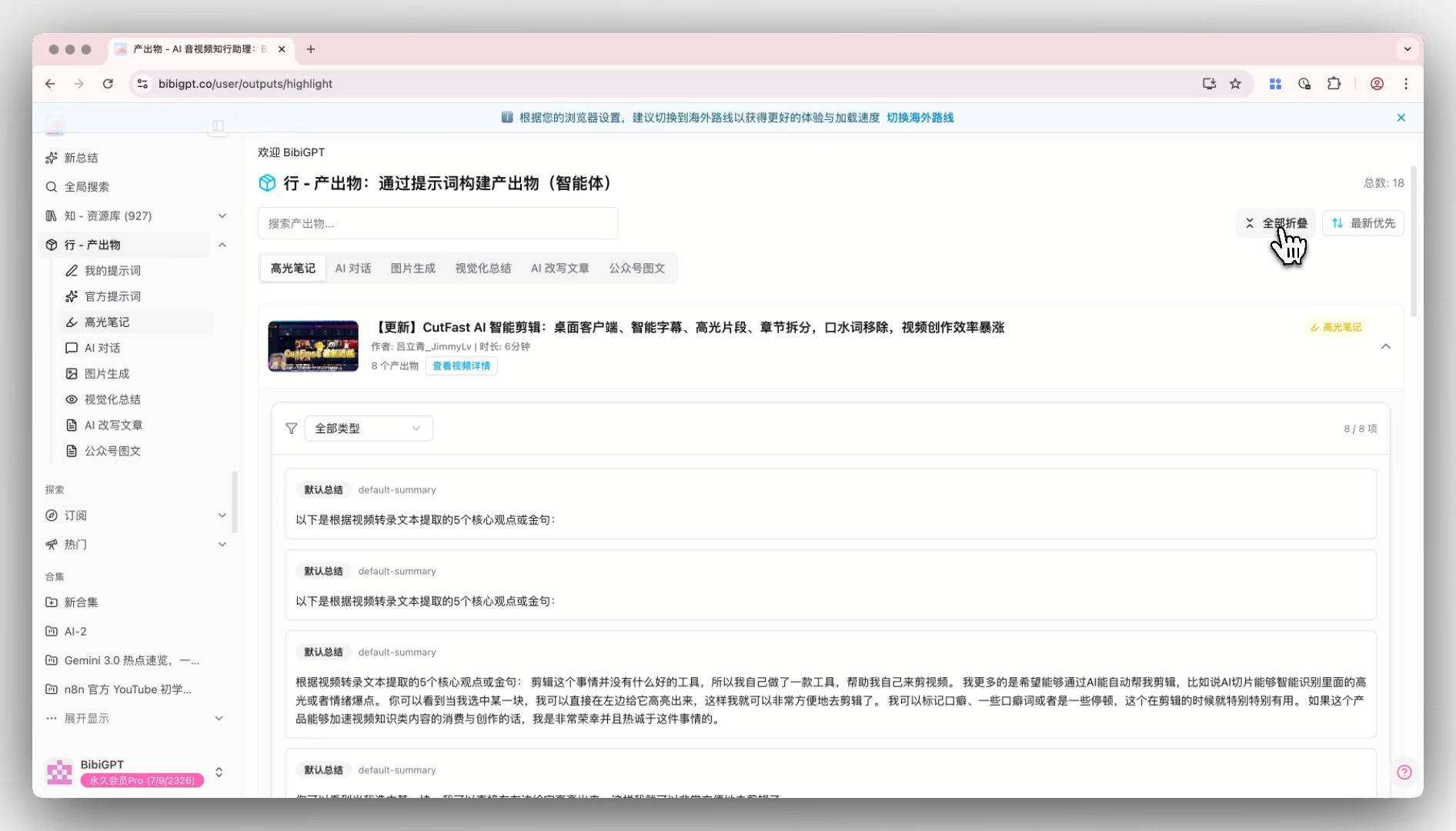
This update targets UI-level optimization for BibiGPT's "Output" list. To address the issue of excessively long pages caused by numerous output types (such as Highlight Notes, AI Rewritten Articles, Public Account Images, etc.), the system has added a module collapse function. Now, users can click the arrow in the upper right corner of each section to freely collapse or expand specific content areas. This allows users to more comfortably and efficiently locate the information they need when browsing multiple interactive outputs generated from audio and video.
Here is an example of the function interface:
 ## Solved Pain Points
"BibiGPT generates very rich output content (including Highlight Notes, AI Dialogue, Mind Maps, Public Account Images, etc.), resulting in a very long results page. Every time I want to browse specific content, I need to perform a lot of scrolling. The page looks cluttered and the browsing efficiency is not high."
## Core Features
* This update performs UI-level optimization for the "Output" list.
* A module collapse function has been added to solve the problem of pages being too long due to many output types.
* Users can click the arrow in the upper right corner of each section to freely collapse or expand specific areas.
* This helps users more comfortably and efficiently locate information when browsing multiple outputs.
## Feature Highlights
BibiGPT has upgraded the UI interaction of the "Output" list, adding "Collapse/Expand" functionality for each module (such as Highlight Notes, AI Dialogue, etc.). They are expanded by default, but users can collapse modules they are not interested in with one click, making the page layout cleaner and core output browsing more efficient.
## Applicable Scenarios
* BibiGPT generates very rich output content (including Highlight Notes, AI Dialogue, Mind Maps, Public Account Images, etc.), resulting in a very long results page.
* Every time I want to browse specific content, I need to perform a lot of scrolling. The page looks cluttered and the browsing efficiency is not high.
## Usage Suggestions
* Modules are expanded by default, but users can collapse those they are not interested in with one click, making the page layout cleaner and core output browsing more efficient.
## Related Features
## Solved Pain Points
"BibiGPT generates very rich output content (including Highlight Notes, AI Dialogue, Mind Maps, Public Account Images, etc.), resulting in a very long results page. Every time I want to browse specific content, I need to perform a lot of scrolling. The page looks cluttered and the browsing efficiency is not high."
## Core Features
* This update performs UI-level optimization for the "Output" list.
* A module collapse function has been added to solve the problem of pages being too long due to many output types.
* Users can click the arrow in the upper right corner of each section to freely collapse or expand specific areas.
* This helps users more comfortably and efficiently locate information when browsing multiple outputs.
## Feature Highlights
BibiGPT has upgraded the UI interaction of the "Output" list, adding "Collapse/Expand" functionality for each module (such as Highlight Notes, AI Dialogue, etc.). They are expanded by default, but users can collapse modules they are not interested in with one click, making the page layout cleaner and core output browsing more efficient.
## Applicable Scenarios
* BibiGPT generates very rich output content (including Highlight Notes, AI Dialogue, Mind Maps, Public Account Images, etc.), resulting in a very long results page.
* Every time I want to browse specific content, I need to perform a lot of scrolling. The page looks cluttered and the browsing efficiency is not high.
## Usage Suggestions
* Modules are expanded by default, but users can collapse those they are not interested in with one click, making the page layout cleaner and core output browsing more efficient.
## Related Features