> ## Documentation Index
> Fetch the complete documentation index at: https://docs.bibigpt.co/llms.txt
> Use this file to discover all available pages before exploring further.
# Smart Optimized Summary (Deep Summary Overview)
> Smart Optimized Summary (Deep Summary Overview) is one of the core features of BibiGPT. BibiGPT has majorly upgraded the default "Summary Overview" function, solving the problem of previous summary content being too simple. Learn about feature highlights, applicable scenarios, and usage suggestions to improve learning and content processing efficiency.
## Feature Overview
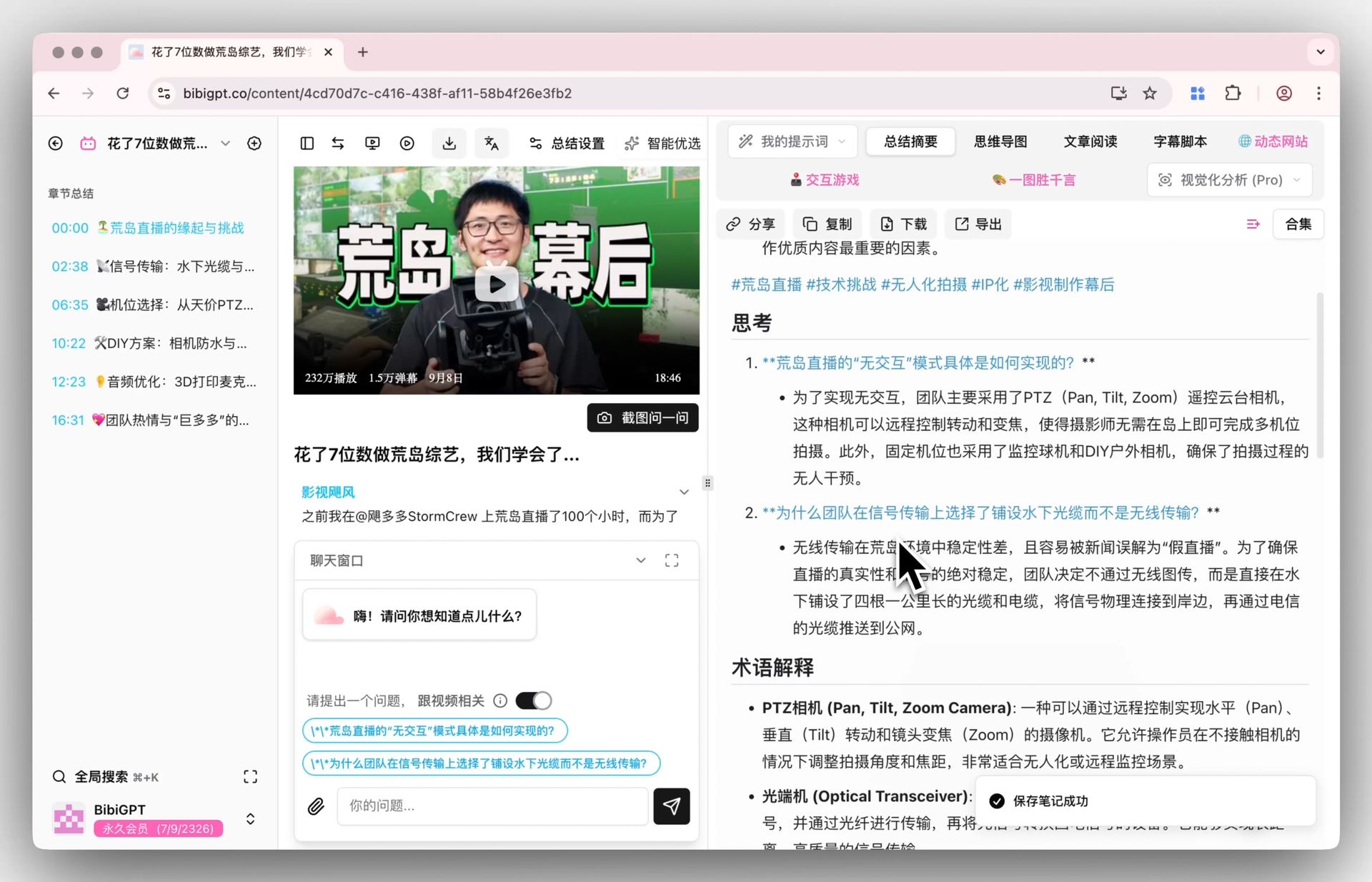
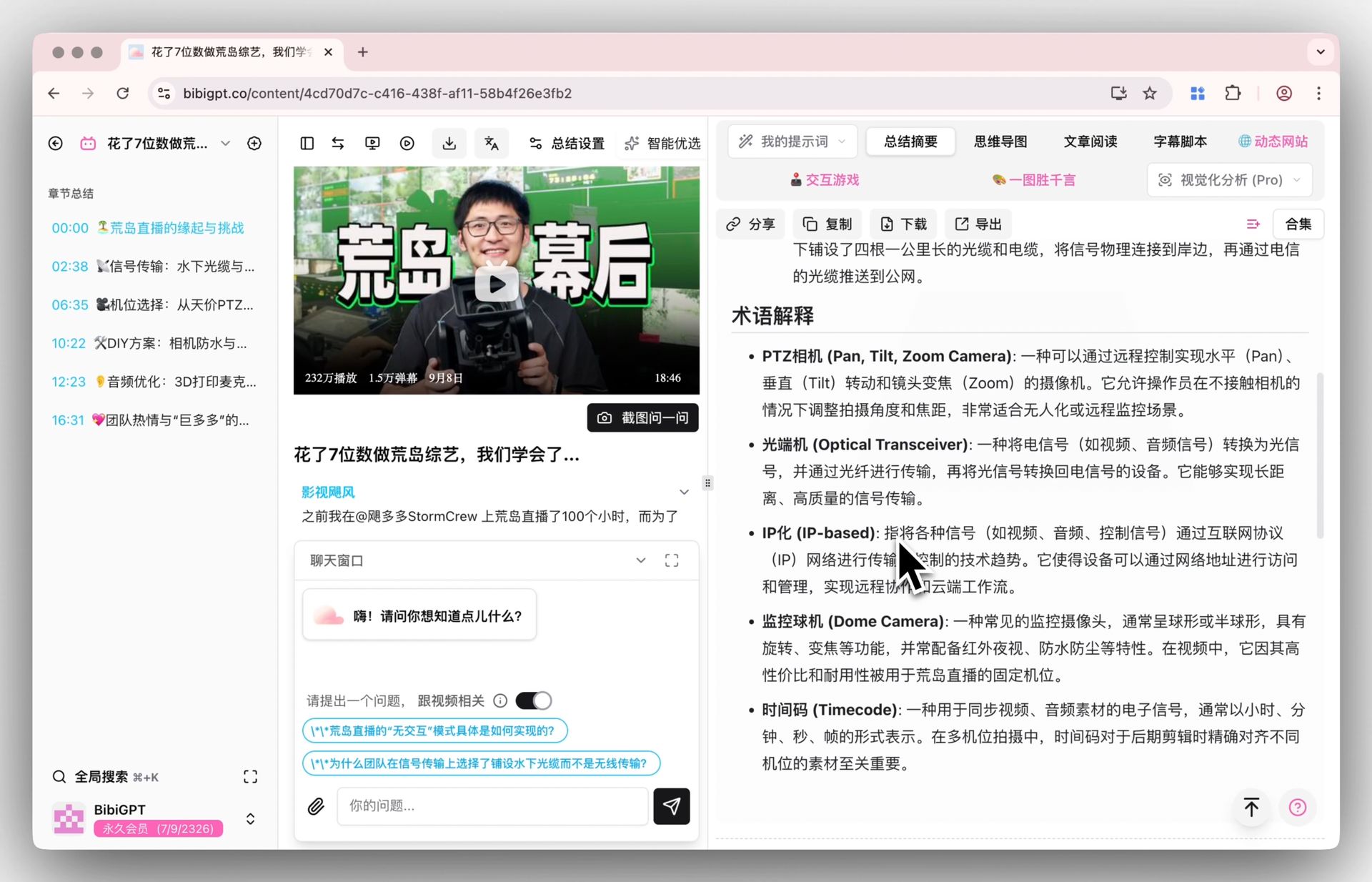
BibiGPT has majorly upgraded the default "Summary Overview" function, solving the problem of previous summary content being too simple. Through the brand new smart selection configuration, a structured report containing core summaries, highlights, deep thinking Q\&A, and key term explanations can now be generated with one click. This update allows users to obtain more detailed and enlightening video overviews without customizing prompts, greatly enhancing the first-time experience and content absorption efficiency.
Here is an example of the function interface:
 ## Solved Pain Points
I hope the video summaries generated by AI can be deeper and more detailed, not just a few simple sentences. The current default summaries are sometimes too brief, and I want to see richer analysis, such as key points, thinking questions, and even relevant term explanations, but I don't want to spend time writing complex custom prompts every time.
## Core Features
* BibiGPT has majorly upgraded the default "Summary Overview" function, solving the problem of previous summary content being too simple.
* Through the brand new smart selection configuration, a structured report containing core summaries, highlights, deep thinking Q\&A, and key term explanations can now be generated with one click.
* This update allows users to obtain more detailed and enlightening video overviews without customizing prompts.
* BibiGPT upgraded the default "Summary Overview" function. Through the brand new smart selection configuration, it can generate a structured deep summary containing core summaries, highlights, deep thinking Q\&A, and term explanations with one click, allowing users to obtain more detailed and enlightening content overviews without manually adjusting prompts.
## Feature Highlights
BibiGPT upgraded the default "Summary Overview" function. Through the brand new smart selection configuration, it can generate a structured deep summary containing core summaries, highlights, deep thinking Q\&A, and term explanations with one click, allowing users to obtain more detailed and enlightening content overviews without manually adjusting prompts.
## Applicable Scenarios
* I hope the video summaries generated by AI can be deeper and more detailed, not just a few simple sentences.
* The current default summaries are sometimes too brief, and I want to see richer analysis, such as key points, thinking questions, and even relevant term explanations, but I don't want to spend time writing complex custom prompts every time.
## Related Features
## Solved Pain Points
I hope the video summaries generated by AI can be deeper and more detailed, not just a few simple sentences. The current default summaries are sometimes too brief, and I want to see richer analysis, such as key points, thinking questions, and even relevant term explanations, but I don't want to spend time writing complex custom prompts every time.
## Core Features
* BibiGPT has majorly upgraded the default "Summary Overview" function, solving the problem of previous summary content being too simple.
* Through the brand new smart selection configuration, a structured report containing core summaries, highlights, deep thinking Q\&A, and key term explanations can now be generated with one click.
* This update allows users to obtain more detailed and enlightening video overviews without customizing prompts.
* BibiGPT upgraded the default "Summary Overview" function. Through the brand new smart selection configuration, it can generate a structured deep summary containing core summaries, highlights, deep thinking Q\&A, and term explanations with one click, allowing users to obtain more detailed and enlightening content overviews without manually adjusting prompts.
## Feature Highlights
BibiGPT upgraded the default "Summary Overview" function. Through the brand new smart selection configuration, it can generate a structured deep summary containing core summaries, highlights, deep thinking Q\&A, and term explanations with one click, allowing users to obtain more detailed and enlightening content overviews without manually adjusting prompts.
## Applicable Scenarios
* I hope the video summaries generated by AI can be deeper and more detailed, not just a few simple sentences.
* The current default summaries are sometimes too brief, and I want to see richer analysis, such as key points, thinking questions, and even relevant term explanations, but I don't want to spend time writing complex custom prompts every time.
## Related Features