> ## Documentation Index
> Fetch the complete documentation index at: https://docs.bibigpt.co/llms.txt
> Use this file to discover all available pages before exploring further.
# Enhanced Video Player
> Enhanced Video Player is one of the core features of BibiGPT. BibiGPT has enhanced its built-in video player, aiming to solve users' operational pain points when learning video content. Learn about feature highlights, applicable scenarios, and usage suggestions to improve learning and content processing efficiency.
## Feature Overview
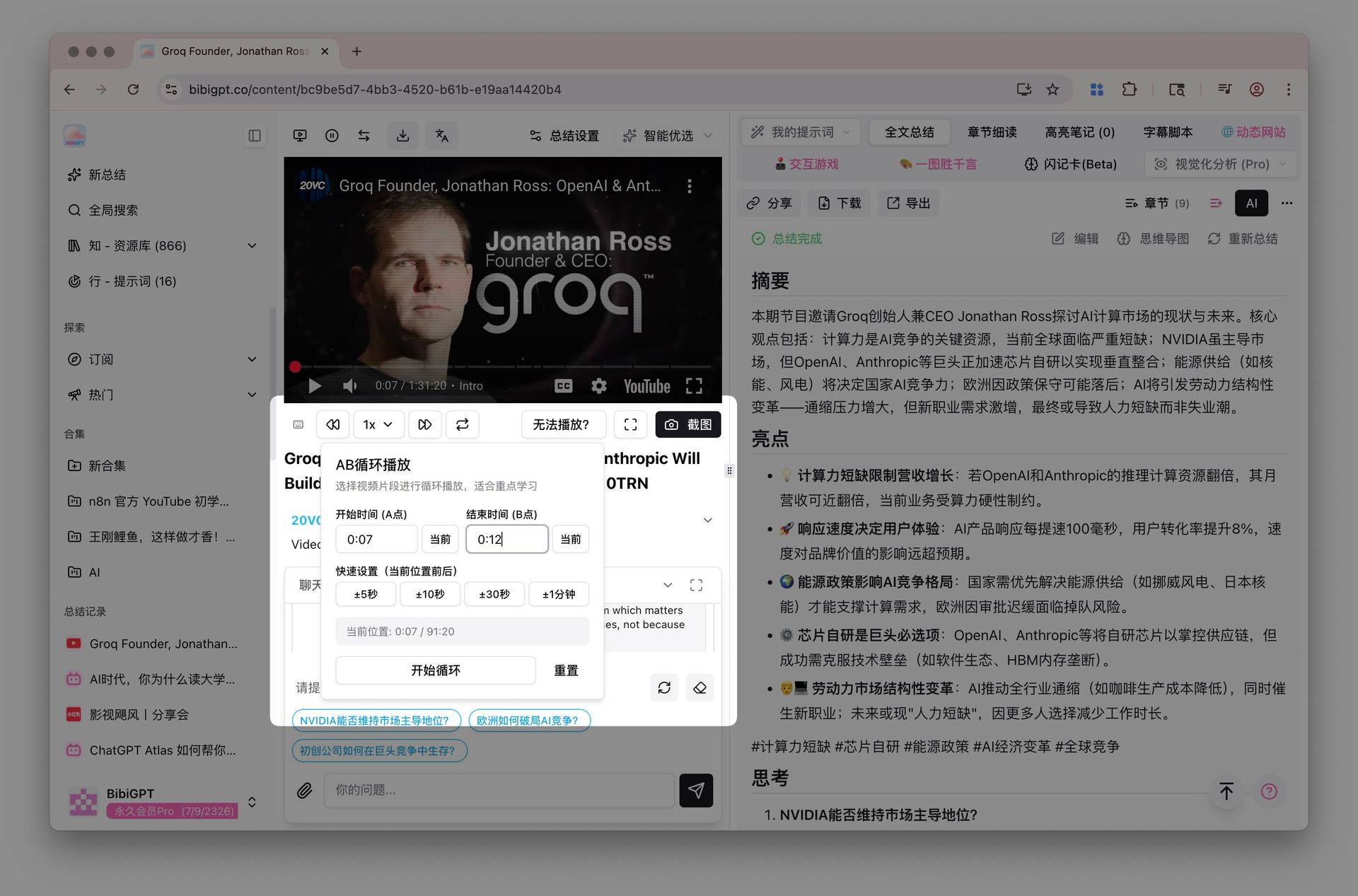
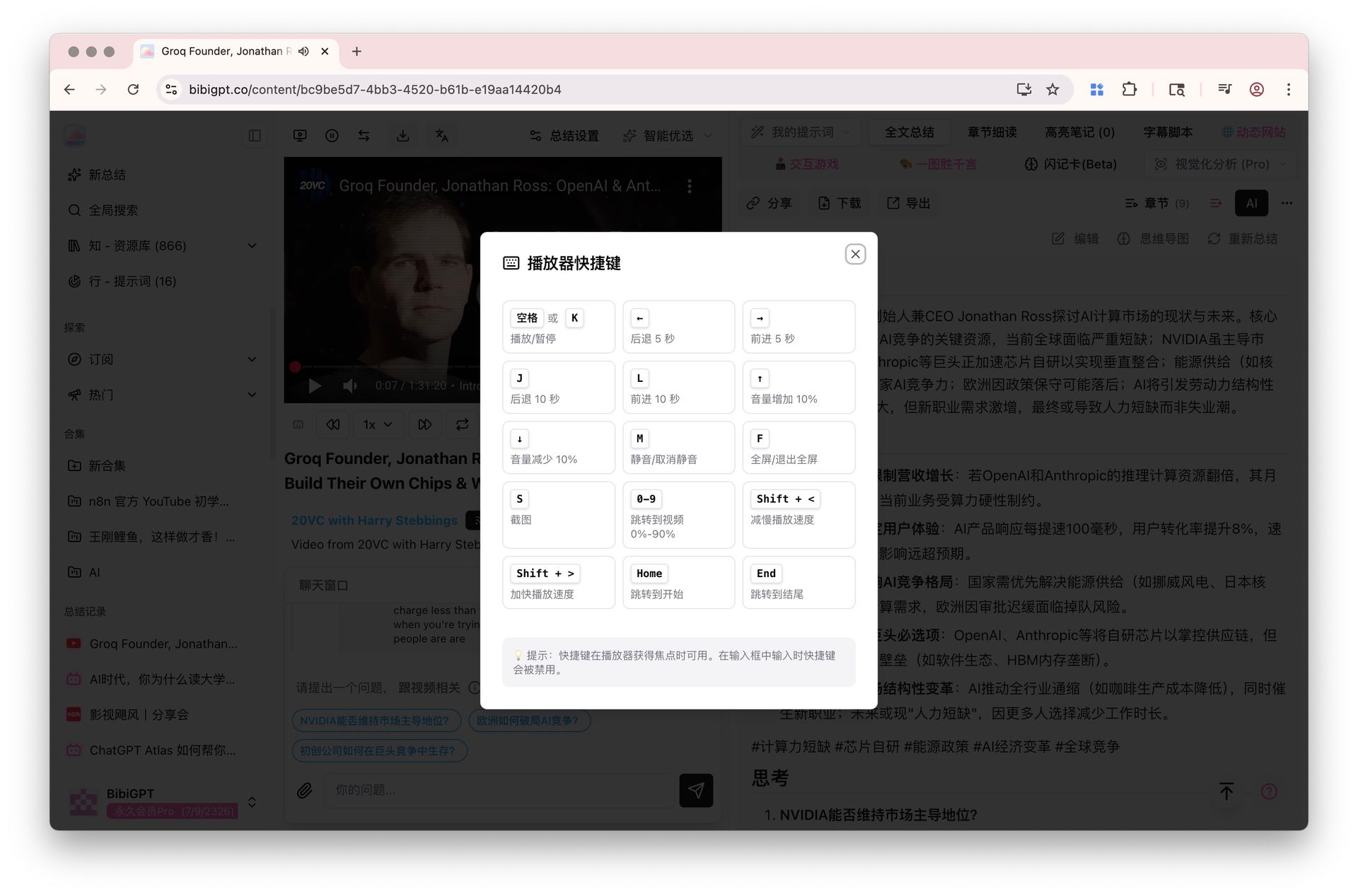
BibiGPT has enhanced its built-in video player, aimed at solving users' operational pain points when learning from video content. This update primarily includes two core functions: 1. **Keyboard Shortcuts**: Users can now use a series of shortcuts such as the space bar and arrow keys to control video play/pause, fast forward/rewind, volume, and playback speed, greatly improving operational efficiency. 2. **AB Loop Playback**: The new loop function allows users to precisely set a time period (point A to point B) for the player to repeatedly play that segment infinitely. This is very practical for users who need focused learning, shadowing, or understanding complex concepts. This function currently supports platforms like YouTube.
Here is an example of the function interface:
 ## Solved Pain Points
I want to be able to precisely repeat a certain key segment in a video to deepen understanding, or use shortcuts to efficiently control playback, but ordinary players are troublesome to operate, always dragging the progress bar back and forth.
## Core Features
* BibiGPT enhanced its built-in video player for better learning efficiency.
* 1. **Keyboard Shortcuts**: Control playback, volume, and speed using shortcuts like space and arrow keys.
* 2. **AB Loop Playback**: Define a specific segment (A to B) for infinite repetition.
* Highly useful for language learners, shadowing, or mastering complex topics.
## Feature Highlights
BibiGPT's enhanced video player provides rich keyboard shortcuts and AB loop playback functions, allowing you to easily control videos without a mouse and precisely repeat any key content for learning.
## Applicable Scenarios
* Language learning, concept mastery, or any situation requiring precise control and repetition of video segments.
## Related Features
## Solved Pain Points
I want to be able to precisely repeat a certain key segment in a video to deepen understanding, or use shortcuts to efficiently control playback, but ordinary players are troublesome to operate, always dragging the progress bar back and forth.
## Core Features
* BibiGPT enhanced its built-in video player for better learning efficiency.
* 1. **Keyboard Shortcuts**: Control playback, volume, and speed using shortcuts like space and arrow keys.
* 2. **AB Loop Playback**: Define a specific segment (A to B) for infinite repetition.
* Highly useful for language learners, shadowing, or mastering complex topics.
## Feature Highlights
BibiGPT's enhanced video player provides rich keyboard shortcuts and AB loop playback functions, allowing you to easily control videos without a mouse and precisely repeat any key content for learning.
## Applicable Scenarios
* Language learning, concept mastery, or any situation requiring precise control and repetition of video segments.
## Related Features