> ## Documentation Index
> Fetch the complete documentation index at: https://docs.bibigpt.co/llms.txt
> Use this file to discover all available pages before exploring further.
# New Sidebar Navigation and Content Organization
> New Sidebar Navigation and Content Organization is one of the core features of BibiGPT. BibiGPT recently updated its sidebar navigation for a cleaner interface and clearer organization. Learn about feature highlights, applicable scenarios, and usage suggestions to improve learning and content processing efficiency.
## Feature Overview
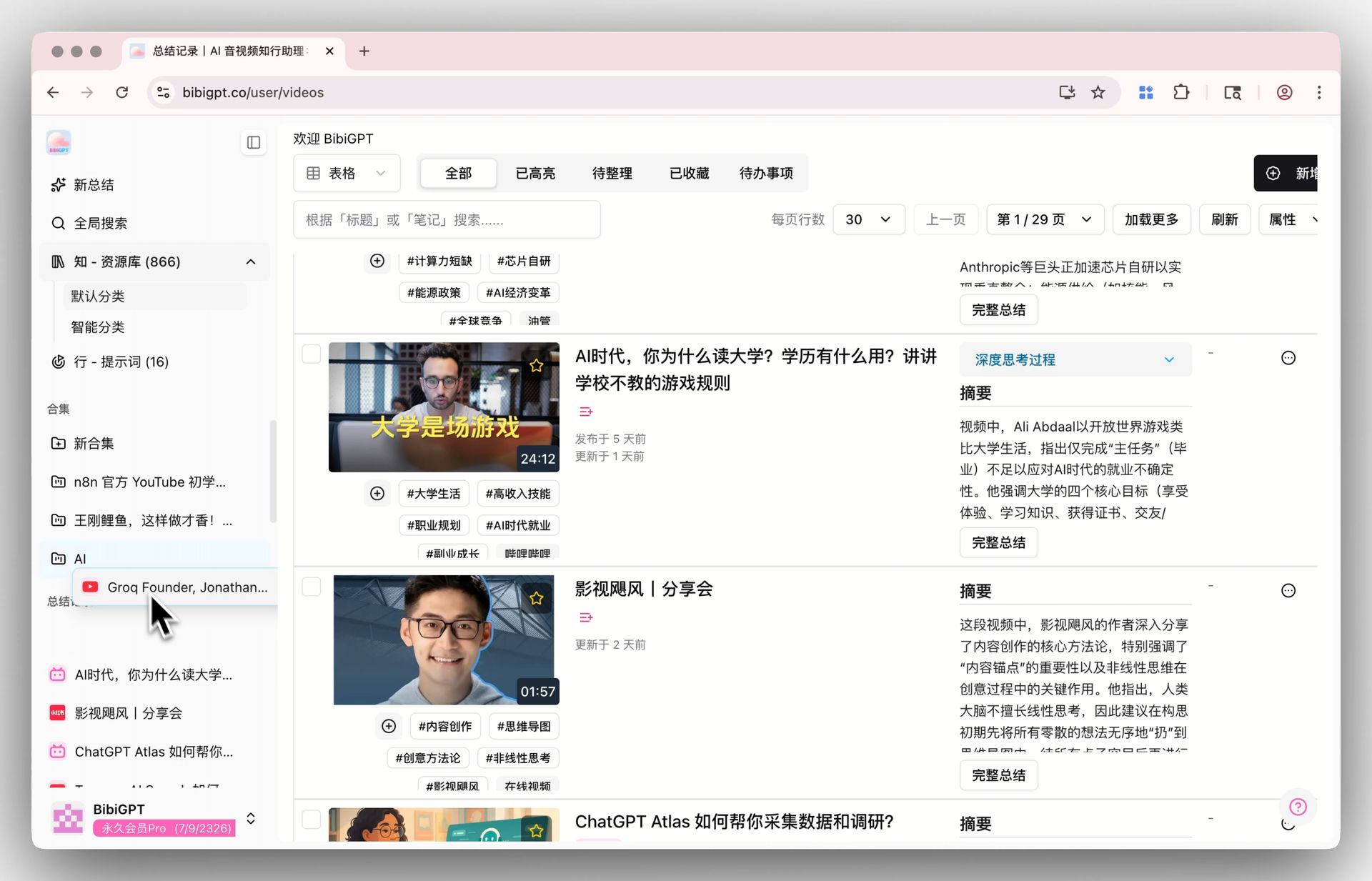
BibiGPT recently updated its sidebar navigation for a cleaner interface and clearer organization. The new sidebar integrates functions into core modules like "Know" (Knowledge Base), "Act" (Prompts), "Explore," and "Collections." The most important improvement is that users can now easily categorize any audio or video summary into a designated "Collection" through simple drag-and-drop operations from the infinitely scrolling "Summary Records" list. This move significantly simplifies the content management process, helping users efficiently build and maintain personalized knowledge bases. Even on detail pages, the fixed sidebar allows users to conveniently switch between different contents.
Here is an example of the function interface:
 ## Solved Pain Points
"I've summarized hundreds of audio and video clips with BibiGPT. Although they are all recorded, as the number increases, these contents start to become cluttered. Every time I want to find videos on a certain topic or group related summaries together, it feels very troublesome and the operation isn't intuitive enough."
## Core Features
* BibiGPT updated the sidebar navigation for a cleaner interface and clearer structure.
* Functions are integrated into modules like Knowledge Base, Prompts, Explore, and Collections.
* Supports drag-and-drop from the Summary Records list into specific Collections for easy organization.
* Simplifies content management, aiding users in efficiently building personalized knowledge bases.
## Feature Highlights
Through its brand new sidebar navigation design, BibiGPT clearly divides content into Knowledge Base, Collections, Explore, and other modules. By providing infinitely scrolling summary history and smooth drag-and-drop functionality, it allows you to easily categorize any summary record into custom collections—just like organizing desktop files—efficiently building your own audio/video knowledge base.
## Applicable Scenarios
* Organizing a large volume of summary records into logical groupings for easier retrieval and study.
## Related Features
## Solved Pain Points
"I've summarized hundreds of audio and video clips with BibiGPT. Although they are all recorded, as the number increases, these contents start to become cluttered. Every time I want to find videos on a certain topic or group related summaries together, it feels very troublesome and the operation isn't intuitive enough."
## Core Features
* BibiGPT updated the sidebar navigation for a cleaner interface and clearer structure.
* Functions are integrated into modules like Knowledge Base, Prompts, Explore, and Collections.
* Supports drag-and-drop from the Summary Records list into specific Collections for easy organization.
* Simplifies content management, aiding users in efficiently building personalized knowledge bases.
## Feature Highlights
Through its brand new sidebar navigation design, BibiGPT clearly divides content into Knowledge Base, Collections, Explore, and other modules. By providing infinitely scrolling summary history and smooth drag-and-drop functionality, it allows you to easily categorize any summary record into custom collections—just like organizing desktop files—efficiently building your own audio/video knowledge base.
## Applicable Scenarios
* Organizing a large volume of summary records into logical groupings for easier retrieval and study.
## Related Features