> ## Documentation Index
> Fetch the complete documentation index at: https://docs.bibigpt.co/llms.txt
> Use this file to discover all available pages before exploring further.
# Video Detail Page Sidebar Grouping Optimization
> Video Detail Page Sidebar Grouping Optimization is one of the core features of BibiGPT. BibiGPT has updated the right sidebar UI of the video detail page, solving the clutter caused by too many stacked function tabs. Learn about feature highlights, applicable scenarios, and usage suggestions to improve learning and content processing efficiency.
## Feature Overview
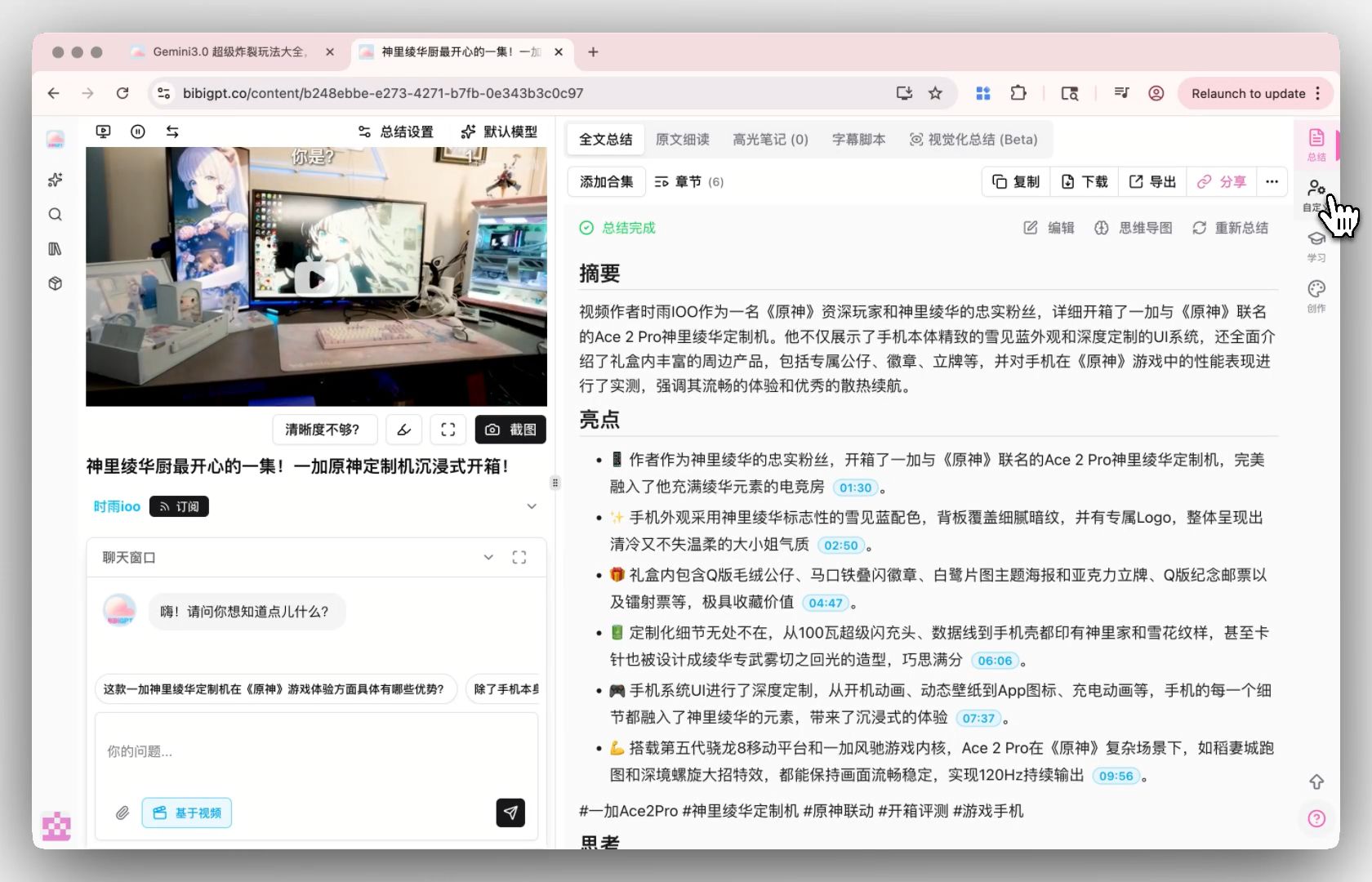
BibiGPT has updated the right sidebar UI of the video detail page, solving the problem of clutter caused by too many stacked function tabs. The new sidebar clearly divides functions into four groups: **Summary** (including overview, notes, etc.), **Custom** (supporting user drag-and-drop to sort tabs), **Learning** (including flashcards, PPT, etc.), and **Output** (including creation tools like Xiaohongshu and podcasts). Additionally, a convenient "Back to Top" button has been added. This update significantly improves interface cleanliness and makes function discovery and usage logic much clearer for users.
Here is an example of the function interface:
 ## Solved Pain Points
"As BibiGPT's functions become increasingly rich, the tab bar on the right side of the detail page became very long and cluttered. It was hard for me to quickly find specific functions (like flashcards or article generation) in this massive stack of buttons, and visually it felt very crowded, affecting my user experience."
## Core Features
* BibiGPT updated the right sidebar UI of the video detail page to address tab stacking.
* Functions are now clearly divided into four groups: Summary, Custom, Learning, and Output.
* Supports user-defined tab sorting via drag-and-drop.
* Includes a "Back to Top" button and improved overall interface cleanliness.
## Feature Highlights
BibiGPT has undergone a complete UI reconstruction and grouping of the right sidebar on the detail page, dividing numerous functions into four clear dimensions: "Summary (Overview), Custom, Learning, and Output," and supporting user custom sorting via drag-and-drop. This not only solves interface crowding but also allows users with different needs (learners vs. creators) to focus more on relevant tools.
## Applicable Scenarios
* Efficiently navigating and personalizing access to BibiGPT's expanding range of tools on the summary detail page.
## Usage Suggestions
* BibiGPT has undergone a complete UI reconstruction and grouping of the right sidebar on the detail page, dividing numerous functions into four clear dimensions: "Summary (Overview), Custom, Learning, and Output," and supporting user custom sorting via drag-and-drop.
## Related Features
## Solved Pain Points
"As BibiGPT's functions become increasingly rich, the tab bar on the right side of the detail page became very long and cluttered. It was hard for me to quickly find specific functions (like flashcards or article generation) in this massive stack of buttons, and visually it felt very crowded, affecting my user experience."
## Core Features
* BibiGPT updated the right sidebar UI of the video detail page to address tab stacking.
* Functions are now clearly divided into four groups: Summary, Custom, Learning, and Output.
* Supports user-defined tab sorting via drag-and-drop.
* Includes a "Back to Top" button and improved overall interface cleanliness.
## Feature Highlights
BibiGPT has undergone a complete UI reconstruction and grouping of the right sidebar on the detail page, dividing numerous functions into four clear dimensions: "Summary (Overview), Custom, Learning, and Output," and supporting user custom sorting via drag-and-drop. This not only solves interface crowding but also allows users with different needs (learners vs. creators) to focus more on relevant tools.
## Applicable Scenarios
* Efficiently navigating and personalizing access to BibiGPT's expanding range of tools on the summary detail page.
## Usage Suggestions
* BibiGPT has undergone a complete UI reconstruction and grouping of the right sidebar on the detail page, dividing numerous functions into four clear dimensions: "Summary (Overview), Custom, Learning, and Output," and supporting user custom sorting via drag-and-drop.
## Related Features