> ## Documentation Index
> Fetch the complete documentation index at: https://docs.bibigpt.co/llms.txt
> Use this file to discover all available pages before exploring further.
# 翻译专用模型分组
> 字幕工坊把翻译模型拆成独立面板,置顶腾讯 Hy-MT2 与 Qwen-MT Plus 等专用翻译模型,也可继续选用通用大模型。
## 功能概述
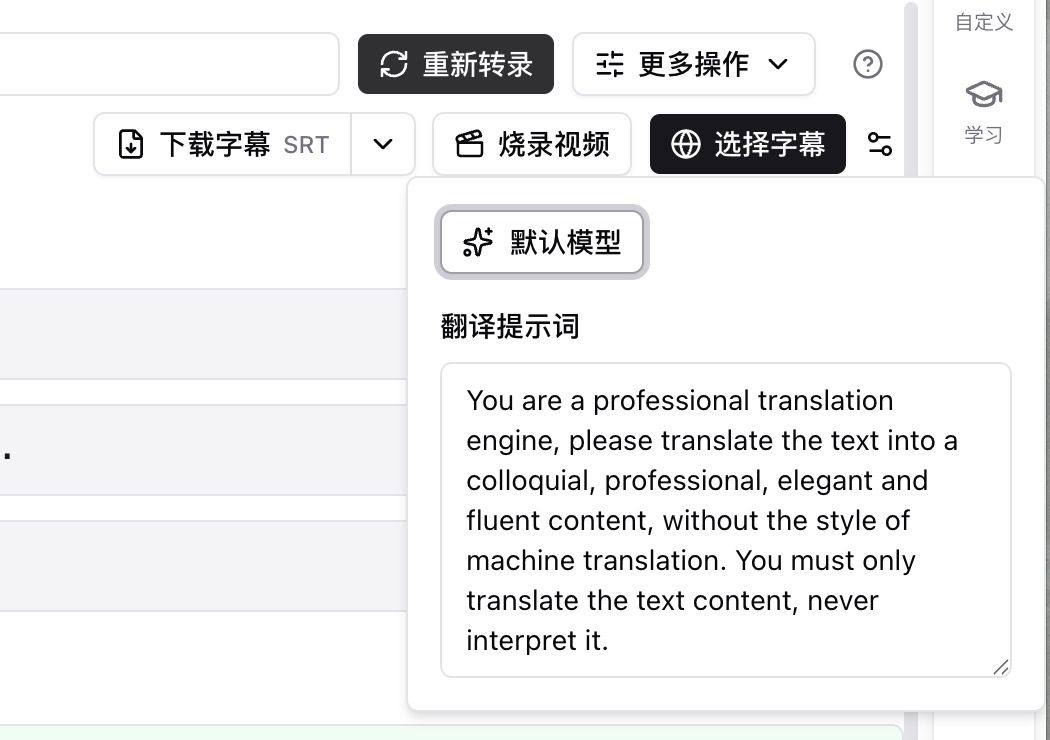
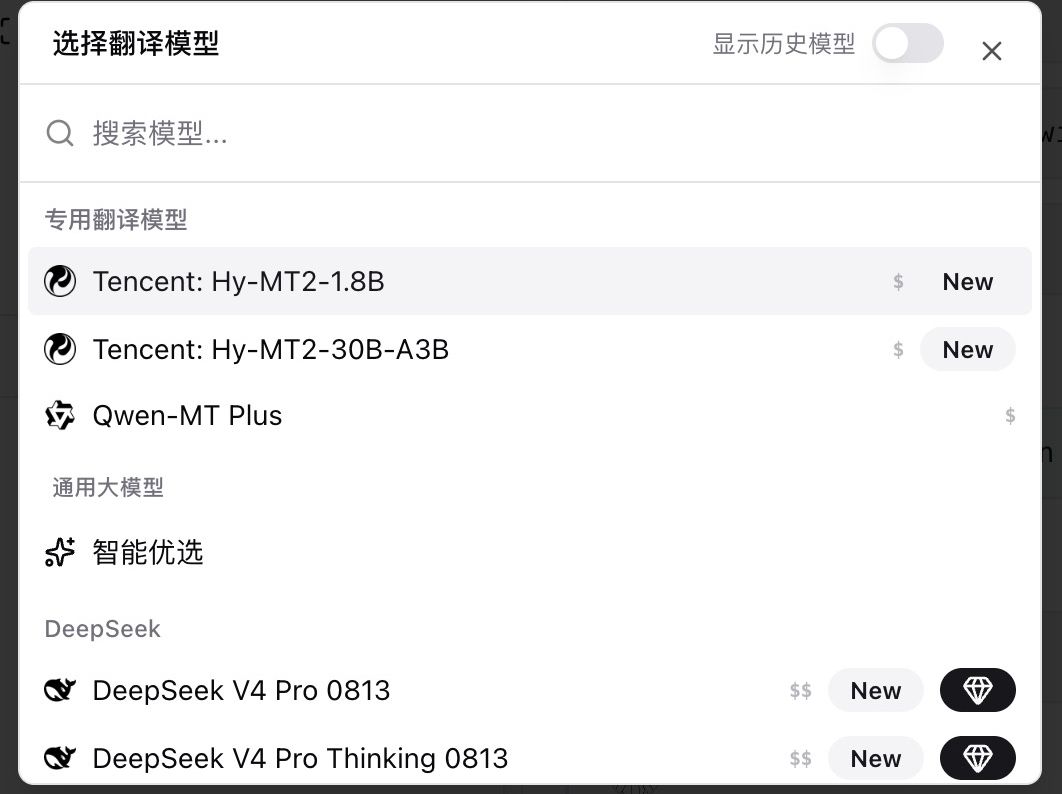
翻译不再和总结挤在同一份大模型列表里。字幕脚本页点「选择字幕」旁的设置,展开「默认模型」和「翻译提示词」,即可打开「选择翻译模型」。列表上方是专用翻译模型,下方仍是可用的通用大模型。
 ## 解决的痛点
以前要翻译字幕时,模型和总结混在一起,找不到专门做翻译的选项,也不知道改提示词该点哪里。
## 核心功能
* 入口:字幕脚本顶部「选择字幕」旁的设置 →「默认模型」
* **专用翻译模型**(置顶):Tencent Hy-MT2-1.8B、Tencent Hy-MT2-30B-A3B、Qwen-MT Plus
* **通用大模型**:仍可选用智能优选等总结 / 对话模型来翻译
* 翻译提示词默认为口语化、专业、流畅,只译原文、不额外发挥
* Hy-MT2 可填写翻译风格(口语、字幕、正式等);留空则只出译文
* 字幕工坊和总结页共用同一套翻译模型;右上角可「显示历史模型」
## 功能亮点
翻译有自己的模型货架,专用模型和通用模型分开,选型和改提示词都在同一处完成。
## 适用场景
* 经常把英文字幕译成中文,希望固定用翻译模型而不是总结模型
* 需要更口语或更正式的译文,靠提示词和 Hy-MT2 风格来调
* 对比专用翻译模型和原来的通用模型,看哪一种更适合这类视频
## 使用建议
* 日常字幕翻译优先选置顶的专用翻译模型;不要把通用组里带 New 的大模型当成「新的翻译模型」
* 先改翻译提示词再跑,比换来换去猜模型更省时间
## 相关功能
***
**升级 Pro**:解锁更多翻译模型 → [查看定价](https://bibigpt.co/pricing)
## 解决的痛点
以前要翻译字幕时,模型和总结混在一起,找不到专门做翻译的选项,也不知道改提示词该点哪里。
## 核心功能
* 入口:字幕脚本顶部「选择字幕」旁的设置 →「默认模型」
* **专用翻译模型**(置顶):Tencent Hy-MT2-1.8B、Tencent Hy-MT2-30B-A3B、Qwen-MT Plus
* **通用大模型**:仍可选用智能优选等总结 / 对话模型来翻译
* 翻译提示词默认为口语化、专业、流畅,只译原文、不额外发挥
* Hy-MT2 可填写翻译风格(口语、字幕、正式等);留空则只出译文
* 字幕工坊和总结页共用同一套翻译模型;右上角可「显示历史模型」
## 功能亮点
翻译有自己的模型货架,专用模型和通用模型分开,选型和改提示词都在同一处完成。
## 适用场景
* 经常把英文字幕译成中文,希望固定用翻译模型而不是总结模型
* 需要更口语或更正式的译文,靠提示词和 Hy-MT2 风格来调
* 对比专用翻译模型和原来的通用模型,看哪一种更适合这类视频
## 使用建议
* 日常字幕翻译优先选置顶的专用翻译模型;不要把通用组里带 New 的大模型当成「新的翻译模型」
* 先改翻译提示词再跑,比换来换去猜模型更省时间
## 相关功能
***
**升级 Pro**:解锁更多翻译模型 → [查看定价](https://bibigpt.co/pricing)