> ## Documentation Index
> Fetch the complete documentation index at: https://docs.bibigpt.co/llms.txt
> Use this file to discover all available pages before exploring further.
# はじめに
> [BibiGPT.co](https://bibigpt.co) APIエンドポイントを紹介するセクション例
BibiGPTのAPIは現在ベータ版です。ご質問やフィードバックがございましたら、[hi@bibigpt.co](mailto:hi@bibigpt.co?subject=BibiGPT.co%20API%20Feedback)までご連絡ください。
ヒント:製品体験を最適化しており、APIサービスはまだ公式サイトと完全に一致していない場合があります。ご理解とご支援に感謝します!ご質問やフィードバックがございましたら、[hi@bibigpt.co](mailto:hi@bibigpt.co?subject=BibiGPT.co%20API%20Feedback)までご連絡ください。
# BibiGPT オープンAPI (ベータ版)
信頼できる唯一の情報源:OpenAPIスキーマを直接表示 [https://api.bibigpt.co/api/openapi.json](https://api.bibigpt.co/api/openapi.json)
## 1. 専用APIトークンの取得
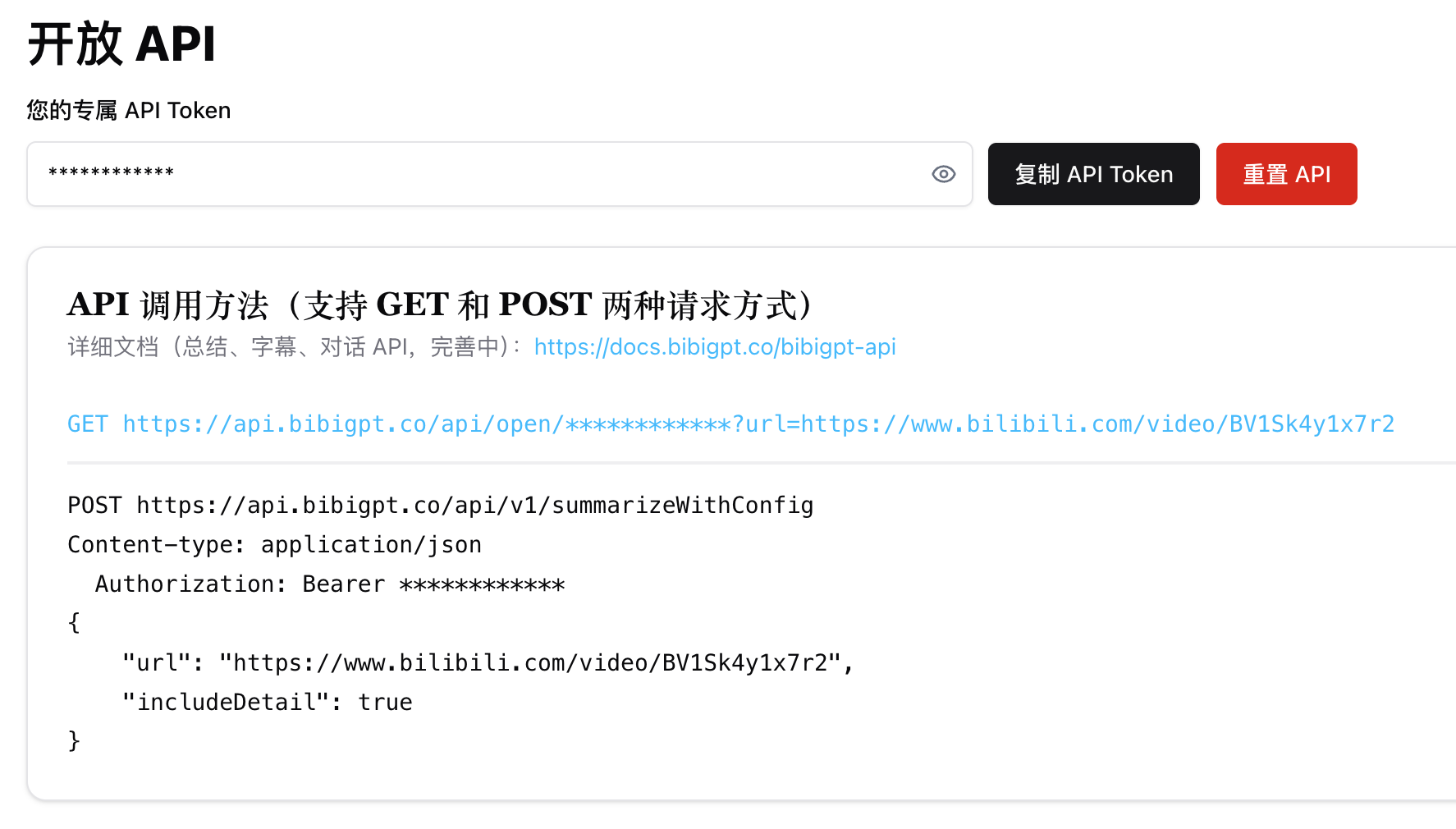
すべてのAPIエンドポイントは、HTTPヘダーの`api_token`トークンを使用して認証されるか、エンドポイントから直接取得されます。
```shell theme={null}
curl --request GET \
--url https://api.bibigpt.co/api/v1/summarize \
--header 'Authorization: Bearer '
```
ログイン後、[https://bibigpt.co/user/integration](https://bibigpt.co/user/integration) ページで専用のAPIトークンを取得してください。時間クレジットを購入するには、[https://bibigpt.co/shop](https://bibigpt.co/shop) ページにアクセスしてください。
 ## 2. API呼び出し方法
### 1. 要約 [/api/v1/summarize](https://docs.bibigpt.co/api-reference/open/generate-video-or-audio-summary-from-url)
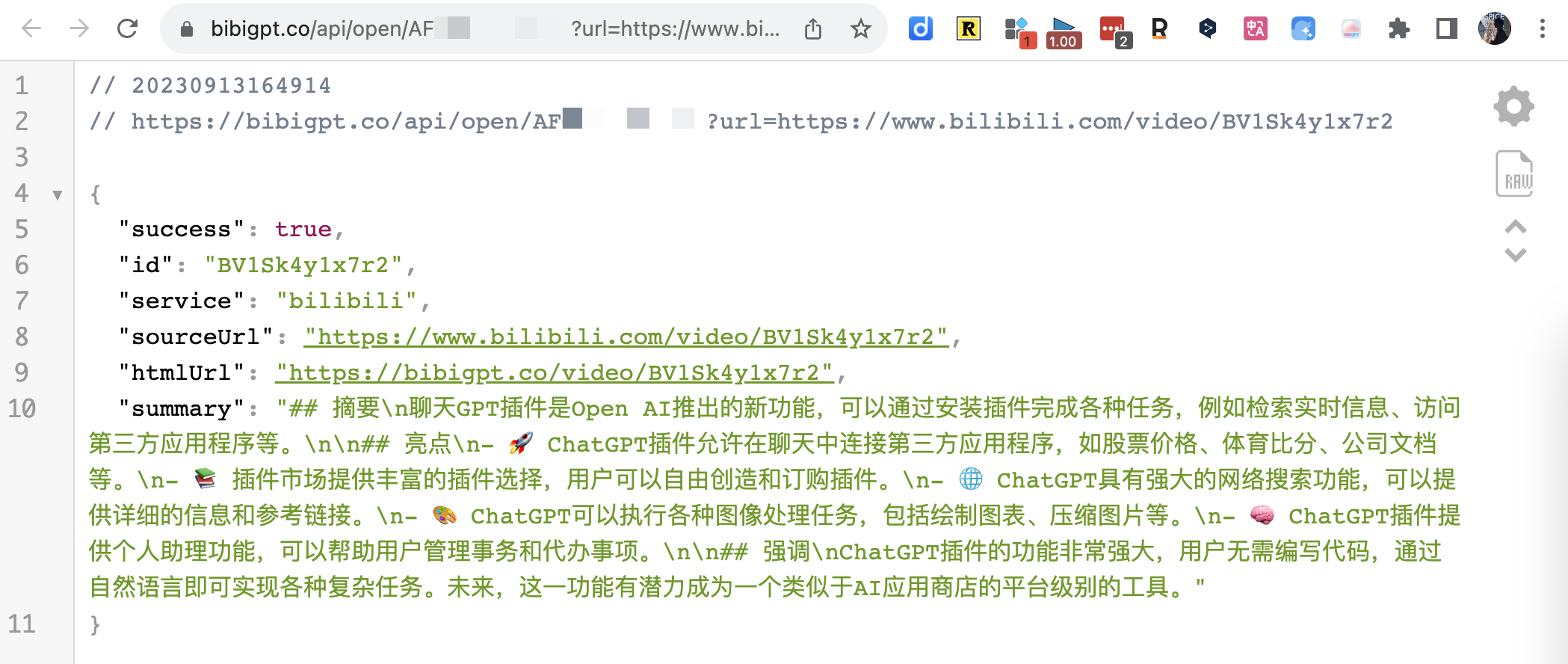
GETリクエスト例
## 2. API呼び出し方法
### 1. 要約 [/api/v1/summarize](https://docs.bibigpt.co/api-reference/open/generate-video-or-audio-summary-from-url)
GETリクエスト例
 ### 2. カスタム要約パラメータ [/api/v1/summarizeWithConfig](https://docs.bibigpt.co/api-reference/open/generate-configurable-summary-from-url-based-on-prompt-config)
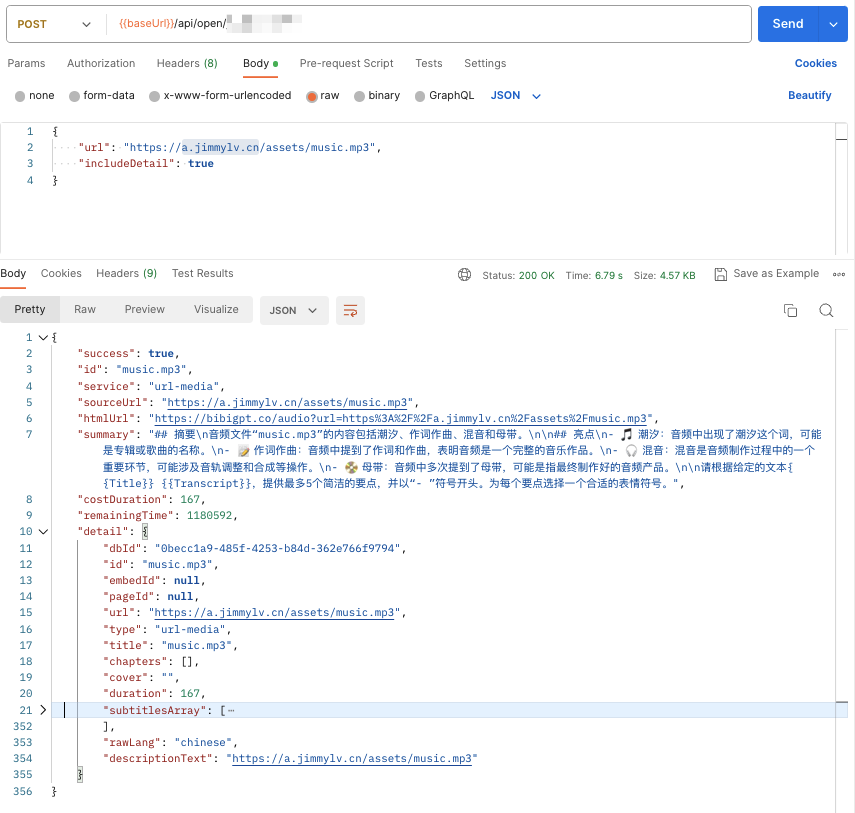
POSTメソッドは [promptConfig](https://docs.bibigpt.co/api-reference/open/generate-configurable-summary-from-url-based-on-prompt-config#body-prompt-config) を設定して要約結果を調整できます。また、includeDetail をサポートして音動画コンテンツの詳細を返します。
### 3. 字幕 [/api/v1/getSubtitle](https://docs.bibigpt.co/api-reference/open/only-returns-the-video-subtitles-array-in-detail)
要約インターフェースと比較して、LLMへのリクエスト時間が短縮されるため、はるかに高速になります。
注意:デフォルトでは、音声言語が自動的に検出され、対応する中国語または英語の字幕が生成されます。ただし、自動検出が失敗する(またはキャッシュが原因で)場合があります。字幕が音声言語と一致しないことがわかった場合は、`audioLanguage` パラメータを手動で指定できます。
```shell theme={null}
https://api.bibigpt.co/api/v1/getSubtitle?url=https://www.youtube.com/watch?v=z5U843Ob8xw&audioLanguage=en
```
「音声言語」の対応関係は以下のとおりです(現在のデフォルト音声認識モデルにのみ適用):
```json theme={null}
{
"Auto": "auto",
"中文": "zh",
"English": "en",
"日本語": "ja",
"粤语": "yue",
"한국어": "ko",
"Deutsch": "de",
"Français": "fr",
"Русский": "ru"
}
```
以下の言語のサポートが必要な場合は、[ビジネス担当](mailto:hi@bibigpt.co?subject=BibiGPT.co%20API%20AudioLanguage%20Feedback)までご連絡ください:`pt`(ポルトガル語)、`ar`(アラビア語)、`it`(イタリア語)、`es`(スペイン語)、`hi`(ヒンディー語)、`id`(インドネシア語)、`th`(タイ語)、`tr`(トルコ語)、`uk`(ウクライナ語)、`vi`(ベトナム語)
### 4. ファイルURL [/api/v1/summarize](https://docs.bibigpt.co/api-reference/open/generate-video-or-audio-summary-from-url)
BibiGPT APIはカスタム音動画ファイルアドレスをサポートしています。APIにファイルダウンロードリンクを提供するだけです。ローカルファイルの場合は、まずOSSにアップロードし、ダウンロードリンクが直接アクセス可能であることを確認してください。
例えば、以下の [https://a.jimmylv.cn/assets/music.mp3](https://a.jimmylv.cn/assets/music.mp3) (URLパスが `.mp3` で終わることに注意)
> 💡 現在サポートされているタイプは `mp3|mp4|m4a|m4s|wav|webm|mpga|aac|ogg|oga|flac|alac|wma|avi|mkv|mov|flv|3gp|mpeg|mpg|ts|ogv|vob` です。サポートされていない形式が見つかった場合はご連絡ください!
### 2. カスタム要約パラメータ [/api/v1/summarizeWithConfig](https://docs.bibigpt.co/api-reference/open/generate-configurable-summary-from-url-based-on-prompt-config)
POSTメソッドは [promptConfig](https://docs.bibigpt.co/api-reference/open/generate-configurable-summary-from-url-based-on-prompt-config#body-prompt-config) を設定して要約結果を調整できます。また、includeDetail をサポートして音動画コンテンツの詳細を返します。
### 3. 字幕 [/api/v1/getSubtitle](https://docs.bibigpt.co/api-reference/open/only-returns-the-video-subtitles-array-in-detail)
要約インターフェースと比較して、LLMへのリクエスト時間が短縮されるため、はるかに高速になります。
注意:デフォルトでは、音声言語が自動的に検出され、対応する中国語または英語の字幕が生成されます。ただし、自動検出が失敗する(またはキャッシュが原因で)場合があります。字幕が音声言語と一致しないことがわかった場合は、`audioLanguage` パラメータを手動で指定できます。
```shell theme={null}
https://api.bibigpt.co/api/v1/getSubtitle?url=https://www.youtube.com/watch?v=z5U843Ob8xw&audioLanguage=en
```
「音声言語」の対応関係は以下のとおりです(現在のデフォルト音声認識モデルにのみ適用):
```json theme={null}
{
"Auto": "auto",
"中文": "zh",
"English": "en",
"日本語": "ja",
"粤语": "yue",
"한국어": "ko",
"Deutsch": "de",
"Français": "fr",
"Русский": "ru"
}
```
以下の言語のサポートが必要な場合は、[ビジネス担当](mailto:hi@bibigpt.co?subject=BibiGPT.co%20API%20AudioLanguage%20Feedback)までご連絡ください:`pt`(ポルトガル語)、`ar`(アラビア語)、`it`(イタリア語)、`es`(スペイン語)、`hi`(ヒンディー語)、`id`(インドネシア語)、`th`(タイ語)、`tr`(トルコ語)、`uk`(ウクライナ語)、`vi`(ベトナム語)
### 4. ファイルURL [/api/v1/summarize](https://docs.bibigpt.co/api-reference/open/generate-video-or-audio-summary-from-url)
BibiGPT APIはカスタム音動画ファイルアドレスをサポートしています。APIにファイルダウンロードリンクを提供するだけです。ローカルファイルの場合は、まずOSSにアップロードし、ダウンロードリンクが直接アクセス可能であることを確認してください。
例えば、以下の [https://a.jimmylv.cn/assets/music.mp3](https://a.jimmylv.cn/assets/music.mp3) (URLパスが `.mp3` で終わることに注意)
> 💡 現在サポートされているタイプは `mp3|mp4|m4a|m4s|wav|webm|mpga|aac|ogg|oga|flac|alac|wma|avi|mkv|mov|flv|3gp|mpeg|mpg|ts|ogv|vob` です。サポートされていない形式が見つかった場合はご連絡ください!
 ### 5. AI Q\&A [/api/open/\[apiToken\]/chat](https://docs.bibigpt.co/api-reference/endpoint/chat) (まもなく終了)
```tsx theme={null}
interface ChatContentParams {
url: string
question: string
# tuple for each [['Q1', 'A1'], ['Q2', 'A2']]
history?: [string, string][]
language?: string
}
```
### 5. AI Q\&A [/api/open/\[apiToken\]/chat](https://docs.bibigpt.co/api-reference/endpoint/chat) (まもなく終了)
```tsx theme={null}
interface ChatContentParams {
url: string
question: string
# tuple for each [['Q1', 'A1'], ['Q2', 'A2']]
history?: [string, string][]
language?: string
}
```
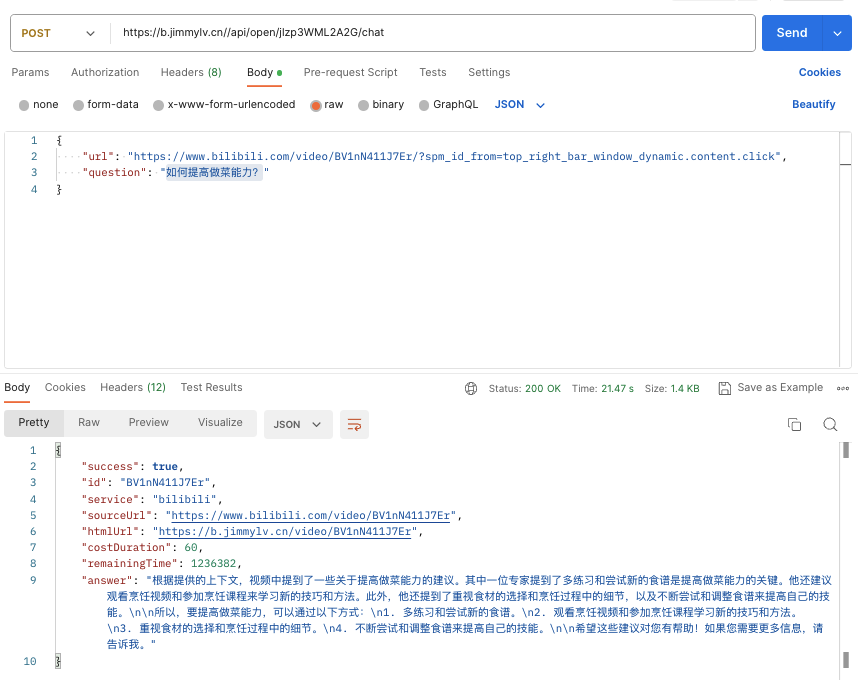 `answer` に加えて、`includeDetail` パラメータを設定して、回答に関連する `sourceDocuments` を返すかどうかを選択することもできます。
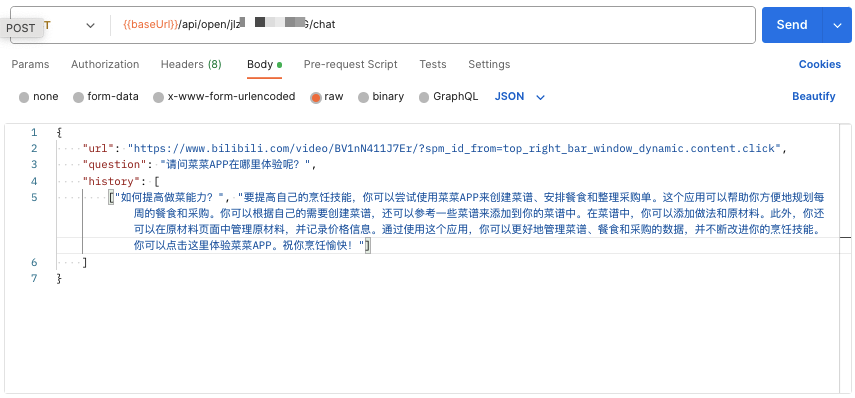
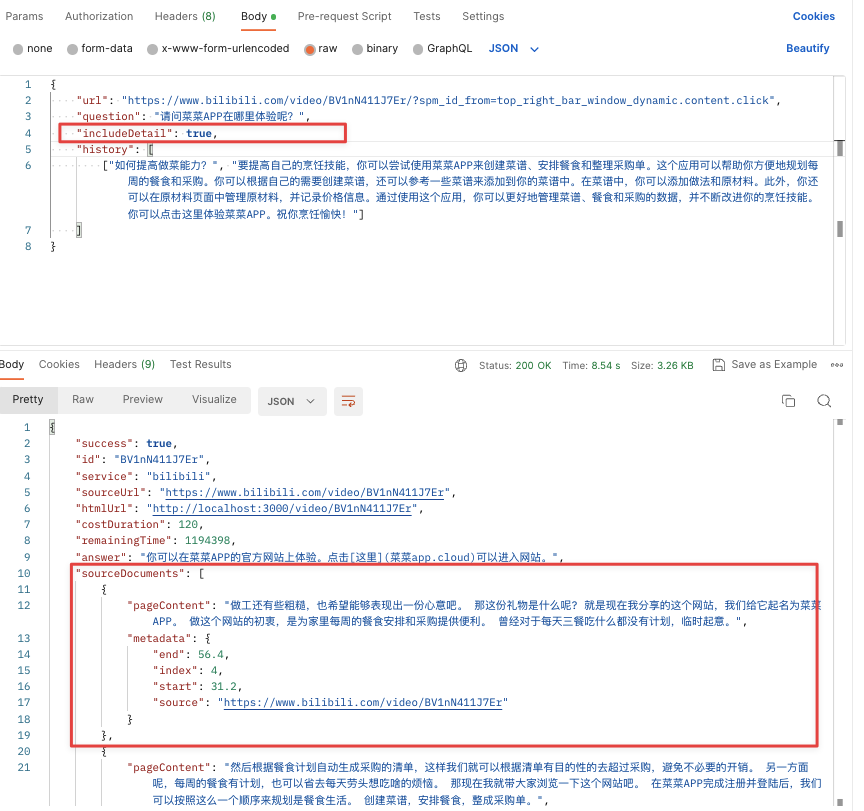 連続して質問する必要がある場合は、前回のQAの質問と回答をhistoryコンテキストとして使用し、次回の回答の正確性と一貫性を向上させてください(もちろん、消費されるトークン時間も倍増します)。
 ### 6. AI 記事書き換え [/api/v1/express](https://docs.bibigpt.co/api-reference/open/rewrite-video-subtitles-as-a-polished-article)
動画の字幕を自動取得し、構造化された記事に書き換えます。カスタム出力言語とモデルをサポートします。
```shell theme={null}
curl --request GET \
--url 'https://api.bibigpt.co/api/v1/express?url=https://www.youtube.com/watch?v=dQw4w9WgXcQ' \
--header 'Authorization: Bearer '
```
レスポンス形式:
```json theme={null}
{
"success": true,
"id": "dQw4w9WgXcQ",
"service": "youtube",
"sourceUrl": "https://www.youtube.com/watch?v=dQw4w9WgXcQ",
"htmlUrl": "https://bibigpt.co/...",
"title": "動画タイトル",
"article": "書き換え後の完全なMarkdown記事...",
"fromCache": false,
"costDuration": 600,
"remainingTime": 3000
}
```
オプションパラメータ:
* `outputLanguage`:出力言語コード(例:`zh-CN`、`en-US`)
* `model`:使用するAIモデル
* `includeDetail`:音動画の詳細をレスポンスに含めるかどうか
### 7. AI 字幕校正 [/api/v1/getPolishedText](https://docs.bibigpt.co/api-reference/open/polish-video-subtitles-into-readable-article-segments)
動画の字幕を自動取得し、チャプターまたは固定長セグメントごとに校正し、すべての校正済みセグメントを一括で返します。`keywords` パラメータで専門用語の精度向上をサポートします。
```shell theme={null}
curl --request GET \
--url 'https://api.bibigpt.co/api/v1/getPolishedText?url=https://www.youtube.com/watch?v=dQw4w9WgXcQ&keywords=AI,GPT' \
--header 'Authorization: Bearer '
```
レスポンス形式:
```json theme={null}
{
"success": true,
"id": "dQw4w9WgXcQ",
"service": "youtube",
"sourceUrl": "https://www.youtube.com/watch?v=dQw4w9WgXcQ",
"title": "動画タイトル",
"segments": [
{
"startTime": 0,
"endTime": 120,
"chapterTitle": "チャプタータイトル(ある場合)",
"polishedText": "校正後のMarkdownテキスト...",
"fromCache": false
}
],
"costDuration": 600,
"remainingTime": 3000
}
```
オプションパラメータ:
* `keywords`:キーワード(カンマ区切り)、専門用語の認識精度を向上させます
* `includeDetail`:音動画の詳細をレスポンスに含めるかどうか
## 3. APIインターフェースパラメータ(現在は「要約」APIのみサポート)
### 3.1 オプション設定パラメータ [promptConfig](https://docs.bibigpt.co/api-reference/open/generate-configurable-summary-from-url-based-on-prompt-config#body-prompt-config)
#### 1、promptConfig はPOSTリクエストのみサポートし、bodyパラメータとして使用
### 6. AI 記事書き換え [/api/v1/express](https://docs.bibigpt.co/api-reference/open/rewrite-video-subtitles-as-a-polished-article)
動画の字幕を自動取得し、構造化された記事に書き換えます。カスタム出力言語とモデルをサポートします。
```shell theme={null}
curl --request GET \
--url 'https://api.bibigpt.co/api/v1/express?url=https://www.youtube.com/watch?v=dQw4w9WgXcQ' \
--header 'Authorization: Bearer '
```
レスポンス形式:
```json theme={null}
{
"success": true,
"id": "dQw4w9WgXcQ",
"service": "youtube",
"sourceUrl": "https://www.youtube.com/watch?v=dQw4w9WgXcQ",
"htmlUrl": "https://bibigpt.co/...",
"title": "動画タイトル",
"article": "書き換え後の完全なMarkdown記事...",
"fromCache": false,
"costDuration": 600,
"remainingTime": 3000
}
```
オプションパラメータ:
* `outputLanguage`:出力言語コード(例:`zh-CN`、`en-US`)
* `model`:使用するAIモデル
* `includeDetail`:音動画の詳細をレスポンスに含めるかどうか
### 7. AI 字幕校正 [/api/v1/getPolishedText](https://docs.bibigpt.co/api-reference/open/polish-video-subtitles-into-readable-article-segments)
動画の字幕を自動取得し、チャプターまたは固定長セグメントごとに校正し、すべての校正済みセグメントを一括で返します。`keywords` パラメータで専門用語の精度向上をサポートします。
```shell theme={null}
curl --request GET \
--url 'https://api.bibigpt.co/api/v1/getPolishedText?url=https://www.youtube.com/watch?v=dQw4w9WgXcQ&keywords=AI,GPT' \
--header 'Authorization: Bearer '
```
レスポンス形式:
```json theme={null}
{
"success": true,
"id": "dQw4w9WgXcQ",
"service": "youtube",
"sourceUrl": "https://www.youtube.com/watch?v=dQw4w9WgXcQ",
"title": "動画タイトル",
"segments": [
{
"startTime": 0,
"endTime": 120,
"chapterTitle": "チャプタータイトル(ある場合)",
"polishedText": "校正後のMarkdownテキスト...",
"fromCache": false
}
],
"costDuration": 600,
"remainingTime": 3000
}
```
オプションパラメータ:
* `keywords`:キーワード(カンマ区切り)、専門用語の認識精度を向上させます
* `includeDetail`:音動画の詳細をレスポンスに含めるかどうか
## 3. APIインターフェースパラメータ(現在は「要約」APIのみサポート)
### 3.1 オプション設定パラメータ [promptConfig](https://docs.bibigpt.co/api-reference/open/generate-configurable-summary-from-url-based-on-prompt-config#body-prompt-config)
#### 1、promptConfig はPOSTリクエストのみサポートし、bodyパラメータとして使用
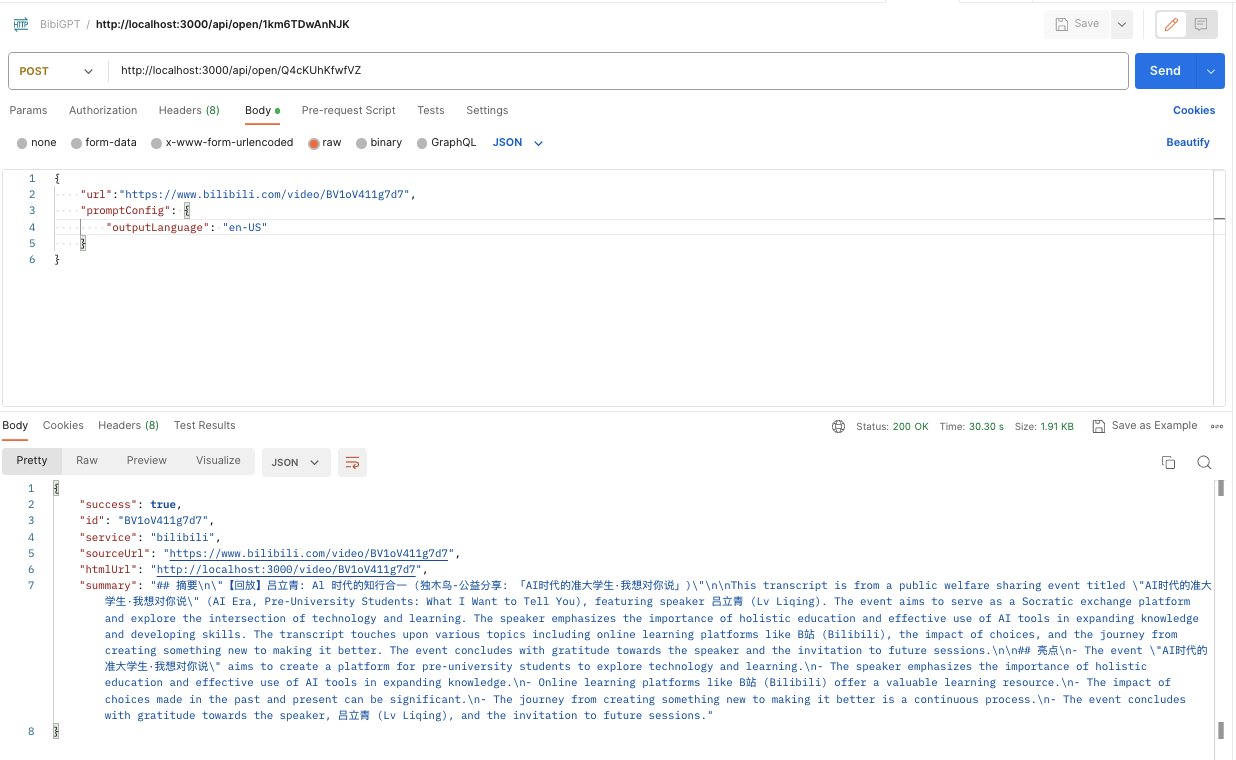 #### 2、promptConfig が空の場合のデフォルトパラメータ(必要に応じて変更可能)
 ```json theme={null}
{
"showEmoji": true,
"showTimestamp": false,
"outlineLevel": 1,
"sentenceNumber": 5,
"detailLevel": 700,
"outputLanguage": "zh-CN"
}
```
注意:`detailLevel` は「文の長さ」に対応し、関係は50です。つまり、700/50=14(Webページに表示される値)です。
また、「出力言語」の対応関係は以下のとおりです:
```jsx theme={null}
{
English: 'en-US',
中文: 'zh-CN',
繁體中文: 'zh-TW',
日本語: 'ja-JP',
русский: 'ru-RU',
Italiano: 'it-IT',
Deutsch: 'de-DE',
Español: 'es-ES',
Français: 'fr-FR',
Nederlands: 'nl-NL',
Português: 'pt-PT',
한국어: 'ko-KR',
ភាសាខ្មែរ: 'km-KH',
हिंदी: 'hi-IN',
ภาษาไทย: 'th-TH',
}
```
#### 3、promptConfig には特別なパラメータがあります:`isRefresh`。値があり `true` の場合のみキャッシュを無視します
例:「*絵文字を出力しない、タイムスタンプを表示する、アウトラインレベルは2、文の数は3、文の長さは10、出力言語は英語、かつキャッシュを強制的にリフレッシュする*」promptConfig:
```json theme={null}
{
"showEmoji": false,
"showTimestamp": true,
"outlineLevel": 2,
"sentenceNumber": 3,
"detailLevel": 500,
"outputLanguage": "en-US",
"isRefresh": true
}
```
### 3.2 カスタム要約
```json theme={null}
{
"showEmoji": true,
"showTimestamp": false,
"outlineLevel": 1,
"sentenceNumber": 5,
"detailLevel": 700,
"outputLanguage": "zh-CN"
}
```
注意:`detailLevel` は「文の長さ」に対応し、関係は50です。つまり、700/50=14(Webページに表示される値)です。
また、「出力言語」の対応関係は以下のとおりです:
```jsx theme={null}
{
English: 'en-US',
中文: 'zh-CN',
繁體中文: 'zh-TW',
日本語: 'ja-JP',
русский: 'ru-RU',
Italiano: 'it-IT',
Deutsch: 'de-DE',
Español: 'es-ES',
Français: 'fr-FR',
Nederlands: 'nl-NL',
Português: 'pt-PT',
한국어: 'ko-KR',
ភាសាខ្មែរ: 'km-KH',
हिंदी: 'hi-IN',
ภาษาไทย: 'th-TH',
}
```
#### 3、promptConfig には特別なパラメータがあります:`isRefresh`。値があり `true` の場合のみキャッシュを無視します
例:「*絵文字を出力しない、タイムスタンプを表示する、アウトラインレベルは2、文の数は3、文の長さは10、出力言語は英語、かつキャッシュを強制的にリフレッシュする*」promptConfig:
```json theme={null}
{
"showEmoji": false,
"showTimestamp": true,
"outlineLevel": 2,
"sentenceNumber": 3,
"detailLevel": 500,
"outputLanguage": "en-US",
"isRefresh": true
}
```
### 3.2 カスタム要約
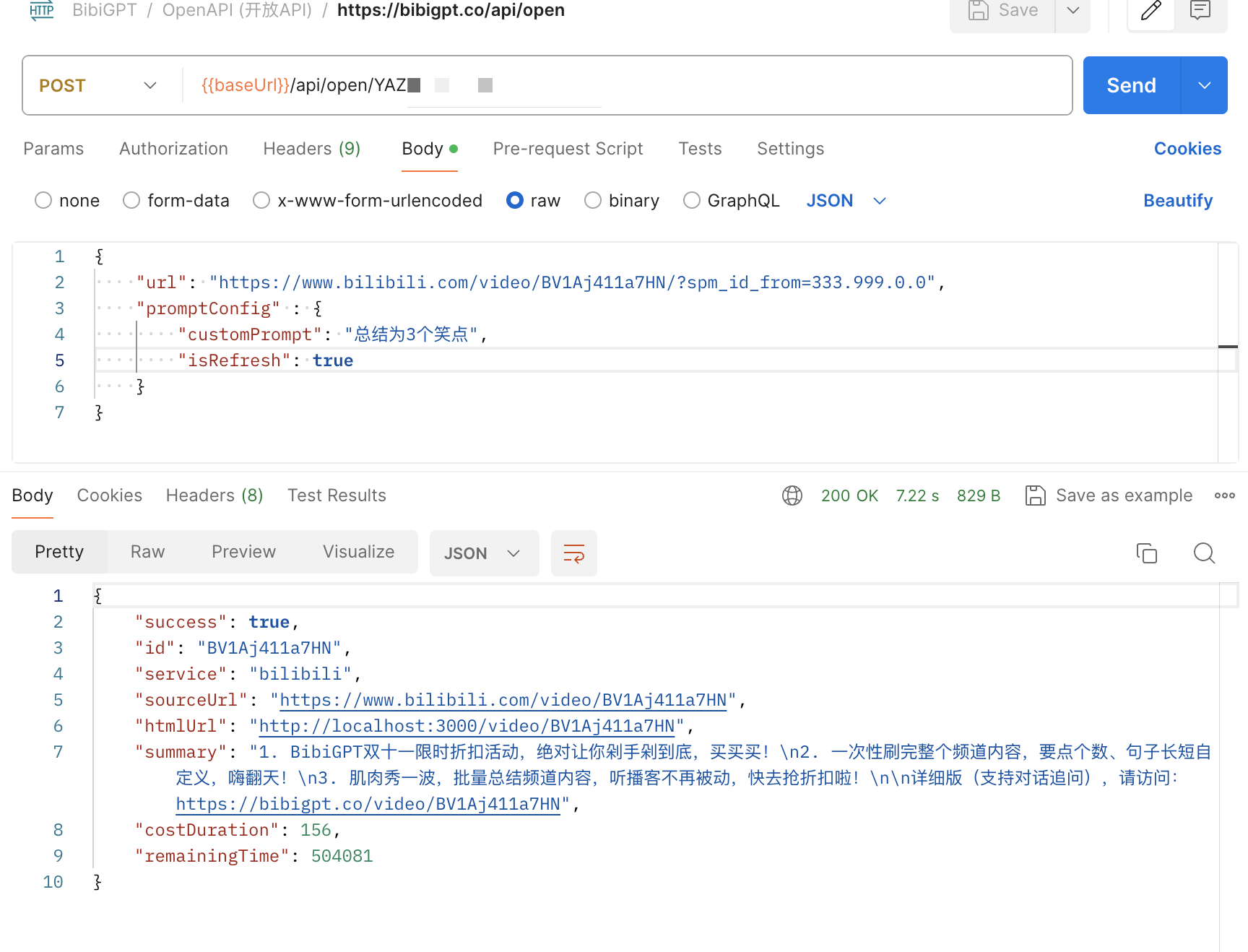 ```json theme={null}
{
"url": "https://www.bilibili.com/video/BV1Aj411a7HN",
"promptConfig": {
"customPrompt": "3つのジョークとして要約",
"isRefresh": true
}
}
```
promptConfig に customPrompt を追加することで、独自の要約プロンプトをカスタマイズできます。動画がすでに要約されている場合、customPrompt カスタム要約を有効にするには、`isRefresh: true` でキャッシュされた結果をスキップする必要があることに注意してください。
### 3.3 limitation 制限条件
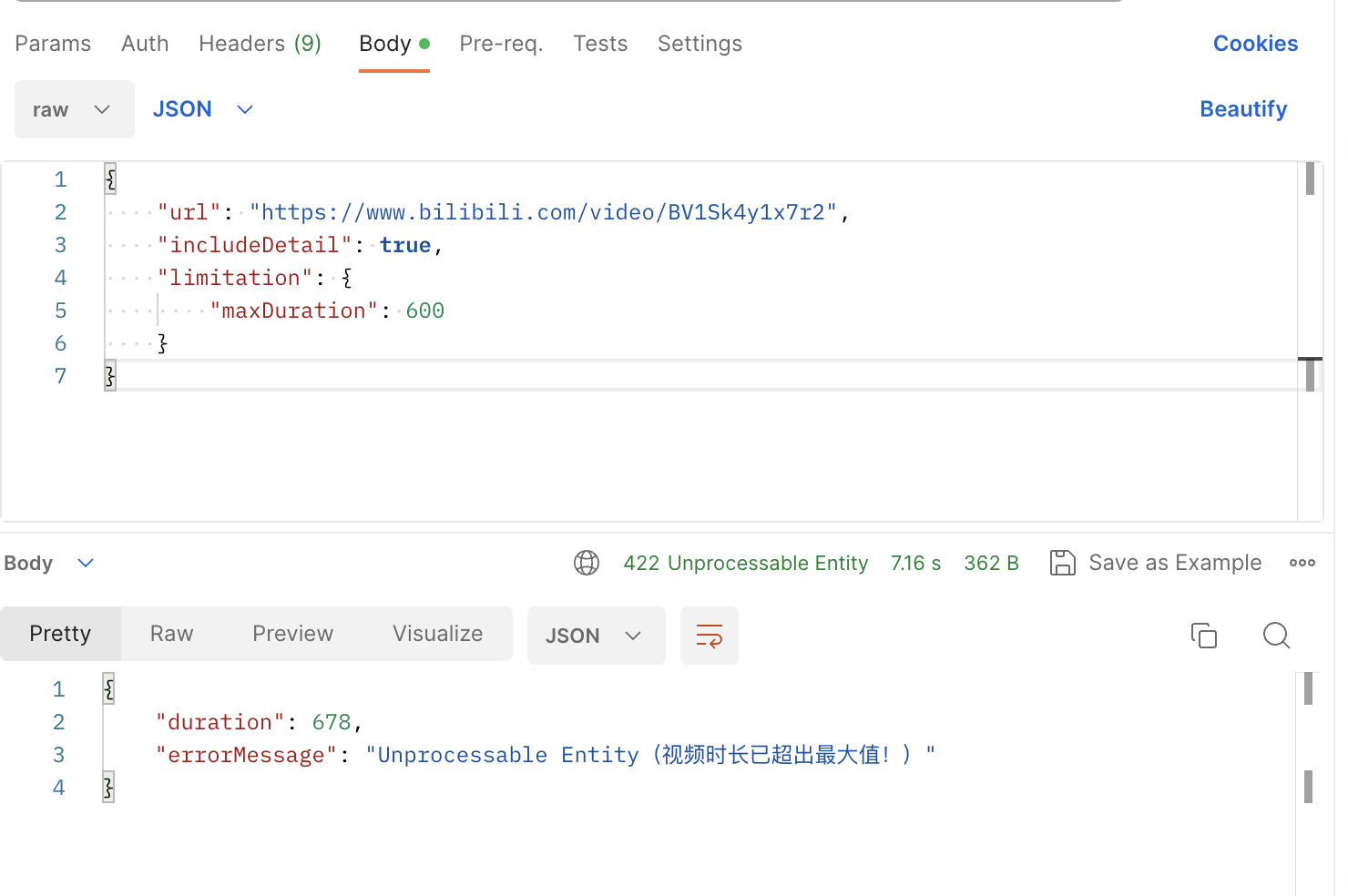
APIの limitation フィールドとして `maxDuration` 最大時間を設定できます。バックグラウンドがurlに対応する音動画時間がmaxDurationを超えていることを検出した場合、422 errorエラーステータスコードを返します。
```json theme={null}
{
"url": "https://www.bilibili.com/video/BV1Sk4y1x7r2",
"includeDetail": true,
"limitation": {
"maxDuration": 600
}
}
```
```json theme={null}
{
"url": "https://www.bilibili.com/video/BV1Aj411a7HN",
"promptConfig": {
"customPrompt": "3つのジョークとして要約",
"isRefresh": true
}
}
```
promptConfig に customPrompt を追加することで、独自の要約プロンプトをカスタマイズできます。動画がすでに要約されている場合、customPrompt カスタム要約を有効にするには、`isRefresh: true` でキャッシュされた結果をスキップする必要があることに注意してください。
### 3.3 limitation 制限条件
APIの limitation フィールドとして `maxDuration` 最大時間を設定できます。バックグラウンドがurlに対応する音動画時間がmaxDurationを超えていることを検出した場合、422 errorエラーステータスコードを返します。
```json theme={null}
{
"url": "https://www.bilibili.com/video/BV1Sk4y1x7r2",
"includeDetail": true,
"limitation": {
"maxDuration": 600
}
}
```
 ## 4. 使用事例
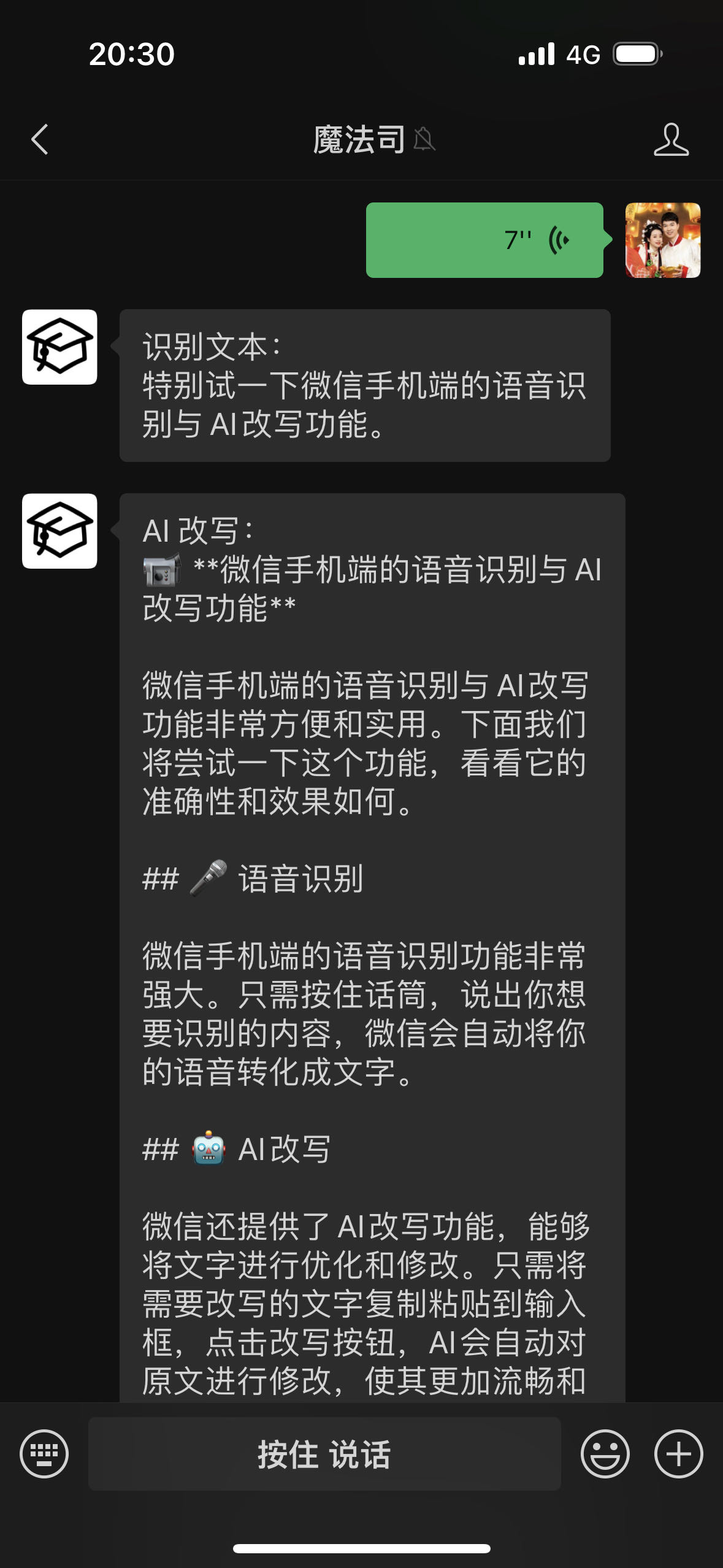
### 4.1 WeChatアシスタント
[ChatGPT AIが音動画ワンクリック要約を支援、WeChat Creator Cloudへのリンクに成功!](https://mp.weixin.qq.com/s/iFoi6Yx7QU1Oh042Az4hlQ)
[https://github.com/zhayujie/chatgpt-on-wechat/issues/1417](https://github.com/zhayujie/chatgpt-on-wechat/issues/1417)
[【見る?買う?】今日のApple発表会関連動画が多すぎて爆発しそうだし、つまらない。\_bilibili](https://www.bilibili.com/video/BV1GN4y1X7Na)
### 4.2 モバイルiOSショートカット
【AI ビデオノート】BibiGPT オープンAPI & IFTTT 無限の想像力
[【AI ビデオノート】Appleメモ:ワンクリックでBilibili動画を要約、ショートカットと連携丨BibiGPT オープンAPI & IFTTT 無限の想像力\_bilibili](https://www.bilibili.com/video/BV1ZN411z7Hc/)
### 4.3 ブラウザ拡張機能
[【BibiGPT】ブラウザ拡張機能:任意のウェブページの音動画コンテンツのワンクリック文字起こし&要約をサポート\_bilibili](https://www.bilibili.com/video/BV1gN411W7NY)
### 4.4 ノートアプリとの連携
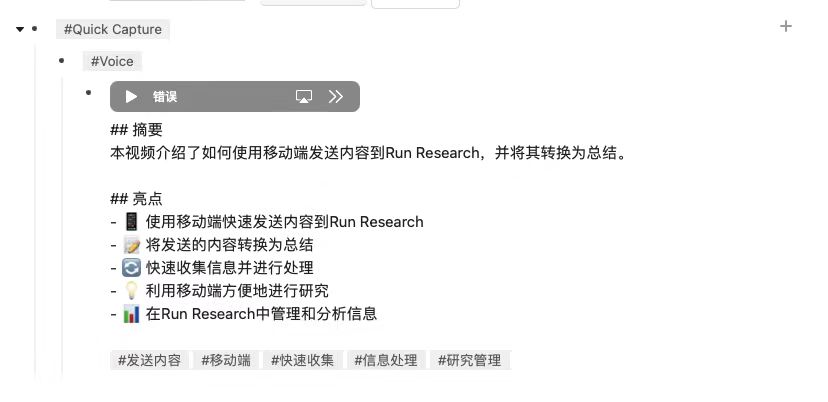
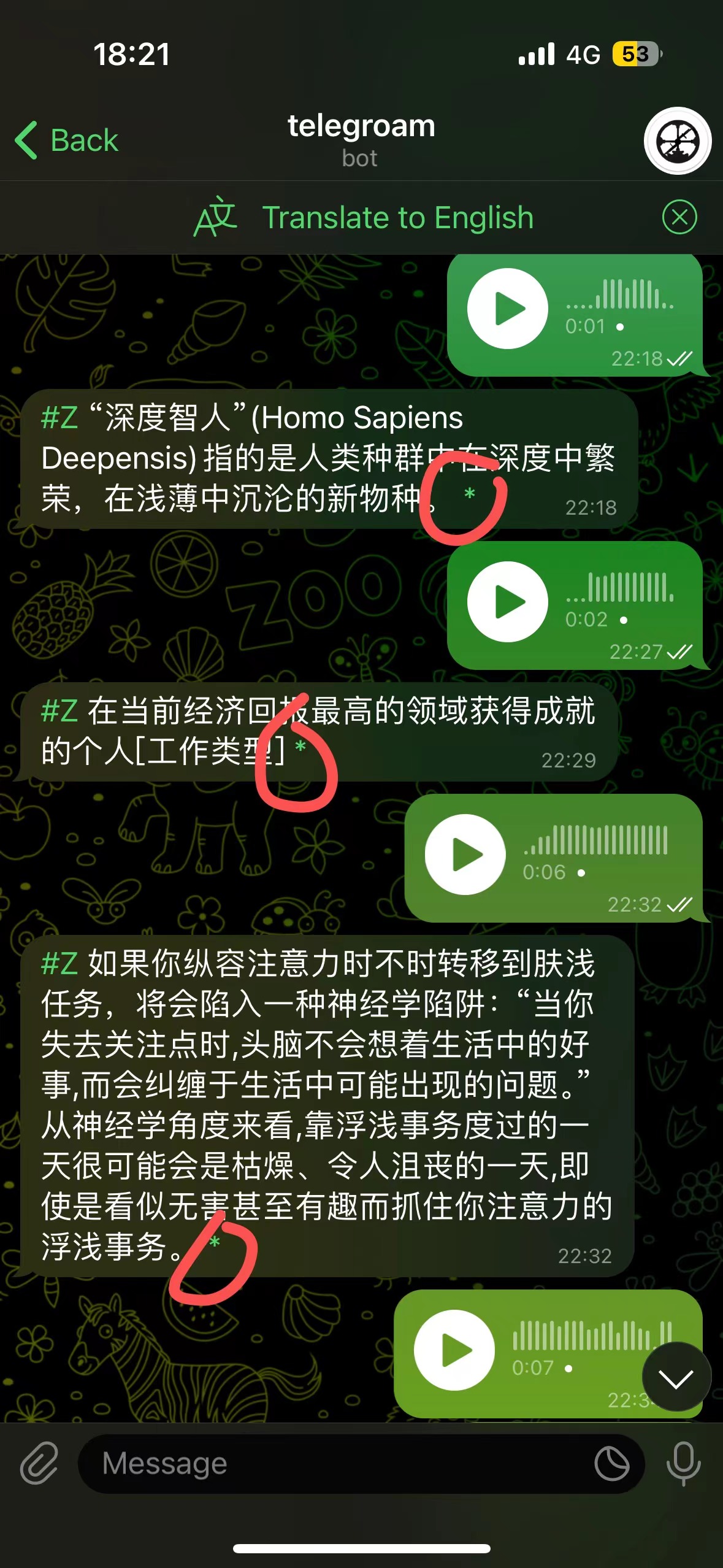
音声入力 → Roam Research → AI 書き換え → AI レビュー
[telegroam](https://github.com/JimmyLv/telegroam) を介して音声を送信し、BibiGPT APIを使用してテキストに要約し、ワンクリックでRoam Researchに保存します
## 4. 使用事例
### 4.1 WeChatアシスタント
[ChatGPT AIが音動画ワンクリック要約を支援、WeChat Creator Cloudへのリンクに成功!](https://mp.weixin.qq.com/s/iFoi6Yx7QU1Oh042Az4hlQ)
[https://github.com/zhayujie/chatgpt-on-wechat/issues/1417](https://github.com/zhayujie/chatgpt-on-wechat/issues/1417)
[【見る?買う?】今日のApple発表会関連動画が多すぎて爆発しそうだし、つまらない。\_bilibili](https://www.bilibili.com/video/BV1GN4y1X7Na)
### 4.2 モバイルiOSショートカット
【AI ビデオノート】BibiGPT オープンAPI & IFTTT 無限の想像力
[【AI ビデオノート】Appleメモ:ワンクリックでBilibili動画を要約、ショートカットと連携丨BibiGPT オープンAPI & IFTTT 無限の想像力\_bilibili](https://www.bilibili.com/video/BV1ZN411z7Hc/)
### 4.3 ブラウザ拡張機能
[【BibiGPT】ブラウザ拡張機能:任意のウェブページの音動画コンテンツのワンクリック文字起こし&要約をサポート\_bilibili](https://www.bilibili.com/video/BV1gN411W7NY)
### 4.4 ノートアプリとの連携
音声入力 → Roam Research → AI 書き換え → AI レビュー
[telegroam](https://github.com/JimmyLv/telegroam) を介して音声を送信し、BibiGPT APIを使用してテキストに要約し、ワンクリックでRoam Researchに保存します
 ***
詳細ドキュメント(作成中):[https://docs.bibigpt.co/api-reference](https://docs.bibigpt.co/api-reference)
***
詳細ドキュメント(作成中):[https://docs.bibigpt.co/api-reference](https://docs.bibigpt.co/api-reference)