
Feature Overview
BibiGPT has added a Cubox note integration function, responding to the demands of many Cubox users. Users simply need to go to the “Note Integration” settings page in the sidebar and find the Cubox option in the “Note Export” area. By clicking the provided help link to get the Cubox API URL and pasting it, configuration is complete. When using, click the “Export” button on any video summary page and select “Save to Cubox” to complete synchronization. Additionally, an “Enable Auto Send” option is provided to further simplify the workflow and achieve automatic archiving after summarization. Here is an example of the function interface: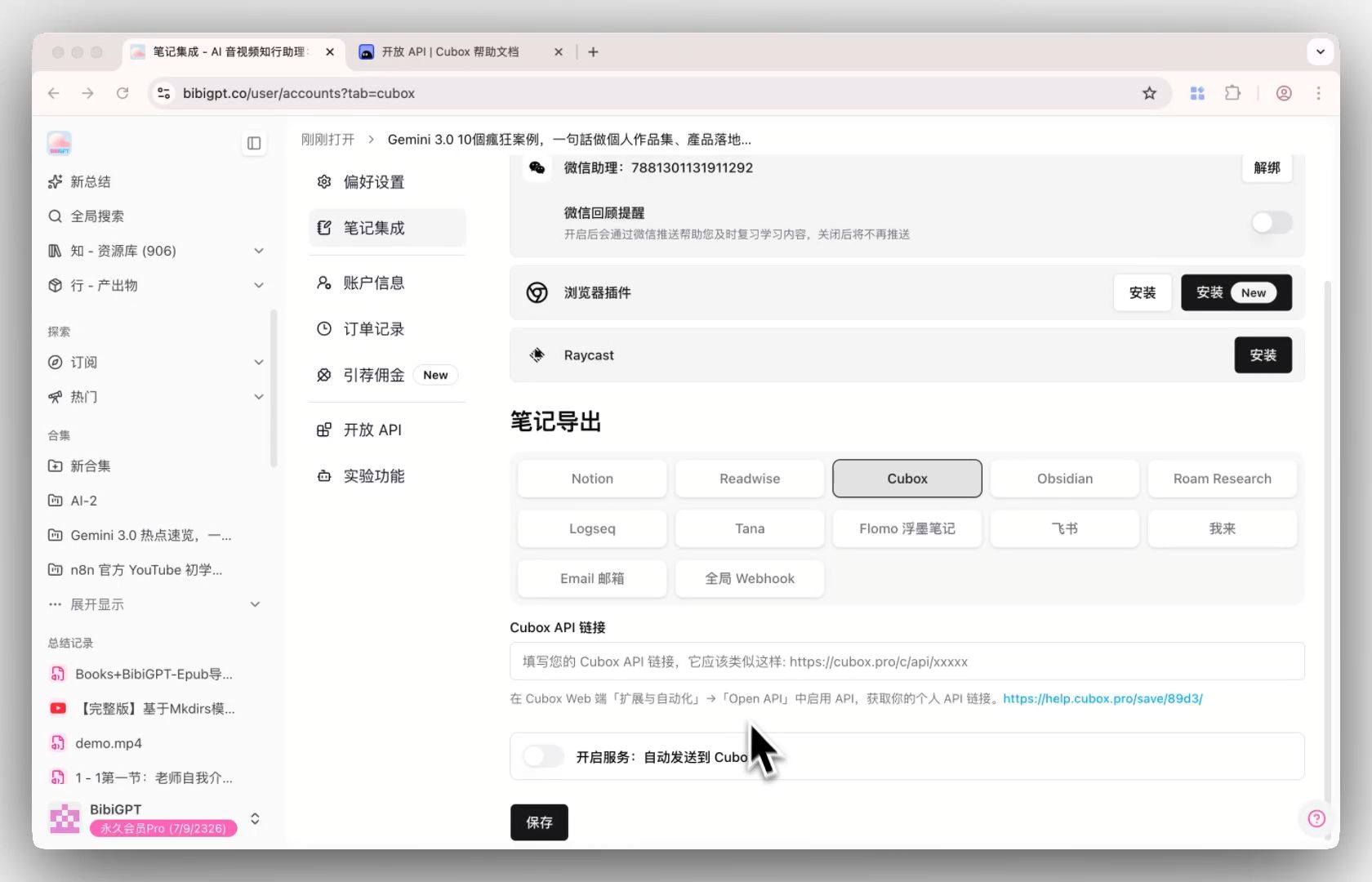
Solved Pain Points
As a loyal user of Cubox, I often use BibiGPT to summarize videos and articles, but I was frustrated by the inability to sync high-quality notes directly to my Cubox knowledge base. Manually copying and pasting each time not only interrupts my workflow but also leads to omissions in information archiving.Core Features
- BibiGPT added Cubox note integration based on user feedback.
- Located in the “Note Integration” section of settings.
- Simply paste the Cubox API URL to configure.
- One-click “Save to Cubox” from the export menu on summary pages.
Feature Highlights
BibiGPT officially integrated the Cubox API. Users only need to fill in their custom Cubox API link in the settings to save summaries, outlines, and timestamps to Cubox with one click after a video summary is finished. It even supports “Auto Send” for seamless knowledge collection and archiving.Applicable Scenarios
- As a loyal user of Cubox, I often use BibiGPT to summarize videos and articles, but I was frustrated by the inability to sync high-quality notes directly to my Cubox knowledge base.
- Manually copying and pasting each time not only interrupts my workflow but also leads to omissions in information archiving.
Usage Suggestions
- BibiGPT officially integrated the Cubox API. Users only need to fill in their custom Cubox API link in the settings to save summaries, outlines, and timestamps to Cubox with one click after a video summary is finished. It even supports “Auto Send” for seamless knowledge collection and archiving.