
Overview
On any video page, open the ⋯ menu at the far right of the player bar and use Layout mode to switch among Highlight, Study, and Free. You can also save the current panel arrangement and player height as a personal preset.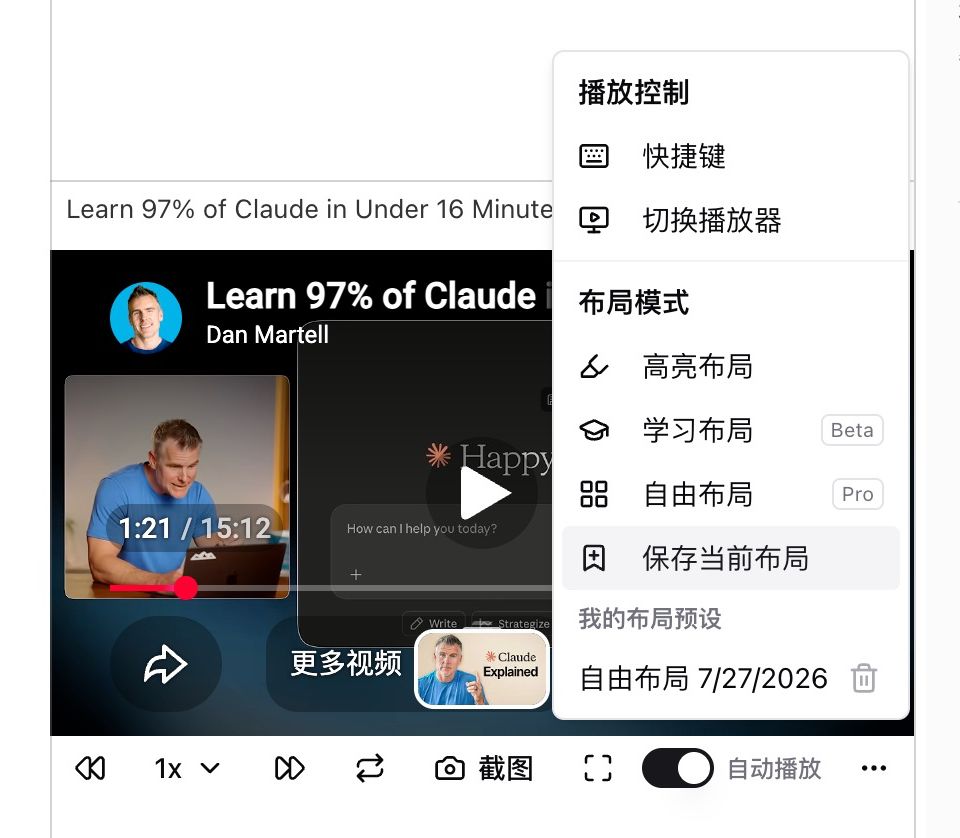
Pain Point
Sometimes I only highlight takeaways, sometimes I read line by line, and sometimes I want the video, captions, and chat in my own order. Every switch meant dragging panels again, and the next visit reset to default.Key Features
- Highlight layout: fast highlighting and note-taking
- Study layout (Beta): line-by-line reading with timestamp sync, copy shortcuts, and collapsible headings
- Free layout (Pro): place the video, captions, and AI chat yourself
- Save current layout: keep height and arrangement as a named preset; restore or delete from My layouts
Highlights
Switching study modes is one click instead of a drag session, and your favorite setup stays.Use Cases
- Highlight first, then switch to Study for one dense section
- Save a side-by-side captions-and-chat layout as your default
- Raise the player for shadowing and restore it next time
Tips
- Pick a preset, tweak height, then save
- Free layout needs Pro; Study is still Beta
Related Features
Enhanced Video Player
Immersive Mode
Chapter Deep Reading
Upgrade to Pro: unlock Free layout and more custom arrangements → Pricing