
Feature Overview
BibiGPT has launched the “Video Collection Details” function, optimizing the browsing experience of series videos. Below the full-text summary of the video, a collection entry has been added, which can be expanded to view the playlist the current video belongs to. Users can directly click other videos in the list in the sidebar to achieve seamless switching between playback and summarization, without jumping pages. In addition, this panel also supports one-click copying of the collection link for sharing, and using the “Ask AI” function to ask questions about the entire collection content. Here is an example of the function interface: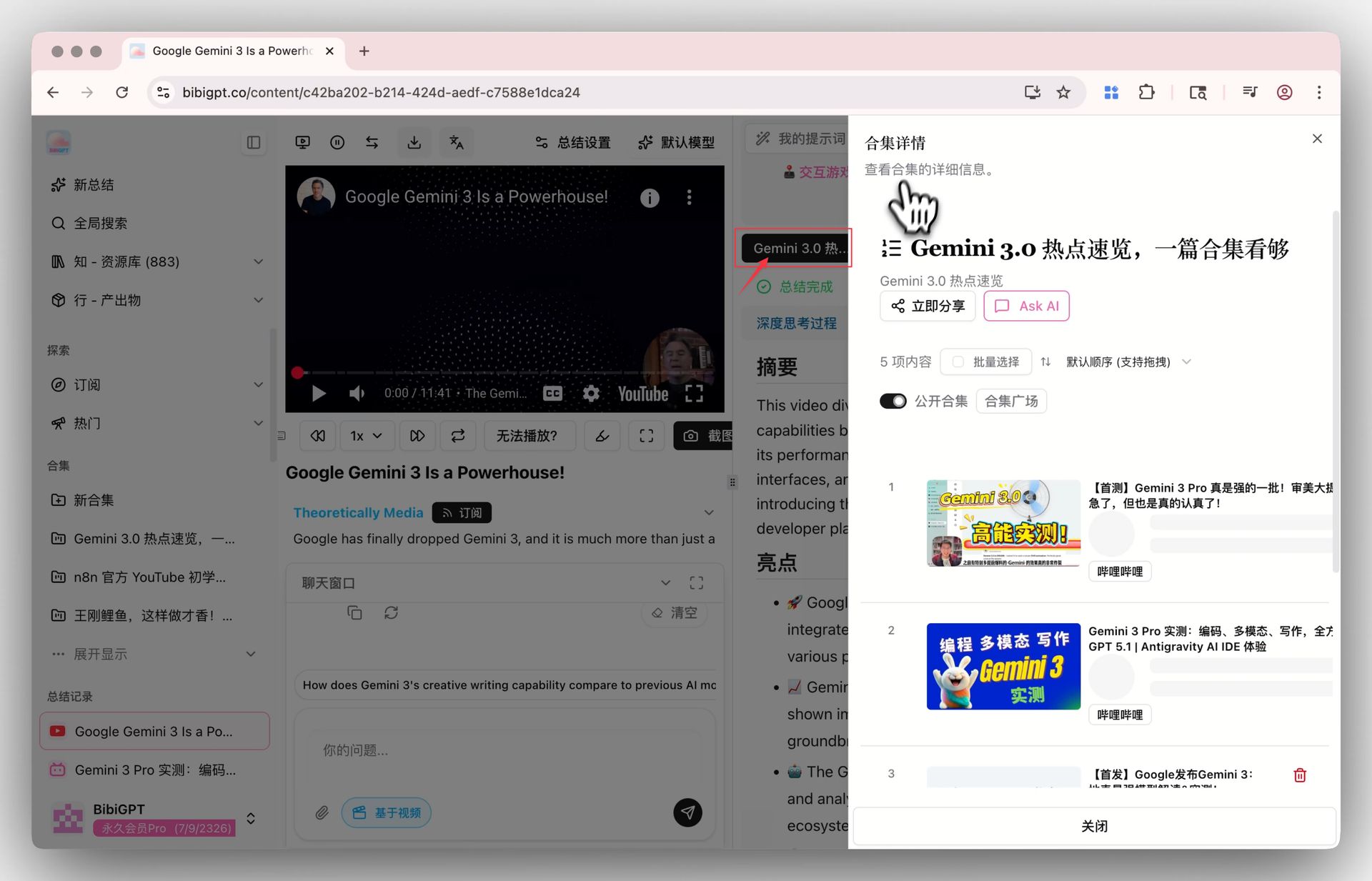
Solved Pain Points
When I am studying a set of series courses or watching serialized videos, after finishing one episode and wanting to see the summary of the next episode, I usually need to go back to the home page or search again. I cannot directly understand what other content is in this collection on the current page, and I cannot read summaries in a smooth “binge-reading” way.Core Features
- BibiGPT has launched the “Video Collection Details” function, optimizing the browsing experience of series videos.
- Below the full-text summary of the video, a collection entry has been added, which can be expanded to view the playlist the current video belongs to.
- Users can directly click other videos in the list in the sidebar to achieve seamless switching between playback and summarization, without jumping pages.
- In addition, this panel also supports one-click copying of the collection link for sharing, and using the “Ask AI” function to ask questions about the entire collection content.
Feature Highlights
BibiGPT adds a “Collection Details” sidebar to the video summary page, automatically identifying and displaying the playlist/collection the current video belongs to. Users only need to click the thumbnail in the list to seamlessly switch to other video summaries under the same collection on the spot, and can also perform AI questions or one-click sharing for the entire collection.Applicable Scenarios
- When I am studying a set of series courses or watching serialized videos, after finishing one episode and wanting to see the summary of the next episode, I usually need to go back to the home page or search again. I cannot directly understand what other content is in this collection on the current page, and I cannot read summaries in a smooth “binge-reading” way.
Usage Suggestions
- BibiGPT adds a “Collection Details” sidebar to the video summary page, automatically identifying and displaying the playlist/collection the current video belongs to. Users only need to click the thumbnail in the list to seamlessly switch to other video summaries under the same collection on the spot, and can also perform AI questions or one-click sharing for the entire collection.