
Feature Overview
BibiGPT has launched a brand new chat window UI and interaction experience. The new chat window supports maximizing, free dragging to adjust size and position, and the interface is cleaner. When the user interacts with the video, the AI will intelligently recommend 3 relevant questions. The core upgrade lies in the AI Q&A function: after the user asks a question, the answer generated by the AI will contain multiple clickable timestamps. When the user hovers over the timestamp, they can preview the original video text of the information point, ensuring the accuracy and traceability of the answer. At the same time, users can view all video source segments cited by the AI answer. In addition, the new interaction also supports questions based on video screenshots, file uploads, and switching between general AI dialogue and video Q&A, and optimizes detailed operations such as copying and regenerating, greatly improving the efficiency of video learning and information acquisition. Here is an example of the function interface: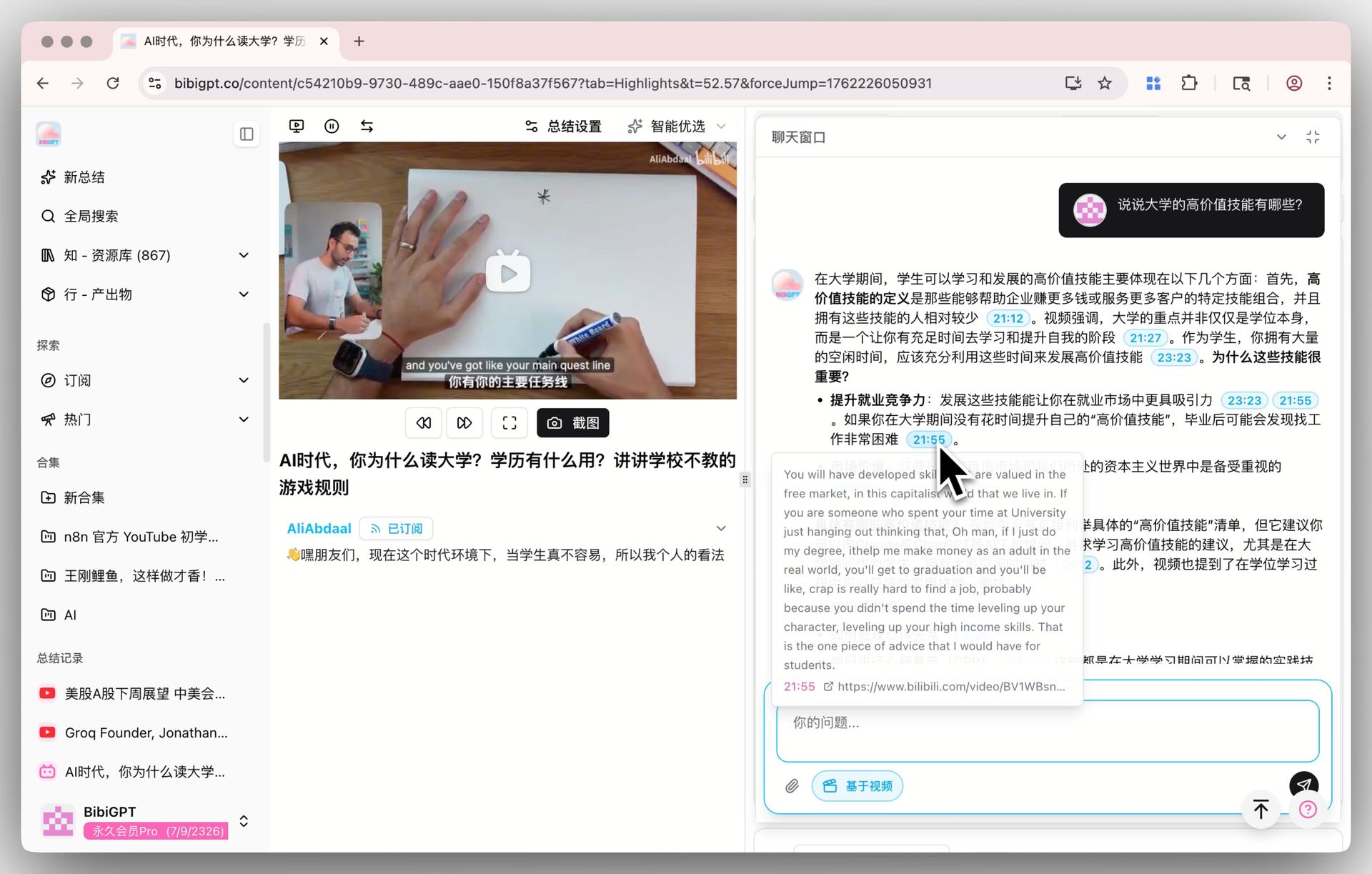
Solved Pain Points
After watching a long video, I have many specific doubts, but it is difficult to quickly locate the answer in the video, and I am not sure if the information summarized by AI is accurate or where it comes from.Core Features
- BibiGPT has launched a brand new chat window UI and interaction experience.
- The new chat window supports maximizing, free dragging to adjust size and position, and the interface is cleaner.
- When the user interacts with the video, the AI will intelligently recommend 3 relevant questions.
- The core upgrade lies in the AI Q&A function: after the user asks a question, the answer generated by the AI will contain multiple clickable timestamps.
Feature Highlights
BibiGPT’s new dialogue window allows you to conduct intelligent Q&A with the video. Each answer provided by the AI comes with clickable timestamps, helping you quickly trace back to the original video text to ensure that the information is accurate and reliable.Applicable Scenarios
- After watching a long video, I have many specific doubts, but it is difficult to quickly locate the answer in the video, and I am not sure if the information summarized by AI is accurate or where it comes from.
Usage Suggestions
- BibiGPT’s new dialogue window allows you to conduct intelligent Q&A with the video. Each answer provided by the AI comes with clickable timestamps, helping you quickly trace back to the original video text to ensure that the information is accurate and reliable.