
Overview
The chat window on a video page and follow-up chat under a custom summary both accept attachments. Tap the paperclip under the input to add images or documents to the current thread.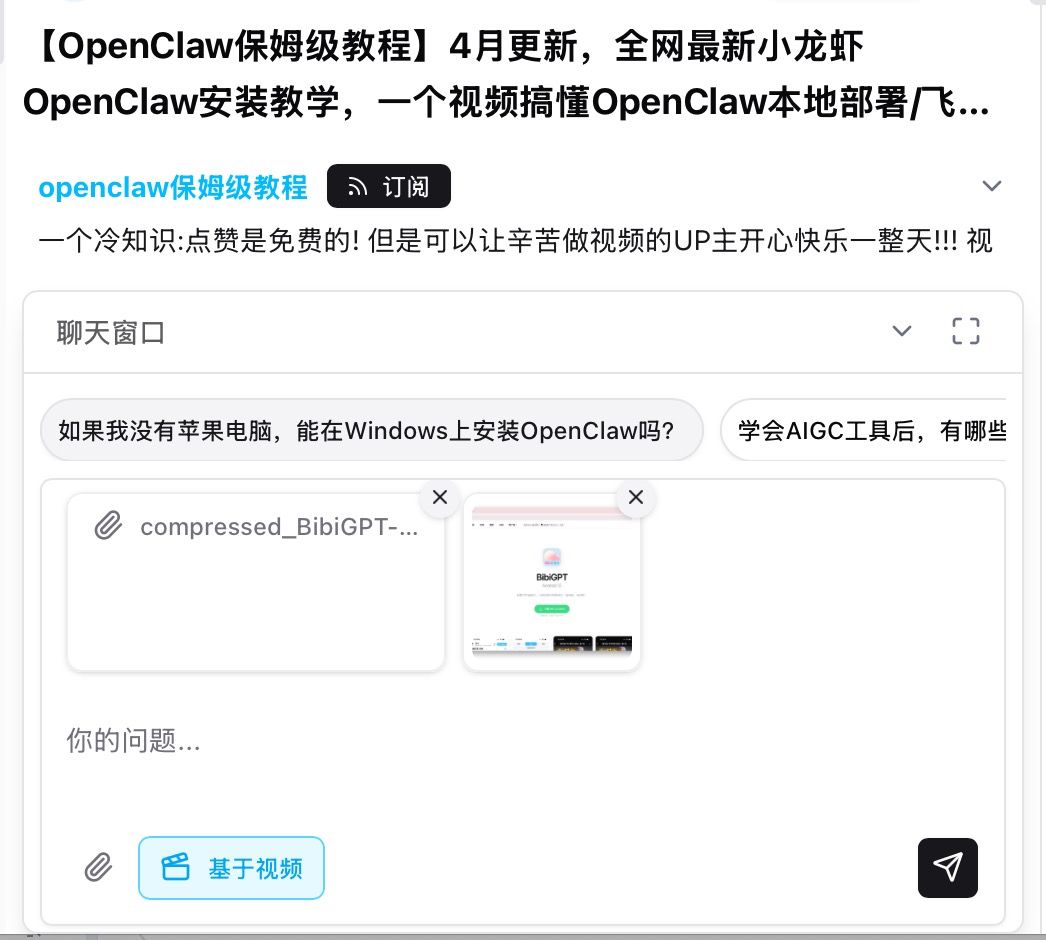
Pain Point
When I chat about a video I often want to drop in a notes PDF, a spreadsheet, or a screenshot. I used to paste text only—tables and pictures were stuck outside the conversation.Key Features
- Works in the video chat window and in custom-summary follow-up
- Images: PNG / JPG / WebP / GIF and other
image/* - Documents: PDF, TXT, Markdown, CSV, DOCX, XLSX, PPTX
- Up to 10 files per send, 10MB each
- Cards sit above the input with a remove control; images show a thumbnail
- With Based on video on, answers use both the clip and your files
Highlights
The thread is no longer limited to one video. Your handouts, tables, and screenshots can sit in the same context.Use Cases
- Ask about a step while the lecture PDF is attached
- Cross-check a spreadsheet against what the speaker said
- Paste a UI screenshot so the reply matches the screen you are editing
Tips
- Chat attachments are images and documents only; upload video or audio from the main input
- Long file names are truncated in the card; the file itself is unchanged
Related Features
Chat Agent Mode
Custom Prompt Summary
AI Conversation Chat Window
Related: Chat attachments — try it now Upgrade to Pro: more chat and attachment quota → Pricing